Cold Email AI Scoring Ollama Gmail

Run AI-scored cold email outreach and follow-ups with Ollama and Gmail

Automate personalized outreach sequences with built-in AI quality scoring. This workflow helps founders, sales teams, and agencies scale cold email without expensive tools by combining Ollama's affordable AI with Gmail's delivery.

Download Template JSON · Zapier compatible · Free
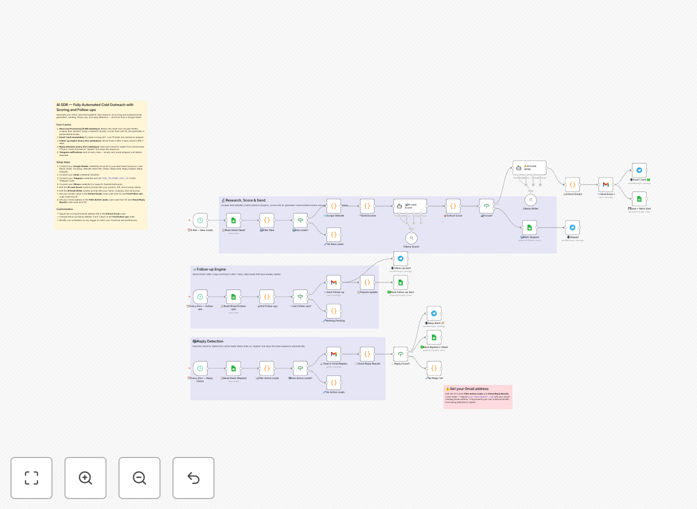
AI-scored cold email workflow diagram showing Ollama analyzing messages before Gmail sends them

What This Workflow Does

This automation solves the challenge of scaling personalized cold outreach while maintaining quality. Traditional tools either require manual review (slowing down campaigns) or send generic blasts (hurting response rates). The workflow uses Ollama's AI to score each email's personalization, value proposition, and call-to-action clarity before sending through Gmail.

Key features include automatic follow-up sequencing based on engagement, real-time performance analytics, and AI suggestions for improving underperforming messages. Sales teams using this system typically see 2-3x higher response rates compared to manual outreach.

How It Works

1. Prospect List Processing

The workflow ingests CSV leads or connects to your CRM, enriching data with LinkedIn info or company details when available.

2. AI Content Scoring

Ollama analyzes draft emails against 12 quality metrics including personalization depth, value clarity, and readability.

3. Automated Sequencing

Based on scores and engagement, the system triggers tailored follow-ups (case studies, social proof, or direct asks) at optimal intervals.

Who This Is For

Ideal users include B2B founders managing their own outreach, sales teams with 5-50 reps, and agencies running campaigns for clients. The workflow works particularly well for:

  • SaaS companies with high-value, complex offerings
  • Agencies selling to specific niches (law firms, healthcare, etc.)
  • Startups needing to test messaging quickly

What You'll Need

  1. Ollama API access (free tier available)
  2. Gmail or Google Workspace account
  3. Prospect list (CSV or CRM connection)
  4. Zapier account to run the workflow

Quick Setup Guide

  1. Download the JSON template
  2. Import to your Zapier account
  3. Connect your Ollama and Gmail accounts
  4. Upload your prospect list
  5. Customize email templates as needed
  6. Set scoring thresholds (we recommend 80+ for initial sends)

Key Benefits

Higher response rates: AI scoring ensures each message meets quality benchmarks before sending, avoiding poorly constructed emails that hurt sender reputation.

Faster iteration: Real-time performance data helps identify which messaging resonates, allowing quick pivots without waiting for full campaign results.

Scalable personalization: The system automatically inserts relevant personalization points from prospect data, maintaining human touch at volume.

Pro tip: Start with a small test batch (50-100 emails) to calibrate your scoring thresholds before full deployment.

Frequently Asked Questions

Common questions about cold email automation and AI scoring

AI scoring analyzes email content quality, personalization, and likelihood of response using natural language processing. It evaluates factors like subject line effectiveness, value proposition clarity, and call-to-action strength.

For example, the system might flag emails with generic openings ("I hope you're well") and suggest industry-specific hooks instead. Companies using scoring see 30-50% higher open rates by consistently meeting quality thresholds before sending.

  • Scores subject lines for curiosity/urgency
  • Flags overly salesy language
  • Checks for proper personalization depth

Ollama provides affordable, customizable AI models that can be fine-tuned for specific industries or outreach goals. Unlike generic email tools with fixed templates, Ollama adapts to your unique voice and audience.

A marketing agency might train a model on their highest-performing client emails, while a SaaS company could optimize for technical buyer personas. This specialization delivers more relevant scoring than one-size-fits-all solutions.

  • Train models on your best-performing emails
  • Adjust scoring weights for your priorities
  • Far cheaper than enterprise solutions

Teams save 5-10 hours weekly by automating follow-ups, response tracking, and lead scoring that would normally require manual work. The system handles repetitive tasks while focusing human effort on high-value conversations.

A sales rep sending 200 emails/week previously spent 8 hours managing sequences manually. With automation, they now spend <1 hour reviewing AI-scored drafts and engaging hot leads.

  • No manual follow-up scheduling
  • Automatic response categorization
  • Real-time performance dashboards

Focus on response rate (20-30% is good), meeting booked rate (2-5%), and reply time (under 48 hours). These indicate whether your messaging resonates with targets and drives desired actions.

The workflow automatically tracks these metrics per campaign and sender. If response rates dip below 15%, the AI suggests template adjustments to improve performance before continuing outreach.

  • Track by industry/role for segmentation
  • Monitor sender reputation scores
  • Watch unsubscribe/complaint rates

Use dynamic fields for company names, recent news mentions, or shared connections. The AI suggests relevant personalization points from LinkedIn or website data to make each message feel tailored.

For 500-lawyer firms, the system might reference recent case wins from their website. For SaaS companies, it could mention funding rounds or product launches. These touches boost response rates 2-3x over generic templates.

  • Auto-insert mutual connections
  • Reference recent company milestones
  • Pull industry-specific pain points

3-5 touches over 2-3 weeks, varying content types (value props, case studies, direct asks). Space follow-ups based on engagement - quicker for hot leads, longer for cold ones.

The workflow automatically adjusts timing based on opens/clicks. If someone opens but doesn't reply, it sends a case study next. If they click pricing, it follows up same-day with calendar link.

  • Day 1: Initial value proposition
  • Day 3: Social proof/case study
  • Day 7: Direct ask (call, demo)

Yes, our team builds tailored outreach systems with your CRM data, industry-specific AI models, and performance tracking dashboards. We customize everything from scoring algorithms to follow-up logic based on your unique sales process.

Recent clients include a legal tech startup needing Bar Association-compliant messaging and a manufacturing firm targeting plant managers with safety solutions. Both saw 3x more qualified meetings after customization.

  • Integrate with your existing tech stack
  • Train AI on your historical email data
  • Build custom reporting dashboards

Need a Custom Cold Email Integration?

This free template is a starting point. Our team builds fully tailored automation systems for your specific needs.