Sales Automation AI Google Sheets Gmail Calendar

AI SDR Sales Pipeline Automation

A complete, automated sales operating system that acts as an AI-powered SDR, moving leads into CRM, sending personalized follow-ups, tracking bookings, and handling no-shows.

Download Template JSON · n8n compatible · Free
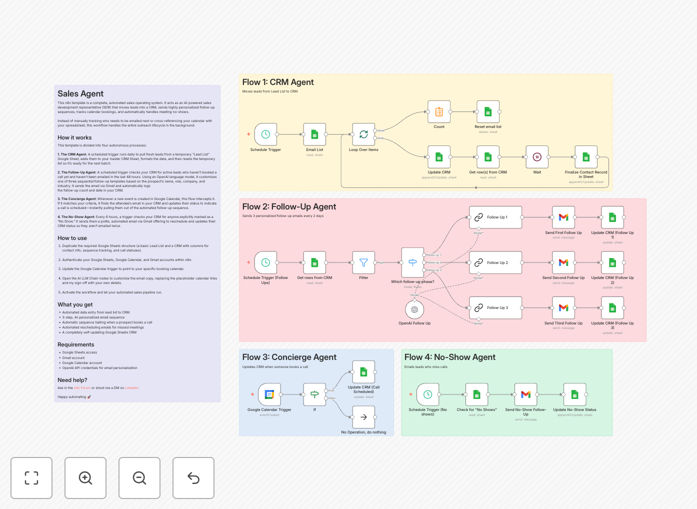
AI SDR Sales Pipeline Automation workflow diagram showing integration between OpenAI, Google Sheets, Gmail, and Calendar

What This Workflow Does

This template transforms your sales process from a manual, time-consuming chore into a fully automated, intelligent pipeline. It acts as an AI-powered Sales Development Representative (SDR) that works 24/7, handling everything from lead intake to booking coordination.

Instead of manually copying leads from a spreadsheet into your CRM, writing personalized follow-up emails, checking calendar bookings, and chasing no-shows, this workflow orchestrates all four tasks autonomously. It ensures every prospect receives timely, relevant communication while keeping your CRM perfectly updated.

The system eliminates the most repetitive parts of sales outreach, reducing human error and ensuring consistency. You get a self-updating sales machine that nurtures leads, books meetings, and manages follow-up sequences without requiring daily oversight.

How It Works

1. The CRM Agent

A scheduled trigger runs daily to pull fresh leads from a temporary "Lead List" Google Sheet. It adds them to your master CRM Sheet, formats the data (name, email, company, industry), and then resets the temporary list so it's ready for the next batch. This automates data entry completely.

2. The Follow-Up Agent

Another scheduled trigger checks your CRM for active leads who haven't booked a call yet and haven't been emailed in the last 48 hours. Using OpenAI, it customizes one of three sequential email templates based on the prospect's details. It sends the email via Gmail and automatically logs the follow-up count and date in your CRM.

3. The Concierge Agent

Whenever a new event is created in your Google Calendar, this flow intercepts it. If it matches your booking criteria (like a sales call), it finds the attendee's email in your CRM and updates their status to "Call Scheduled"—instantly pulling them out of the automated follow-up sequence.

4. The No-Show Agent

Every 6 hours, a trigger checks your CRM for anyone marked as a "No Show." It sends them a polite, automated email via Gmail offering to reschedule and updates their CRM status so they aren't emailed twice. This ensures missed meetings don't break the pipeline.

Who This Is For

This automation is perfect for solopreneurs, small sales teams, and startups who need to scale outreach without hiring a full-time SDR. It's also valuable for agencies managing multiple client pipelines, consultants who want systematic lead nurturing, and any business that relies on consistent follow-up to convert leads.

If you're spending hours each week on manual data entry, email writing, and calendar coordination, this workflow reclaims that time. It's especially useful for businesses using Google Sheets as a lightweight CRM, but can be adapted to integrate with professional CRM platforms like Salesforce or HubSpot.

What You'll Need

  1. Google Sheets access – to serve as your CRM and lead intake sheet.
  2. Gmail account – for sending personalized follow-up emails.
  3. Google Calendar – to track booked meetings and trigger status updates.
  4. OpenAI API credentials – for generating context-aware email content.
  5. n8n instance – either cloud or self-hosted, to run the automation.

Quick Setup Guide

1. Download the template JSON file and import it into your n8n workspace.

2. Duplicate the provided Google Sheets structure: a "Lead List" for new entries and a "CRM Master" with columns for contact info, follow-up count, last email date, and call status.

3. Authenticate your Google Sheets, Google Calendar, and Gmail accounts within n8n.

4. Update the Google Calendar trigger node to point to your specific booking calendar.

5. Open the AI LLM Chain nodes and customize the email copy—replace placeholder calendar links and sign-offs with your own details.

6. Activate the workflow. The system will now run autonomously, managing your sales pipeline behind the scenes.

Pro tip: Start with a small batch of test leads to verify email personalization and CRM updates before scaling to your full list.

Key Benefits

Eliminates manual data entry – Leads automatically move from intake sheet to CRM, formatted and ready for outreach.

Personalizes at scale – AI generates unique emails for each prospect based on their role, company, and industry, boosting engagement rates.

Ensures timely follow-up – Sequences run on a precise schedule, eliminating human forgetfulness and reducing response time from days to hours.

Automates booking coordination – Calendar events instantly update CRM statuses, stopping follow-ups for booked leads.

Handles no-shows gracefully – Automated rescheduling emails keep prospects engaged even when meetings are missed.

Frequently Asked Questions

Common questions about AI sales automation and integration

An AI SDR (Sales Development Representative) automates the initial stages of the sales pipeline, handling lead intake, qualification, follow-up, and booking. It improves efficiency by eliminating manual data entry, ensuring timely outreach, and personalizing communication at scale, freeing human salespeople to focus on high-value conversations.

Traditional SDRs spend hours on repetitive tasks; AI handles these consistently and without fatigue, allowing your team to concentrate on closing deals rather than administrative work.

AI personalization uses data like the prospect's name, role, company, and industry to generate context-aware email content, making each message feel individually crafted. Traditional templates are static; AI adapts tone, references, and value propositions dynamically, increasing engagement rates significantly.

For example, an AI can reference a prospect's specific job title or mention their company's recent news, creating a tailored experience that static templates cannot achieve.

Yes. While this template uses Google Sheets as a lightweight CRM, n8n can connect to platforms like Salesforce, HubSpot, or Pipedrive. You can replace the Google Sheets nodes with your CRM's API nodes to sync leads, update statuses, and log activities directly into your professional CRM system.

This flexibility allows businesses with established CRM infrastructure to maintain their existing data models while adding AI-powered automation layers.

Automated follow-ups ensure consistency, eliminate human forgetfulness, and operate on a precise schedule. They reduce response time from days to hours, increase lead engagement, and systematically nurture prospects through the pipeline without requiring manual tracking or calendar checks.

By automating sequences, you guarantee every lead receives the same quality of follow-up, regardless of how busy your team is, creating a reliable and scalable outreach process.

The workflow monitors your CRM for 'No Show' statuses, triggers automatically after a missed meeting, and sends a polite rescheduling email via Gmail. It updates the lead's status to prevent duplicate outreach, ensuring the prospect receives a timely follow-up without manual intervention.

This turns a common sales frustration—missed meetings—into an automated recovery opportunity, maintaining momentum even when prospects don't attend.

Absolutely. It's ideal for solopreneurs and small teams who lack dedicated SDRs. The automation acts as a full-time virtual assistant, managing lead intake, outreach, and booking coordination 24/7, allowing you to focus on delivering services while the system handles lead generation and qualification.

For solo founders, this can effectively multiply your sales capacity, letting you manage dozens of leads simultaneously without increasing your workload.

You need access to Google Sheets, Gmail, and Google Calendar, plus an OpenAI API key for email personalization. Basic n8n knowledge is helpful, but the template is pre-built. You'll configure authentication for each service, duplicate the provided spreadsheet structure, and activate the workflow.

No coding is required—the workflow uses visual nodes. Most setup involves connecting accounts and adjusting a few configuration fields to match your sales process.

Yes. GrowwStacks specializes in building tailored automation systems that integrate with your specific tools, data models, and sales processes. We can design workflows that incorporate your unique CRM, email sequences, booking logic, and AI models to create a fully custom sales operating system.

Custom automations can handle complex scenarios like multi-stage nurturing, integration with proprietary software, and advanced lead scoring algorithms, giving you a competitive edge.

  • Integration with your existing CRM and sales tools
  • Custom AI models trained on your successful outreach patterns
  • Advanced reporting and analytics dashboards

Need a Custom AI Sales Automation?

This free template is a starting point. Our team builds fully tailored automation systems for your specific business needs.