What This Workflow Does
This automation solves the time-consuming process of manually creating AI-generated images for business content. Instead of spending hours crafting prompts, adjusting parameters, and downloading results, this workflow connects ComfyUI's powerful image generation capabilities through the Replicate API to your n8n automation platform.
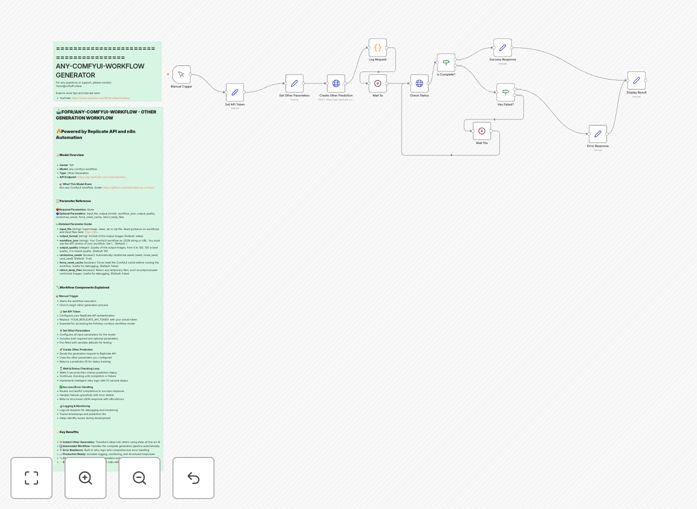
The template handles the complete image generation pipeline: it accepts input parameters (prompts, dimensions, style settings), communicates with the Replicate API, monitors the generation process, retrieves completed images, and delivers them to your designated storage or next workflow step. Built-in error handling ensures reliability even with API rate limits or temporary service issues.
How It Works
Step 1: Input Configuration
The workflow begins by accepting your image generation parameters. You can provide these through a manual trigger, webhook, or connected application. Essential parameters include prompt text, negative prompts, image dimensions, sampling steps, and any ComfyUI workflow-specific settings.
Step 2: API Communication
The workflow authenticates with your Replicate API key and formats the request according to the Fofr Any Comfyui Workflow model specifications. It sends the generation request and captures the prediction ID for tracking.
Step 3: Processing & Monitoring
While Replicate processes the image generation, the workflow polls for completion status at intelligent intervals. This eliminates the need for manual checking and ensures the automation proceeds as soon as images are ready.
Step 4: Result Handling
Once generation completes, the workflow retrieves the image URLs, downloads the files, and can perform additional processing like resizing, format conversion, or quality optimization before delivering to your chosen destination.
Who This Is For
This automation is ideal for marketing teams producing social media visuals, e-commerce businesses creating product images, content agencies developing client assets, bloggers needing custom illustrations, and any organization requiring consistent, scalable AI-generated imagery. It's particularly valuable for teams producing 10+ images weekly who want to maintain quality while reducing production time by 70% or more.
What You'll Need
- A Replicate API account (free tier available with credits)
- n8n instance (cloud or self-hosted)
- Basic understanding of ComfyUI workflow parameters
- Destination for generated images (cloud storage, CMS, etc.)
- Clear image specifications for your use case
Quick Setup Guide
- Download the template file using the button above
- Import the JSON file into your n8n instance
- Add your Replicate API token to the authentication node
- Configure your preferred image parameters in the Set node
- Connect the output to your storage or next workflow step
- Test with a simple prompt to verify the end-to-end flow
- Schedule or trigger based on your content calendar needs
Pro tip: Create multiple workflow copies with different parameter sets for various content types (social media banners, blog illustrations, product shots). Use n8n's workflow calling feature to maintain one master configuration.
Key Benefits
Save 5-15 hours weekly per team member on manual image creation tasks. What previously required constant attention now runs automatically in the background.
Ensure brand consistency across all generated content by using standardized prompts, dimensions, and style parameters in every automation run.
Scale visual content production without proportional cost increases. Generate dozens of images simultaneously instead of one at a time.
Integrate with existing workflows by connecting image generation directly to your content calendar, social media scheduler, or asset management system.
Reduce dependency on individual designers while maintaining creative control through carefully crafted prompt engineering and parameter optimization.