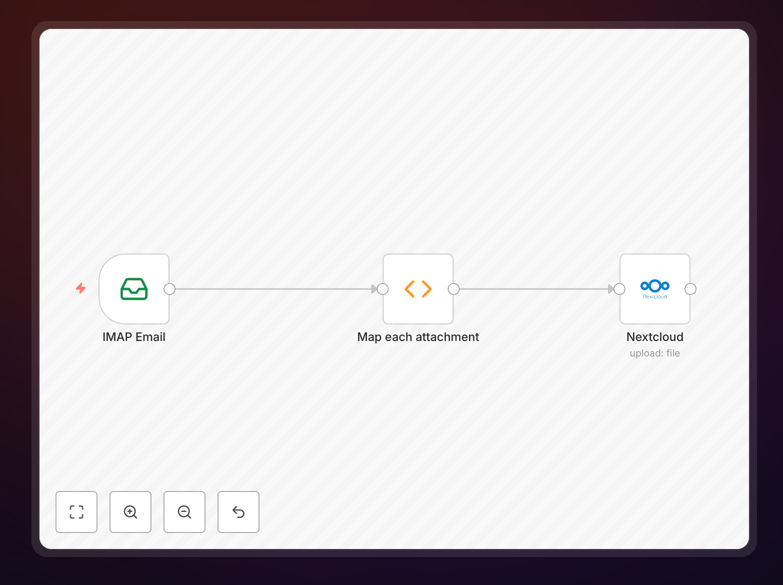
What This Workflow Does
This automation solves the tedious manual process of downloading email attachments and uploading them to cloud storage. Every day, businesses receive important documents via email—invoices, contracts, reports, and customer files—that need to be securely stored and organized. Without automation, these files get lost in crowded inboxes, creating compliance risks and workflow bottlenecks.
The workflow automatically monitors a designated email folder, extracts any attachments, uploads them to your Nextcloud instance with intelligent file naming, and optionally marks emails as read. It transforms chaotic email attachments into organized cloud files without any manual intervention.
How It Works
1. Email Monitoring & Filtering
The workflow connects to your email account via IMAP and watches a specific folder you configure. You can set custom filters to process only certain emails—like those from specific senders, with particular subjects, or containing certain file types.
2. Attachment Extraction & Processing
When a matching email arrives, the workflow extracts all attachments and prepares them for upload. It can handle multiple attachments per email and processes them sequentially to ensure nothing gets missed.
3. Intelligent File Naming & Organization
Attachments are automatically renamed using a consistent format: YYYY-MM-DD_From-Sender-Name_Original-Filename.pdf. This creates searchable, organized files that make sense to your team. You can customize this naming convention to match your business needs.
4. Secure Nextcloud Upload
Files are uploaded to your specified Nextcloud folder with proper permissions. The workflow handles authentication securely and can create subfolders by date, project, or sender if needed.
5. Email Status Update & Logging
After successful processing, emails can be marked as read (configurable) and the operation is logged for audit purposes. Failed uploads trigger error notifications so you never lose track of important documents.
Who This Is For
This automation is ideal for businesses that receive regular documents via email and need them stored securely in centralized cloud storage. Accounting firms processing client invoices, legal offices receiving contracts, HR departments handling employee documents, and customer service teams managing support attachments will find immediate value.
Teams using Nextcloud for document collaboration, companies with compliance requirements for document retention, and any organization tired of manual file management between email and storage systems should implement this workflow.
Pro tip: Use this workflow with a dedicated email address like "[email protected]" or "[email protected]" to create a clean, automated document intake system that bypasses individual inboxes entirely.
What You'll Need
- n8n instance (self-hosted or cloud)
- Email account credentials with IMAP access enabled
- Nextcloud instance with API access
- Environment variable configuration for external libraries (optional)
- Designated email folder for processing (create one like "To Process" or "Attachments")
Quick Setup Guide
- Download and import the JSON template into your n8n instance
- Configure email credentials in the Email Trigger (IMAP) node with your server details
- Set up Nextcloud connection with your instance URL and authentication
- Customize filtering options if you only want to process specific emails
- Test with a sample email containing an attachment to verify the flow works
- Activate the workflow and let it run automatically on your schedule
Configuration note: For advanced filtering, you can use custom IMAP search criteria like ["UNSEEN"] for only unread emails or [["TO", "[email protected]"]] to filter by recipient address.
Key Benefits
Eliminate manual file handling: Save 2-3 hours per week per employee that would be spent downloading, renaming, and uploading email attachments. This time adds up quickly across teams and departments.
Improve document security: Move sensitive attachments from email (often less secure) to Nextcloud with proper access controls, encryption, and audit trails immediately upon receipt.
Ensure consistent organization: Automatic file naming creates a searchable archive that doesn't depend on individual naming habits. Find any document in seconds using consistent patterns.
Reduce human error: No more missed attachments, incorrectly named files, or documents saved to wrong locations. The automation handles every email consistently.
Enable better collaboration: Files in Nextcloud can be shared, commented on, and collaborated on immediately—no need to forward email attachments or manage multiple versions.