n8n RSS.app Google Drive AI News Automation

Scrape AI news from multiple sources to Markdown & Google Drive with RSS.app

Automate your AI research pipeline with this n8n workflow that aggregates and archives breaking news from curated RSS feeds

Download Template JSON · n8n compatible · Free
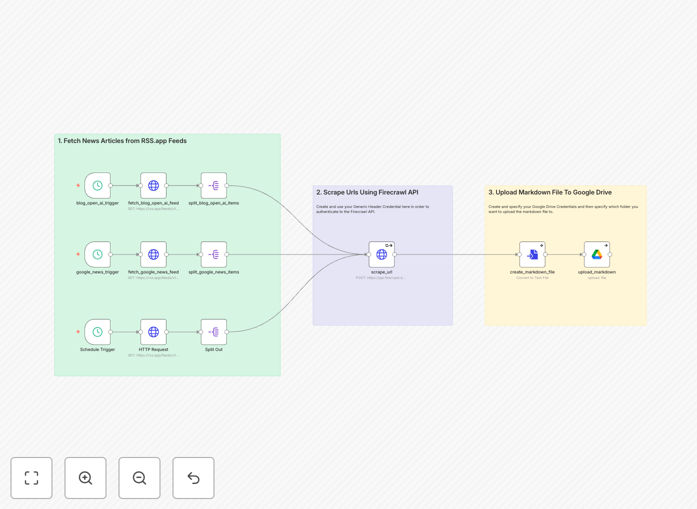
AI news scraping workflow diagram showing RSS feeds connected to n8n and Google Drive

What This Workflow Does

This n8n workflow solves the challenge of staying current with rapidly evolving AI developments by automating news aggregation from multiple trusted sources. Instead of manually checking various websites or newsletters, the system continuously monitors RSS feeds for new AI-related content, extracts key information, and saves organized Markdown files to your Google Drive.

The automation eliminates hours of repetitive research work while ensuring comprehensive coverage of AI breakthroughs, research papers, and industry trends. By centralizing all content in searchable Markdown format, it creates a valuable knowledge base that teams can reference and build upon.

How It Works

1. RSS Feed Aggregation

The workflow begins by pulling in updates from multiple RSS feeds you configure, using RSS.app to standardize the input format. You can include any AI news source that offers RSS, from research repositories like arXiv to tech publications.

2. Content Processing

Each news item gets processed to extract the title, publication date, source URL, and relevant metadata. The workflow can optionally filter items based on keywords to focus on your specific AI interests.

3. Markdown Conversion

The system converts each news item into a clean Markdown file with standardized formatting. This preserves the content structure while making it easily readable and editable.

4. Google Drive Archiving

Finally, the workflow uploads each Markdown file to a designated Google Drive folder, organized by date and source. You can configure the folder structure to match your team's knowledge management system.

Who This Is For

This automation is ideal for AI researchers, tech analysts, content teams, and anyone who needs to stay updated on artificial intelligence developments. Marketing agencies tracking AI trends for clients, startups monitoring competitor activity, and academic teams compiling literature reviews will find particular value in this workflow.

What You'll Need

  1. An n8n instance (cloud or self-hosted)
  2. Google Drive account with API access
  3. RSS.app account (free tier available)
  4. List of AI news sources with RSS feeds

Quick Setup Guide

  1. Download the JSON template file
  2. Import into your n8n instance
  3. Configure your RSS feed URLs in RSS.app
  4. Set up Google Drive API credentials
  5. Adjust any filters or output formatting
  6. Activate the workflow on your preferred schedule

Key Benefits

Save 5-10 hours weekly by eliminating manual news monitoring and research compilation tasks.

Never miss important developments with continuous, automated scanning of all configured sources.

Build a searchable knowledge base of AI news organized in standardized Markdown format.

Scale your monitoring effortlessly by adding new RSS feeds without additional work.

Share insights with your team through centralized Google Drive access to all collected content.

Frequently Asked Questions

Common questions about AI news aggregation and automation

Automating AI news aggregation saves hours of manual research by continuously monitoring multiple sources. It ensures you never miss important developments in the fast-moving AI space while maintaining organized, searchable archives of all relevant articles in your Google Drive.

The automation handles the repetitive tasks of checking sources, copying content, and organizing files—freeing your team to focus on analysis and strategy. For businesses tracking AI trends, this workflow provides competitive intelligence without the overhead of manual monitoring.

Tech blogs, research paper repositories, and news sites with dedicated AI sections work best. Popular sources include arXiv AI papers, MIT Technology Review AI section, and specialized newsletters. RSS.app can convert nearly any news source into a compatible feed for this workflow.

For comprehensive coverage, combine general tech publications with niche AI resources. The workflow supports multiple feed types, including those requiring authentication for premium content. You can gradually expand your source list as you identify valuable new outlets.

Markdown creates clean, structured documents that preserve formatting while remaining lightweight. Unlike PDFs or web archives, Markdown files are easily searchable, editable, and compatible with note-taking apps. They also maintain links to original sources for reference.

The plain text format ensures long-term accessibility and makes it simple to extract key information programmatically. Teams can quickly scan Markdown files or process them further with other automation tools in their workflow stack.

Yes, you can filter RSS feeds by keywords or modify the workflow to only capture articles about specific AI subfields like machine learning, computer vision, or natural language processing. The workflow supports advanced filtering based on your research needs.

For precision targeting, combine RSS feed filtering with n8n's text processing capabilities. You can create exclusion lists for irrelevant topics or prioritize articles mentioning your competitors. The template includes commented sections showing where to add these customizations.

For breaking AI news, run the workflow daily or multiple times per day. For less time-sensitive research, weekly may suffice. n8n's scheduling options let you customize frequency based on how quickly your field evolves and your team's review capacity.

Consider staggering runs for different source types—high-volume blogs might need daily checks while academic journals publish less frequently. The workflow includes error handling to manage temporary feed outages during scheduled runs.

Automated monitoring provides consistent coverage without human oversight gaps. It eliminates repetitive manual work while creating standardized archives. The system also scales effortlessly to track dozens of sources simultaneously—something impractical to do manually.

Unlike human researchers who might overlook items or introduce inconsistencies, the workflow processes every article with identical formatting rules. Historical archives become more valuable as they grow, enabling trend analysis that would be impossible with sporadic manual collection.

Absolutely! GrowwStacks specializes in tailored automation solutions. We can build a custom AI news monitoring system that integrates with your existing tools, filters for your specific interests, and delivers alerts through your preferred channels. Our team handles everything from RSS setup to advanced NLP filtering.

Custom solutions might include sentiment analysis of AI coverage, integration with your CRM for lead tracking, or automated summaries for executive briefings. We'll design a system that fits your workflow and scales with your research needs.

  • Tailored to your industry focus areas
  • Integration with internal knowledge bases
  • Custom reporting and alerting options

Need a Custom AI News Automation?

This free template is a starting point. Our team builds fully tailored automation systems for your specific needs.