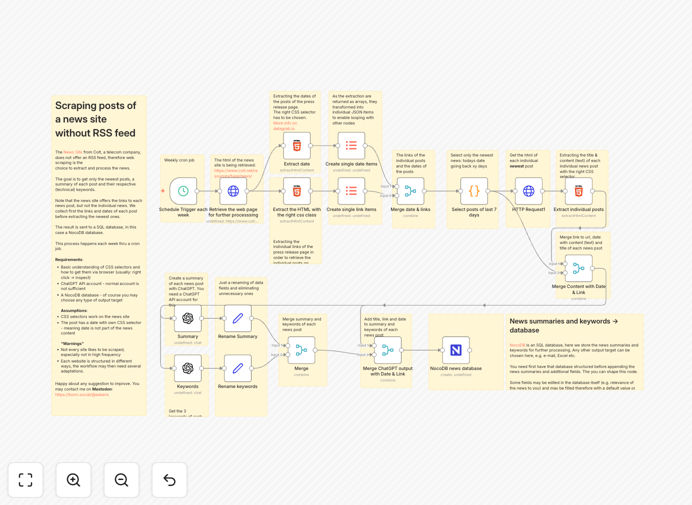
What This Workflow Does
This automation solves the challenge of monitoring news websites that don't provide RSS feeds. Many businesses need to track updates from specific sources for competitive intelligence, market research, or content curation, but manual checking is time-consuming and inefficient.
The workflow automatically scrapes new posts from target news sites, processes the content through AI to generate concise summaries, and stores the structured data in NocoDB for easy access and analysis. It eliminates hours of manual work while providing more consistent and comprehensive monitoring than human teams can achieve.
How It Works
1. Website Scraping
The workflow first extracts article URLs and metadata from the target news site. It handles dynamic content loading and adapts to the site's HTML structure to reliably identify new posts.
2. Content Extraction
For each article URL, the workflow retrieves the full text content while cleaning up unnecessary elements like ads, navigation menus, and comments. This ensures only the core article text is processed.
3. AI Summarization
The extracted content is sent to an AI service that generates executive summaries highlighting key points. The summarization preserves important entities, dates, and context while reducing reading time by 70-80%.
4. NocoDB Storage
Finally, the workflow structures the scraped data with metadata (title, URL, date) and AI summary into records stored in NocoDB. This creates a searchable knowledge base of news updates.
Who This Is For
This workflow benefits businesses that need to monitor news sources without RSS feeds, including:
- Competitive intelligence teams tracking industry updates
- Marketing agencies curating content for clients
- Financial analysts monitoring market-moving news
- PR firms tracking media coverage
- Researchers compiling news archives
What You'll Need
- An n8n instance (cloud or self-hosted)
- Access to an AI summarization service (like OpenAI or Anthropic)
- A NocoDB installation or hosted account
- The URL of the news site you want to monitor
Quick Setup Guide
- Download and import the JSON template into your n8n instance
- Configure the HTTP Request node with your target news site URL
- Set up credentials for your chosen AI service in the AI node
- Connect the NocoDB node to your database with proper table structure
- Test the workflow with a manual trigger before scheduling
Key Benefits
Saves 10+ hours weekly by automating manual news monitoring tasks that would otherwise require constant website checking.
Improves information quality with consistent AI summarization that highlights key points without human bias or oversight.
Creates searchable archives in NocoDB where historical news can be filtered, analyzed, and shared across teams.
Works with any news site regardless of whether they offer RSS feeds or API access.
Scalable monitoring that can track dozens of sources simultaneously with minimal additional setup.
Pro tip: Combine this with a Slack or email notification workflow to alert your team when important keywords appear in new articles.