What This Workflow Does
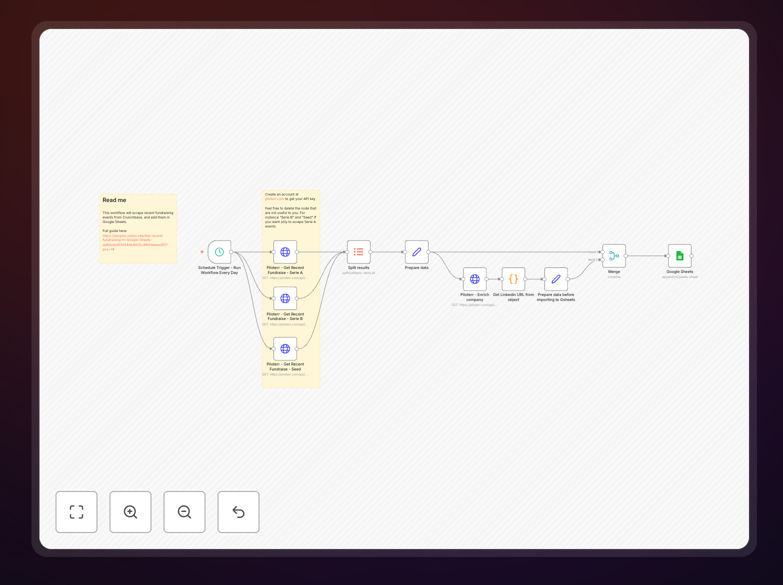
This automation solves the tedious manual process of tracking startup funding activity by automatically scraping Crunchbase's latest funding rounds into an organized Google Sheet. Venture capitalists, sales teams, and market researchers waste countless hours copying data between platforms - this workflow eliminates that friction while ensuring consistent data formatting.
The template captures 10+ critical data points including investment amounts, lead investors, valuation ranges, LinkedIn profiles, and website traffic estimates. Unlike manual methods that become outdated quickly, this n8n workflow can run on scheduled intervals to maintain an always-current pipeline of investment opportunities.
How It Works
Step 1: Configure Crunchbase API Connection
The workflow begins by authenticating with Crunchbase's API using your credentials. You'll need a free developer account to generate the required API key, which takes about 2 minutes to set up.
Step 2: Set Funding Round Parameters
Customize the search criteria for funding rounds including date ranges, minimum investment amounts, and industry filters. The template includes common presets but can be modified for specific use cases.
Step 3: Extract and Transform Data
The automation pulls raw Crunchbase data then structures it into clean columns with standardized formatting. This includes converting date formats, normalizing currency values, and extracting LinkedIn URLs from company profiles.
Step 4: Write to Google Sheets
Finally, the processed data appends to your specified Google Sheet with proper headers and data validation. The workflow handles all API interactions with Sheets automatically.
Pro tip: Add a second n8n workflow to sync this data to your CRM or Airtable for even smoother deal tracking workflows.
Who This Is For
This automation delivers the most value for: 1) Venture capital associates tracking emerging investment opportunities, 2) SaaS sales teams identifying recently-funded prospects, and 3) Market researchers analyzing funding trends across industries. Investment firms using this template typically save 5-10 hours per week on manual data collection.
What You'll Need
- A free Crunchbase developer account (for API access)
- n8n instance (cloud or self-hosted)
- Google Sheets with edit permissions
- 5 minutes to import and configure the workflow
Quick Setup Guide
- Download the JSON template file
- Import into your n8n dashboard
- Add your Crunchbase API key in the credentials section
- Configure your target Google Sheet ID
- Set your preferred schedule (daily/weekly)
- Click execute to run your first data pull
Key Benefits
Never miss important funding announcements with automated daily/weekly checks of Crunchbase's latest additions. The workflow runs reliably in the background while you focus on analysis.
Eliminate spreadsheet errors caused by manual data entry. The automation handles all formatting consistently, including proper date values, currency conversion, and URL standardization.
Enrich your CRM automatically by connecting this workflow to pipe new funding data directly into Salesforce, HubSpot, or other platforms via n8n's 300+ integrations.