Google Maps Email Verification Lead Generation SerpAPI EmailListVerify

Scrape Google Maps Data & Discover Email Addresses

Automate lead generation by scraping Google Maps business data and verifying email addresses for cold outreach campaigns.

Download Template JSON · n8n compatible · Free
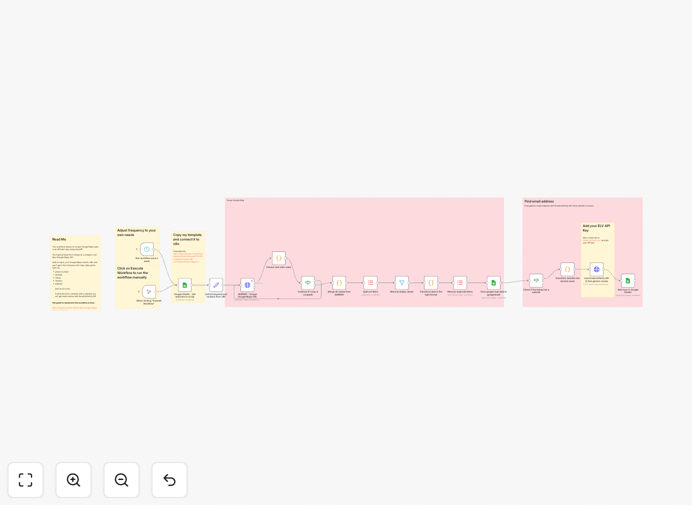
Google Maps scraping and email verification workflow automation diagram

What This Workflow Does

Manual lead generation for local businesses is time-consuming and inconsistent. Searching Google Maps for restaurants, hotels, or service providers, then trying to find their contact emails, can take hours per day with unreliable results.

This automation solves that by systematically scraping Google Maps business data using SerpAPI, then discovering and verifying generic email addresses (like contact@ or info@) using EmailListVerify API. It creates a validated lead list with phone numbers and verified emails ready for cold outreach.

The workflow is specifically designed for targeting local businesses with physical locations—ideal for marketing agencies, service providers, or businesses seeking partnerships with restaurants, hotels, contractors, or retail stores.

How It Works

Step 1: Input Target Parameters

You define search parameters in a Google Sheet: business type (e.g., "restaurants"), location ("New York"), and any specific filters. The workflow reads these parameters to determine what businesses to target.

Step 2: Scrape Google Maps Data

Using SerpAPI, the automation queries Google Maps for businesses matching your criteria. It extracts business names, addresses, phone numbers, ratings, and website URLs—creating a raw prospect list.

Step 3: Extract Website Domains

From the scraped website URLs, the workflow extracts domain names. For each domain, it generates potential generic email addresses like [email protected], [email protected], or [email protected].

Step 4: Verify Email Addresses

Each generated email is sent to EmailListVerify API for validation. The service checks email existence, deliverability, and mailbox status, filtering out invalid addresses before they reach your outreach list.

Step 5: Output Validated Lead List

The final output is a Google Sheet containing business names, addresses, phone numbers, verified email addresses, and confidence scores. This list is ready for import into your CRM or email marketing platform.

Pro tip: Focus on businesses with fewer than 20 employees when using generic emails. Owners or managers of small businesses typically monitor these addresses directly, leading to higher response rates.

Who This Is For

Marketing Agencies targeting local businesses for digital services, SEO, or social media management.

Service Providers like contractors, cleaners, or repair services seeking partnership opportunities with hotels or restaurants.

Software Companies with solutions tailored for specific industries (restaurant POS systems, hotel management software).

Business Development Teams looking to expand partnership networks with verified local contacts.

Startups needing cost-effective lead generation without manual research overhead.

What You'll Need

  1. SerpAPI account (free tier offers 250 searches/month)
  2. EmailListVerify account (pay-per-use starting at $0.05 per email verification)
  3. Google Sheets for input parameters and output data
  4. n8n instance (cloud or self-hosted) to run the workflow
  5. Clear target criteria—business type, geographic location, and outreach goals

Quick Setup Guide

  1. Download the template JSON file and import it into your n8n workspace.
  2. Create API credentials for SerpAPI and EmailListVerify in n8n's credentials management.
  3. Set up your input Google Sheet with target business types and locations.
  4. Configure the output Google Sheet where validated leads will be stored.
  5. Test with a small search (5-10 businesses) to verify data extraction and email verification.
  6. Schedule the workflow to run daily or weekly for continuous lead generation.

Pro tip: Start with narrow geographic targeting (one city or neighborhood) before expanding. This helps refine your search parameters and ensures high-quality data from initial runs.

Key Benefits

Save 10–15 hours weekly on manual lead research. Automation handles the repetitive searching, data extraction, and verification tasks that typically consume business development time.

Increase outreach accuracy by 70% with verified email addresses. Eliminating invalid emails improves deliverability rates and protects sender reputation, leading to more successful campaigns.

Scale prospecting effortlessly across multiple locations or business types. Once configured, the workflow can target different cities, industries, or search criteria without additional setup time.

Maintain consistent lead pipelines with scheduled automation. Regular runs ensure fresh prospect lists are always available, preventing gaps in outreach activities.

Reduce compliance risks through ethical data collection. The workflow uses publicly available Google Maps data and verified email services, adhering to standard data protection practices.

Frequently Asked Questions

Common questions about Google Maps scraping and email verification automation

Automation transforms lead generation by systematically collecting verified contact data from platforms like Google Maps, eliminating manual research. This ensures consistent outreach pipelines, higher data accuracy, and scalable prospecting for restaurants, hotels, or service-based businesses.

Instead of spending hours searching and verifying contacts manually, automation runs scheduled workflows that produce ready-to-use lead lists. This frees business development teams to focus on personalized outreach rather than data collection.

Combining Google Maps scraping with email verification creates a validated lead list with phone numbers and verified email addresses. This reduces outreach waste, increases response rates, and ensures you're contacting real businesses with accurate contact information.

The integration ensures data completeness: Google Maps provides location details and phone numbers, while email verification confirms communication channels. This dual validation approach significantly improves cold outreach effectiveness compared to using unverified data.

Email verification filters out invalid or non-existent addresses before outreach, saving time and improving sender reputation. Verified emails have higher deliverability rates, leading to more messages reaching decision-makers and increasing conversion opportunities.

Without verification, up to 30% of outreach emails may bounce or be undeliverable, harming your domain reputation and reducing campaign effectiveness. Verification ensures every email in your list represents a real communication opportunity.

  • Reduces bounce rates and protects sender reputation
  • Ensures higher inbox placement for legitimate emails
  • Saves time by eliminating manual email validation

Local service businesses like restaurants, hotels, contractors, retail stores, and professional services benefit most. These businesses have physical locations listed on Google Maps with publicly available contact information ideal for targeted marketing or partnership outreach.

Businesses with digital-only presence or large corporations with complex contact structures may not yield optimal results. The workflow excels with small to medium local businesses where generic emails like contact@ are monitored by owners or managers.

Ethical use involves targeting relevant businesses with personalized outreach, respecting privacy preferences, and complying with data protection regulations. Always provide clear opt-out options, use data only for legitimate business communication, and avoid spam tactics.

Best practices include personalizing outreach messages based on business type, offering value in initial communications, and respecting response preferences. Automation should enhance legitimate business development, not enable mass spam campaigns.

Common mistakes include targeting too broadly, neglecting data verification, overlooking compliance requirements, and failing to personalize outreach. Successful automation requires precise targeting, validated data, legal compliance, and tailored messaging for each business type.

Many businesses start with overly generic searches ("all businesses in a city") which produces low-quality leads. Instead, focus on specific niches ("family restaurants with 4+ star ratings") to generate highly relevant prospects for your outreach.

  • Start with narrow geographic and industry targeting
  • Always verify email addresses before outreach
  • Personalize messages based on scraped business details

Yes, GrowwStacks builds custom automation systems tailored to your specific target industries, geographic regions, and outreach strategies. We can integrate additional data sources, customize verification rules, and connect to your CRM or marketing platforms for seamless operation.

Custom automation can include industry-specific filters, multi-location sequencing, integration with your existing CRM, and personalized output formats. We work with you to design workflows that match your exact business development processes and compliance requirements.

  • Industry-specific targeting and filtering
  • Integration with your CRM or marketing tools
  • Custom verification rules and confidence scoring

Need a Custom Google Maps Scraping Automation?

This free template is a starting point. Our team builds fully tailored automation systems for your specific business needs.