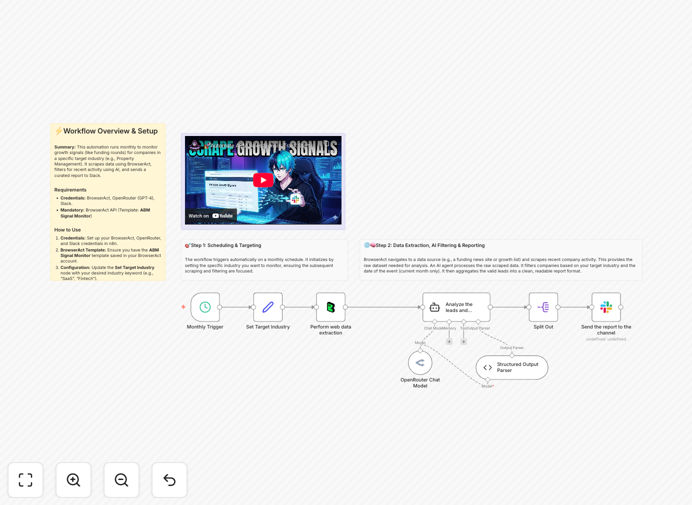
What This Workflow Does
Staying ahead of market shifts is a constant challenge for sales, marketing, and strategy teams. Manually scouring news sites, funding databases, and job boards for competitor activity is slow, inconsistent, and easy to miss. This automation solves that by creating a systematic intelligence-gathering machine.
The workflow automatically scrapes the web for growth signals—like recent funding rounds, hiring surges, or product launches—within your target industries. It uses AI to filter out noise, validate relevance, and format the findings into a clear, actionable report delivered directly to your team's Slack channel. This turns sporadic manual research into a reliable, scheduled intelligence feed.
How It Works
The process is designed for reliability and relevance, ensuring you receive only the signals that matter.
1. Scheduled Trigger & Configuration
A monthly scheduler initiates the process. You define your target industry (e.g., "Fintech," "Property Management") in a configuration node, which acts as the filter for all subsequent steps.
2. Data Extraction with BrowserAct
The BrowserAct node executes a pre-built "ABM Signal Monitor" template, programmatically visiting target websites and data sources to scrape raw lists of companies and their recent activities.
3. AI-Powered Analysis & Filtering
Raw, unstructured text is sent to OpenRouter (using GPT-4o). The AI agent's instructions are to: identify companies within the target industry, check if their activity (like funding) occurred in the current month, and extract key details like company name, amount, and date.
4. Data Structuring & Preparation
The AI formats the validated leads into a clean JSON structure. A logic node checks if the report exceeds Slack's message limits and automatically splits it into manageable chunks if necessary.
5. Delivery to Slack
Finally, the curated "Growth Signal Report" is posted to your designated Slack channel, providing your team with immediate, digestible insights without leaving their communication hub.
Who This Is For
This automation delivers value across multiple business functions. Sales Development Representatives (SDRs) and Account-Based Marketing (ABM) managers can use it to identify hot prospects immediately after funding rounds. Competitive intelligence analysts and venture capital researchers can track industry momentum and investment trends. Business development and partnership teams can spot potential collaborators or acquisition targets. Essentially, any role that benefits from timely, data-driven awareness of market movement will find this workflow transformative.
Pro tip: Pair this automation with a CRM enrichment step. When a new funding signal is detected, automatically create or update a contact record in HubSpot or Salesforce with the funding details, setting the stage for a perfectly timed outreach sequence.
What You'll Need
- An n8n instance (Cloud or self-hosted) to run the workflow.
- A BrowserAct account with the "ABM Signal Monitor" template saved in your library.
- An OpenRouter API key to access the GPT-4o model for intelligent filtering.
- A Slack workspace with permissions to post messages to your desired channel.
- Basic familiarity with n8n to import the JSON template and configure credentials.
Quick Setup Guide
You can have this intelligence system running in under 15 minutes.
- Download & Import: Click the "Download Template" button above and import the JSON file into your n8n workspace.
- Configure Credentials: In n8n, set up credentials for BrowserAct, OpenRouter, and Slack using your API keys and access tokens.
- Set Your Industry: Open the "Set Target Industry" node and change the value to your specific industry of interest (e.g., "Healthcare SaaS").
- Select Slack Channel: Open the final Slack node and choose the channel where reports should be sent.
- Test & Activate: Click "Execute Workflow" once to test. If successful, activate the workflow so it runs on its monthly schedule.
Key Benefits
Eliminate manual research overhead. This workflow automates a task that typically consumes 5–10 hours per month per analyst, freeing them for higher-value strategic work.
Gain a consistent competitive edge. Automated, scheduled runs mean you never miss a signal due to human error, vacation, or workload, ensuring a steady stream of intelligence.
Improve sales timing and relevance. Reaching out to a company days after a funding announcement dramatically increases engagement compared to cold outreach, as budgets and mindsets are open.
Scale your market monitoring effortlessly. Once set up, you can easily clone the workflow to track multiple industries or add new data sources without proportional increases in effort.
Centralize intelligence where your team works. Delivering insights directly into Slack ensures visibility and action, avoiding the "out of sight, out of mind" trap of separate reports or dashboards.