n8n LinkedIn Google Sheets Gemini AI Job Scraping

Scrape LinkedIn jobs with Gemini AI and store in Google Sheets using RSS

Automate job posting collection with AI-powered analysis and spreadsheet organization

Download Template JSON · n8n compatible · Free
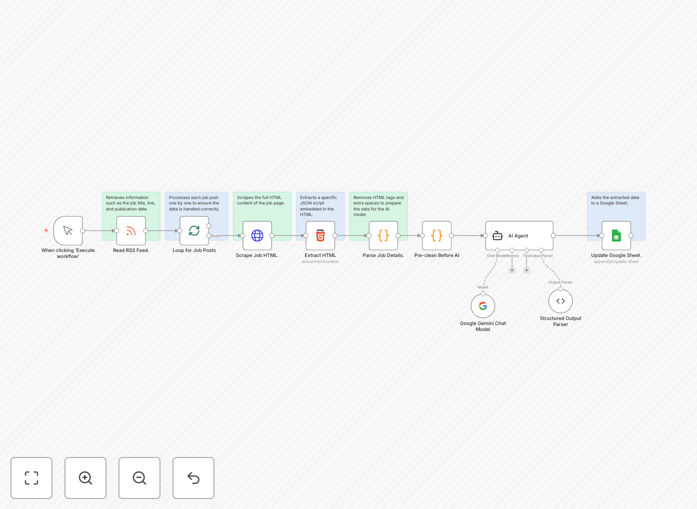
LinkedIn job scraping workflow diagram

What This Workflow Does

This automation solves the tedious manual process of searching for and collecting job postings from LinkedIn. Recruiters, HR professionals, and job seekers often spend hours each week scanning LinkedIn for relevant opportunities, copying details, and organizing them in spreadsheets.

The workflow automatically monitors LinkedIn job postings via RSS feeds, extracts key information using Gemini AI for intelligent analysis, and stores structured data in Google Sheets. This eliminates manual data entry while providing AI-powered insights about each job listing.

How It Works

1. LinkedIn RSS Feed Monitoring

The workflow starts by monitoring LinkedIn job RSS feeds for your specified search criteria. You can configure filters for job titles, locations, experience levels, and other parameters.

2. Data Extraction and AI Processing

New job postings are passed to Gemini AI which extracts key details like company name, position title, salary range, required skills, and job description highlights. The AI can also categorize jobs based on your predefined criteria.

3. Google Sheets Integration

The structured data is then automatically added to your Google Sheets spreadsheet, with each job getting its own row containing all relevant information. The sheet can be formatted to include filters, sorting, and conditional formatting.

Who This Is For

This automation is ideal for:

  • Recruitment agencies tracking multiple job openings
  • HR departments monitoring competitive hiring landscapes
  • Job seekers wanting to organize potential opportunities
  • Market researchers analyzing hiring trends
  • Businesses tracking competitor hiring activity

What You'll Need

  1. An n8n instance (cloud or self-hosted)
  2. Google Sheets account with edit permissions
  3. Gemini API key (Google AI Studio)
  4. LinkedIn RSS feed URL for your job search

Pro tip: Create separate Google Sheets tabs for different job categories or locations to keep your data organized from the start.

Quick Setup Guide

  1. Download and import the JSON template into your n8n instance
  2. Configure the LinkedIn RSS feed URL with your search parameters
  3. Connect your Google Sheets account and specify the target spreadsheet
  4. Add your Gemini API key in the AI processing step
  5. Test the workflow with sample data before enabling automation
  6. Schedule the workflow to run at your preferred frequency

Key Benefits

Save 10+ hours weekly by eliminating manual job search and data entry tasks. The automation handles the repetitive work so you can focus on evaluating opportunities.

Get AI-powered insights from Gemini that highlight key requirements, salary benchmarks, and skill trends across your target job market.

Maintain organized records with all job data automatically structured and stored in searchable Google Sheets.

Stay ahead of competitors by monitoring new postings in real-time rather than relying on periodic manual checks.

Frequently Asked Questions

Common questions about LinkedIn job scraping and AI processing

LinkedIn allows limited data collection through RSS feeds and APIs for personal use. This workflow uses RSS feeds which are publicly available and don't violate LinkedIn's terms when used responsibly. The key is to avoid excessive scraping frequency and only collect data you genuinely need.

For commercial use cases, consider LinkedIn's official API or consult legal advice. Many recruitment tools legally access job data by staying within platform guidelines and respecting data privacy laws.

Gemini AI transforms raw job postings into structured, actionable data. It can extract key details like salary ranges that may not be explicitly stated, identify required skills even when phrased differently, and categorize jobs based on your specific criteria.

For example, AI can standardize varying job titles (e.g., "Software Engineer" vs "Developer") into consistent categories. It can also highlight unusual requirements or benefits that might indicate competitive advantages in the job market.

For most use cases, running the workflow once or twice daily provides optimal results without overwhelming your spreadsheet. LinkedIn job feeds typically update several times per day, so daily checks ensure you don't miss new postings.

If you're tracking highly competitive positions or time-sensitive openings, you might schedule runs every 6-8 hours. Just be mindful of LinkedIn's rate limits and your own data management needs.

Absolutely. The workflow template includes common fields like title, company, and location, but you can modify the AI prompts to extract any specific data points you need. This might include remote work policies, required certifications, or benefit details.

For technical roles, you could configure the AI to identify specific programming languages or tools mentioned. For managerial positions, it could extract team size or budget responsibilities.

Google Sheets offers powerful analysis tools for your job data. Use filters to view specific job categories, pivot tables to analyze salary trends, and charts to visualize hiring patterns over time.

For deeper analysis, connect your sheet to Google Data Studio or export to specialized HR analytics tools. Many users create dashboards showing skills demand, compensation benchmarks, and hiring velocity in their industry.

This automation provides core functionality similar to many paid tools at no cost. While enterprise recruitment platforms offer additional features like candidate management, this workflow excels at the data collection and organization aspects.

The main advantages are customization (you control exactly what data gets collected) and integration with your existing Google Sheets workflow. For small teams or individual recruiters, it can replace expensive subscriptions.

Yes! GrowwStacks specializes in building tailored automation solutions for recruitment and HR workflows. We can create custom versions of this workflow with your specific data requirements, additional integrations, and advanced analytics.

Our team can also help scale this solution for enterprise use, adding features like duplicate detection, candidate matching, and team collaboration tools. We'll ensure the automation aligns with your existing HR tech stack and compliance requirements.

  • Custom fields matching your hiring criteria
  • Integration with your ATS or HRIS
  • Advanced analytics dashboards

Need a Custom LinkedIn Job Automation?

This free template is a starting point. Our team builds fully tailored automation systems for your specific needs.