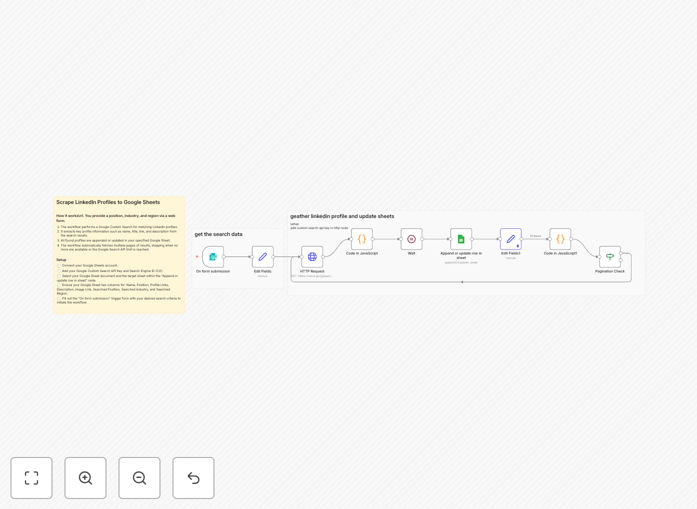
What This Workflow Does
This automation solves the time-consuming challenge of manually collecting LinkedIn profiles for recruitment or sales outreach. Traditional methods require hours of searching, copying, and pasting profile information into spreadsheets. Our n8n workflow automates this entire process by leveraging Google Custom Search to find and extract LinkedIn profile data directly into Google Sheets.
The system performs targeted searches based on your criteria (job titles, companies, locations), extracts key profile details, and organizes them in a structured format. This creates a constantly updated talent pipeline or lead database without manual effort, allowing you to focus on engagement rather than data collection.
How It Works
1. Configure Google Custom Search
The workflow starts with Google Custom Search Engine (CSE) configured to search LinkedIn profiles. You'll define search parameters like industry keywords, job titles, or geographic filters that match your target audience.
2. Execute Automated Searches
The n8n workflow automatically runs your predefined searches through Google CSE. It processes the search results to identify relevant LinkedIn profiles while filtering out noise and irrelevant pages.
3. Extract Profile Data
For each matching profile, the workflow extracts available information including name, headline, current position, company, location, and profile URL. The data is cleaned and standardized for consistency.
4. Populate Google Sheets
Extracted profile data is automatically added to your designated Google Sheet in a structured format. The workflow can append new profiles or update existing entries based on your configuration.
Pro tip: Combine this with email automation tools to automatically initiate outreach campaigns when new matching profiles are added to your sheet.
Who This Is For
This template delivers the most value for talent acquisition professionals, recruiters, and sales teams who need to build targeted contact lists. Specifically:
- Technical recruiters sourcing candidates for hard-to-fill positions
- Startup founders building their initial teams
- Sales development representatives (SDRs) prospecting for new leads
- Executive search firms maintaining talent pipelines
- Marketing teams identifying influencer partnerships
What You'll Need
- An n8n instance (cloud or self-hosted)
- Google Cloud Platform account with Custom Search JSON API enabled
- Google Sheets document prepared with your desired column structure
- Google Service Account credentials for API access
- Clear search criteria (keywords, titles, locations, etc.)
Quick Setup Guide
- Download the JSON template file
- Import into your n8n instance
- Configure your Google Custom Search Engine ID
- Set up Google Sheets API credentials
- Define your target spreadsheet ID
- Adjust search parameters as needed
- Test with a small sample search
- Schedule regular runs or trigger manually
Key Benefits
Save 5-10 hours per week by eliminating manual LinkedIn searches and data entry. The automation handles repetitive profile collection so you can focus on engagement.
Build larger, more targeted talent pools with consistent criteria application. The system doesn't get tired or miss profiles due to human error.
Keep your candidate database fresh with automated updates. Schedule regular searches to capture new profiles matching your criteria.
Improve outreach personalization with structured profile data. Access complete, organized information for each prospect in your Google Sheets.
Scale your recruitment or sales efforts without adding headcount. Process hundreds of profiles daily with the same effort as a handful manually.