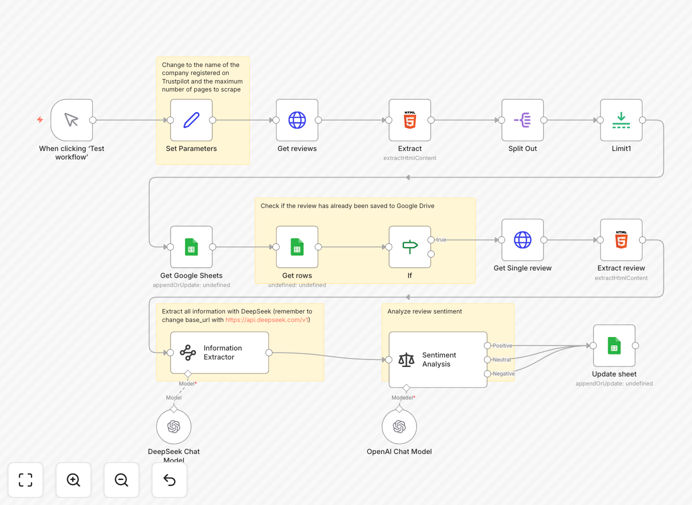
What This Workflow Does
This automation solves the time-consuming problem of manually monitoring customer reviews on Trustpilot. Businesses typically spend hours each week checking reviews, copying data into spreadsheets, and trying to interpret customer sentiment. This workflow eliminates that manual effort by automatically scraping new reviews, analyzing their emotional tone using AI, and organizing everything in Google Sheets for easy analysis.
The system provides real-time insights into customer satisfaction trends, identifies recurring issues before they escalate, and creates a searchable database of all customer feedback. Instead of reactive damage control, you get proactive intelligence about what customers love and what needs improvement.
How It Works
1. Automated Review Collection
The workflow periodically checks your Trustpilot business page for new reviews using HTTP requests and HTML parsing. It handles pagination to collect reviews from multiple pages and extracts the raw review text, ratings, dates, and reviewer information.
2. AI-Powered Sentiment Analysis
Each review passes through OpenAI's sentiment analysis model, which classifies the text as positive, neutral, or negative with confidence scores. The AI understands context, sarcasm, and mixed emotions that simple keyword matching would miss.
3. Structured Data Extraction
Using DeepSeek's information extraction capabilities, the workflow pulls structured data from each review: reviewer name, rating (1-5), date, review title, full text, reviewer's country, and their total review count on Trustpilot.
4. Centralized Storage & Reporting
All processed data automatically populates a Google Sheet with columns for sentiment category, confidence scores, and extracted details. This creates a living database that updates automatically as new reviews arrive.
Pro tip: Configure the workflow to run daily for most businesses, or hourly if you're in high-volume retail or hospitality where rapid response to negative reviews is critical.
Who This Is For
This automation is ideal for e-commerce stores, SaaS companies, service providers, and any business with a Trustpilot presence. Marketing teams use it to track brand sentiment, product teams to identify feature requests, customer support to spot service issues, and executives to monitor overall customer satisfaction trends.
Small businesses benefit from the automated monitoring they couldn't afford to do manually, while larger enterprises use it to consolidate feedback from multiple locations or product lines into a single dashboard. Agencies managing multiple client accounts can scale review monitoring across all their clients simultaneously.
What You'll Need
- n8n instance (cloud or self-hosted) with workflow execution capabilities
- OpenAI API key for sentiment analysis (GPT-3.5 or higher)
- Google Sheets access with edit permissions for the destination spreadsheet
- Trustpilot business page URL that you want to monitor
- Basic understanding of how to import JSON workflows into n8n
Quick Setup Guide
1. Download the template using the button above and import it into your n8n instance. 2. Configure the HTTP Request node with your Trustpilot business page URL and set your desired page limit. 3. Add your OpenAI API credentials to the sentiment analysis node. 4. Connect the Google Sheets node to your destination spreadsheet and map the columns. 5. Set the workflow trigger to run on your preferred schedule (daily recommended). 6. Test with a manual run to verify data flows correctly before enabling automation.
Pro tip: Start with monitoring just the last 30 days of reviews to test the workflow, then expand to historical data once you're confident in the setup.
Key Benefits
Save 10-15 hours monthly on manual review monitoring and data entry. What used to be a weekly chore becomes a fully automated process that runs in the background.
Real-time negative review alerts enable immediate damage control. Instead of discovering problems days later, you can respond within hours when issues are still fresh.
Data-driven product improvements based on actual customer feedback patterns. Identify recurring complaints or feature requests that should prioritize your development roadmap.
Competitive intelligence when applied to competitor Trustpilot pages. Monitor what customers say about alternatives to your product or service.
Scalable across multiple brands or locations without additional manual effort. Duplicate the workflow for different business units with minimal configuration changes.