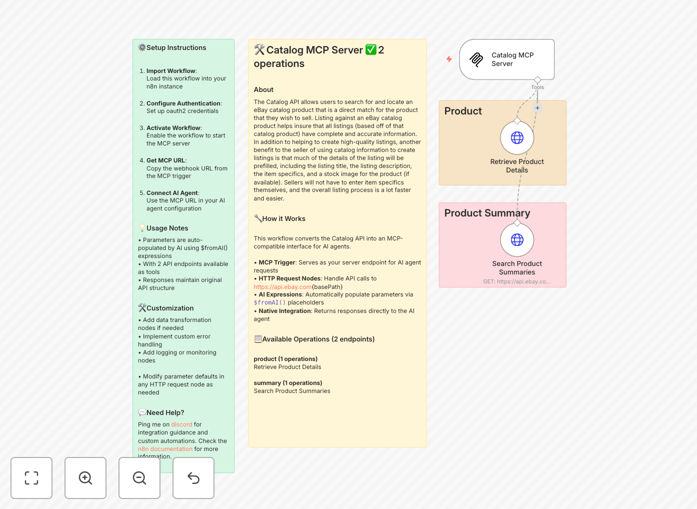
What This Workflow Does
This automation solves a critical problem for e-commerce businesses and AI developers: accessing real-time, structured product data from eBay's massive marketplace. Manually researching products, checking prices, and gathering specifications is time-consuming and error-prone. This workflow bridges the gap between AI agents and eBay's Catalog API, allowing intelligent systems to autonomously search for products, retrieve detailed information, and analyze market data.
The template creates an MCP (Model Context Protocol) server that exposes two key eBay Catalog API operations to AI agents. It handles authentication, parameter mapping, error management, and data formatting—transforming complex API responses into clean, usable information that AI agents can immediately process and act upon. This turns hours of manual market research into seconds of automated intelligence.
How It Works
Step 1: MCP Server Activation
The workflow starts with an MCP Server Trigger node that creates an endpoint for AI agents to connect to. When activated, this node generates a unique webhook URL that AI tools like Claude Desktop or Cursor can use to send requests.
Step 2: AI Request Processing
AI agents send natural language requests (like "Find iPhone 14 Pro prices on eBay" or "Get specifications for Samsung Galaxy S23"). The workflow uses $fromAI() expressions to automatically extract and map parameters from these requests to the appropriate API fields.
Step 3: eBay API Integration
HTTP Request nodes connect to eBay's Catalog API endpoints. The workflow supports two key operations: retrieving specific product details by eBay Product ID (EPID) and searching product summaries with various filters. All authentication and rate limiting are handled automatically.
Step 4: Data Transformation & Response
Raw API responses are cleaned and structured into a consistent format. The workflow returns product titles, descriptions, specifications, pricing information, availability status, and seller details—exactly what AI agents need for analysis and decision-making.
Who This Is For
This template is ideal for e-commerce managers, drop-shipping businesses, market researchers, AI developers, and competitive intelligence teams. If you need to monitor eBay prices, research products for your store, verify product specifications, or provide AI agents with real-time marketplace data, this automation eliminates manual data gathering. It's particularly valuable for businesses scaling their e-commerce operations or developing AI-powered tools for market analysis.
What You'll Need
- An active n8n instance (cloud or self-hosted)
- eBay Developer Program credentials with Catalog API access
- AI agent platform that supports MCP connections (Claude Desktop, Cursor, etc.)
- Basic understanding of eBay product identifiers (EPIDs)
Quick Setup Guide
- Import the template into your n8n instance using the downloaded JSON file
- Configure eBay credentials in the HTTP Request nodes with your API keys
- Activate the workflow to start your MCP server
- Copy the webhook URL from the MCP Trigger node
- Connect your AI agents by adding the MCP URL to their configuration
- Test with sample queries like "Search for gaming laptops under $1000"
Pro tip: Start by testing with specific eBay Product IDs (EPIDs) before moving to search queries. This helps verify your API connection is working correctly before adding complexity.
Key Benefits
Save 10+ hours weekly on market research by automating product data collection. Instead of manually browsing eBay and compiling spreadsheets, your AI agents can gather and analyze data in seconds.
Improve decision accuracy with real-time data directly from eBay's catalog. Eliminate guesswork about pricing, availability, and product specifications with verified, up-to-date information.
Scale your e-commerce intelligence without scaling your team. One automation can handle hundreds of product queries daily, providing consistent, structured data for multiple team members or AI systems.
Reduce errors in product listings and pricing strategies by using authoritative data from eBay's catalog rather than manual entry or outdated sources.
Future-proof your tech stack with a flexible integration layer. As your needs evolve, you can easily extend this workflow to combine eBay data with other sources like your inventory system, CRM, or analytics platforms.