What This Workflow Does
This automation solves a critical problem for online course creators, community managers, and membership site owners: extracting valuable insights from thousands of Skool community posts without manual effort. Communities often contain goldmines of information—common questions, content gaps, student confusion points, and emerging trends—but finding these insights requires hours of scrolling and note-taking.
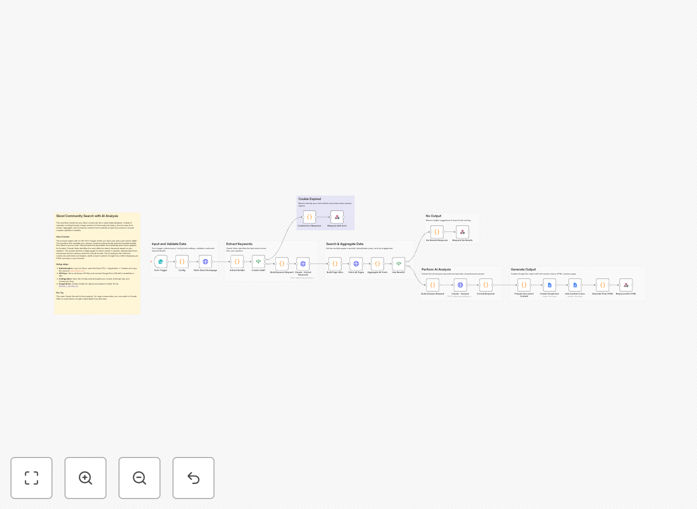
The workflow automates the entire research process. You submit a question (like "What are the most common challenges with implementing XYZ strategy?"), and the system searches multiple pages of Skool discussions, uses Claude AI to analyze the content, and generates a comprehensive Google Docs report with synthesized answers, key themes, and actionable insights. It handles technical complexities like Skool session management, multi-page pagination, and AI token optimization automatically.
How It Works
1. Question Input & Configuration
The workflow starts with a form trigger where you enter your research question and optional settings like search depth (1-10 pages) and target Google Drive folder. This provides flexibility for both quick searches and deep dives into community archives.
2. Skool Session Validation
The system checks if your Skool session cookie is still active and provides clear error messages if renewal is needed. This prevents failed searches and ensures reliable operation without manual monitoring.
3. Dynamic BuildId Extraction
Instead of requiring manual updates when Skool changes its platform, the workflow automatically extracts the current build ID from Skool's homepage. This future-proofs the automation against platform updates.
4. AI-Powered Keyword Extraction
Claude Haiku (a cost-effective AI model) analyzes your question to extract 1-2 optimal search keywords. This improves search accuracy beyond simple keyword matching by understanding the intent behind your question.
5. Multi-Page Community Search
The system fetches 1-10 pages of Skool search results based on your configuration, collecting all relevant posts along with their comments and engagement metrics. This comprehensive data collection forms the basis for meaningful analysis.
6. Advanced AI Analysis
Claude Sonnet (a more powerful AI model) analyzes all collected posts to answer your specific question, identify patterns, summarize discussions, and highlight key insights. The AI considers context, sentiment, and relevance across the entire dataset.
7. Automated Google Docs Reporting
A professionally formatted Google Doc is created in your specified Drive folder, containing the research question, analysis, key findings, supporting quotes, and recommendations. This creates a shareable, persistent knowledge asset.
8. HTML Response Delivery
You receive a beautifully formatted HTML summary page that can be viewed immediately while the full Google Doc is being prepared. This provides instant value while the detailed report generates in the background.
Who This Is For
This automation is ideal for online course creators who need to understand student challenges, community managers monitoring discussion trends, membership site owners identifying content opportunities, and coaches tracking client progress. It's particularly valuable for businesses with active Skool communities of 100+ members where manual research becomes impractical.
Teams managing multiple communities or courses will benefit from scalable insights extraction. Content creators can use it to identify FAQ topics for new lessons. Support teams can quickly find existing answers to member questions. The workflow serves anyone who needs to transform unstructured community discussions into structured, actionable knowledge.
What You'll Need
- Skool Account & Session Cookie: Active membership in the Skool community you want to research, plus a session cookie obtained from browser developer tools.
- Anthropic API Key: Access to Claude AI through Anthropic's API platform (free tier available for testing).
- Google Cloud Project: OAuth2 credentials for Google Docs API with Docs and Drive permissions enabled.
- Google Drive Folder: A designated folder for research documents (optional but recommended for organization).
- n8n Instance: Self-hosted n8n or n8n.cloud account with HTTP Request, If, Google Docs, and Code nodes available.
Pro tip: Use separate Google Drive folders for different research purposes (e.g., "Weekly Community Insights," "Course Improvement Ideas," "Member Feedback"). This keeps your automated research organized and easily accessible for future reference.
Quick Setup Guide
- Download the template using the button above and import it into your n8n instance.
- Obtain your Skool session cookie by logging into your community, opening browser developer tools (F12), going to the Network tab, refreshing the page, and copying the "cookie" value from any request to skool.com.
- Get an Anthropic API key from console.anthropic.com (sign up for free credits if you're new).
- Set up Google OAuth2 credentials in the Google Cloud Console, enabling Google Docs API and Google Drive API, then add the credentials to n8n's Google Docs node.
- Create a Google Drive folder for research documents and copy its folder ID from the URL.
- Update the Config node with your COOKIE, ANTHROPIC_API_KEY, DEFAULT_FOLDER_ID, and COMMUNITY values.
- Test the workflow with a simple question to verify all connections are working properly.
Key Benefits
Save 5-15 hours weekly on community research. What previously required manual scrolling through hundreds of posts now happens automatically in minutes, freeing you to focus on implementation rather than information gathering.
Discover insights you'd miss manually. AI analysis identifies patterns, correlations, and emerging trends across the entire community dataset that human researchers might overlook due to cognitive bias or fatigue.
Create persistent knowledge assets. Automated Google Docs reports become searchable archives of community intelligence that can be referenced months later, unlike temporary notes that get lost or forgotten.
Scale community management without scaling time. As your community grows from hundreds to thousands of members, this automation scales with it, maintaining deep insights without proportional increases in management time.
Make data-driven decisions about content and offerings. Base course updates, new content creation, and community initiatives on actual member discussions rather than assumptions or limited feedback.