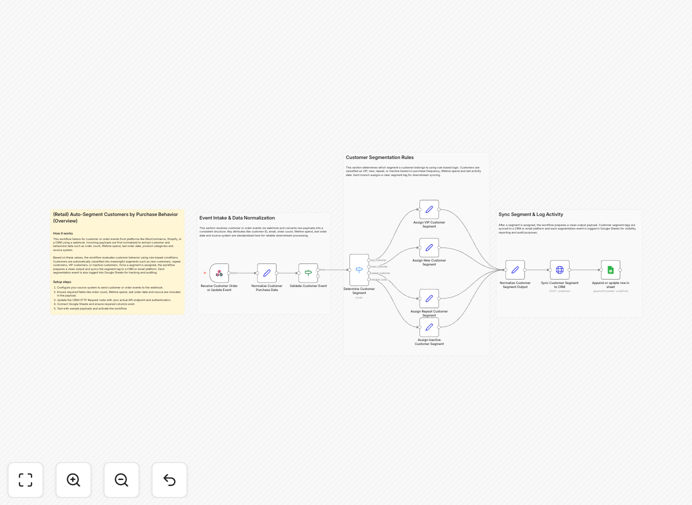
What This Workflow Does
Manual customer segmentation is time-consuming, error-prone, and quickly becomes outdated as customers make new purchases. Retail businesses struggle to identify their most valuable customers, target repeat buyers effectively, or reactivate inactive customers before they're lost forever.
This automated workflow solves these problems by instantly classifying customers whenever a purchase or update occurs. It listens for customer events from your e-commerce platform or CRM, analyzes purchase behavior including order count, lifetime spend, and recency, then assigns appropriate segment tags like "VIP," "Repeat Buyer," or "At Risk." The segments sync directly to your CRM for immediate marketing use and log to Google Sheets for tracking and auditing.
How It Works
1. Receive Customer Events
The workflow starts with a webhook that listens for customer-related events from platforms like WooCommerce, Shopify, or your CRM. Whenever a new order is placed or customer data is updated, the event triggers the automation with all relevant customer and purchase data.
2. Normalize Purchase Data
Customer data from different sources gets standardized into a consistent format. The workflow extracts key metrics: total orders, lifetime spend, last purchase date, favorite product categories, and customer source. This normalization ensures accurate segmentation regardless of the data origin.
3. Apply Segmentation Rules
Using configurable business rules, the workflow evaluates each customer against segmentation criteria. Customers spending over a threshold become "VIPs." Those with multiple recent purchases become "Repeat Buyers." Customers inactive beyond a timeframe get flagged as "At Risk." First-time buyers are tagged as "New."
4. Sync to CRM Systems
Once segmented, the customer's new classification pushes directly to your CRM (like HubSpot, Salesforce, or Zoho) via API. This ensures your sales and marketing teams immediately see updated segment tags without manual data entry, enabling instant targeted actions.
5. Log to Google Sheets
Every segmentation event logs to a Google Sheets spreadsheet with timestamp, customer details, assigned segment, and triggering event. This creates an audit trail for analysis, reporting, and compliance while providing a backup of all segmentation decisions.
Who This Is For
This workflow is ideal for e-commerce retailers using platforms like Shopify or WooCommerce, marketing teams running targeted email campaigns, CRM administrators managing customer data quality, growth teams focused on customer retention, and operations teams maintaining accurate customer insights. It's particularly valuable for businesses with 100+ customers where manual segmentation becomes impractical.
What You'll Need
- An active n8n instance (self-hosted or cloud)
- A source system that can send webhook events (e-commerce platform or CRM)
- Customer data including order history and purchase metrics
- API access to your CRM or email marketing platform
- Google Sheets API credentials and a prepared spreadsheet
- Basic understanding of your segmentation business rules
Quick Setup Guide
- Download and import the JSON template into your n8n instance
- Configure the webhook node with your unique URL
- Connect your e-commerce platform to send events to this webhook
- Adjust segmentation thresholds in the "If" nodes to match your business rules
- Connect the CRM node with your API credentials and field mappings
- Set up Google Sheets authentication and specify your spreadsheet ID
- Activate the workflow and test with sample customer data
Pro tip: Start with conservative segmentation thresholds and adjust based on your actual customer data. Monitor the Google Sheets log for the first week to ensure segments align with your marketing goals before launching campaigns.
Key Benefits
Save 10+ hours weekly on manual segmentation work. Eliminate spreadsheet updates and manual CRM tagging that consume marketing team time. The automation handles segmentation instantly as customers interact with your business.
Improve marketing campaign relevance by 40%+. Targeted messages based on actual purchase behavior dramatically increase open rates, click-throughs, and conversions compared to generic broadcasts to your entire list.
Identify high-value customers instantly for VIP treatment. Automatically flag customers who exceed spending thresholds for special offers, early access, or personalized service that increases lifetime value and loyalty.
Reduce customer churn through proactive intervention. Spot at-risk customers before they leave and trigger reactivation campaigns when purchase patterns change, improving retention rates significantly.
Maintain perfect data synchronization between systems. Ensure your CRM always reflects current customer segments without manual updates, giving your team accurate insights for every customer interaction.