Airtable Gmail CRM Zapier

Automate Daily Airtable Contact Summaries via Gmail

Get formatted email reports of new contacts added to your Airtable base

Download Template JSON · n8n compatible · Free
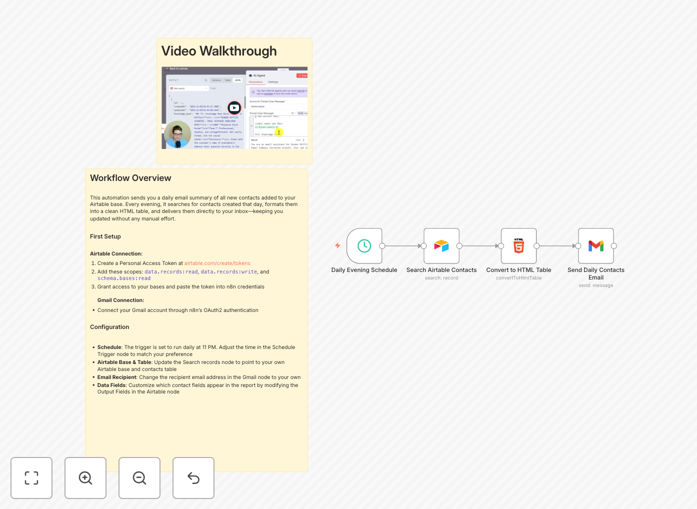
Screenshot of Airtable to Gmail automation workflow

What This Workflow Does

This automation solves the problem of manually tracking new contacts in Airtable by automatically sending you a daily email summary. Instead of constantly checking your base for updates, you'll receive a neatly formatted report each evening with all new entries from that day.

The workflow connects your Airtable base to Gmail, queries for records created in the last 24 hours, formats the data into an easy-to-read HTML table, and delivers it directly to your inbox. It's ideal for sales teams, recruiters, or anyone managing growing contact databases.
Video walkthrough of the Airtable to Gmail automation
Video demonstration of the workflow in action

How It Works

1. Scheduled Trigger

The workflow activates daily at your specified time (default is 11 PM) to capture all new contacts added that day.

2. Airtable Query

It connects to your Airtable base and searches for records created within the last 24 hours using timestamp filtering.

3. Data Formatting

Contact information is extracted and organized into a clean HTML table structure with your preferred fields.

4. Email Composition

The formatted data is inserted into an email template with your preferred styling and branding.

5. Delivery via Gmail

The completed summary email is sent through your connected Gmail account to your specified recipients.

Who This Is For

This workflow is perfect for:

  • Sales teams tracking new leads
  • Recruiters managing candidate pipelines
  • Community managers onboarding new members
  • Small businesses capturing customer inquiries
  • Any team using Airtable as a shared contact database

Pro tip: Add conditional filters to route different contact types to specific team members based on tags or categories.

What You'll Need

  1. An Airtable base with contacts data
  2. Gmail account for sending emails
  3. Airtable personal access token with read permissions
  4. n8n instance (cloud or self-hosted)

Quick Setup Guide

  1. Download the template JSON file
  2. Import into your n8n instance
  3. Configure Airtable credentials with your base ID and API key
  4. Set up Gmail OAuth2 connection
  5. Adjust the schedule trigger timing if needed
  6. Test with a small dataset before enabling daily runs

Key Benefits

Save 1-2 hours daily by eliminating manual contact tracking and reporting. The automation handles data collection and formatting automatically.

Never miss a new contact with systematic daily reporting. Even if you forget to check Airtable, you'll still get all the information.

Standardized reporting ensures consistent presentation of contact information across your team.

Customizable fields let you highlight the most important information for your specific use case.

Scalable solution that works whether you add 5 or 50 new contacts daily.

Frequently Asked Questions

Common questions about Airtable and Gmail automation

Daily contact summaries save time by consolidating new entries into one organized email, eliminating the need to manually check Airtable throughout the day.

They create a predictable workflow rhythm and ensure no contacts slip through the cracks between team members. The standardized format also makes information easier to scan quickly.

Schedule emails during low-activity periods like early morning or late evening when recipients are more likely to read them and systems are less busy.

Consider your team's workflow - sending summaries just before morning standups or end-of-day wrap-ups often works well. Avoid lunch hours and meeting-heavy times.

Connections use OAuth2 authentication and personal access tokens with limited permissions, ensuring only necessary data access while maintaining security.

The workflow only requires read access to Airtable and send access to Gmail. No credentials are stored in plain text, and all connections are encrypted.

Focus on key details like name, company, contact info, and any important notes or tags that help prioritize follow-ups.

Consider your team's specific needs - sales might want lead source and deal size, while recruiters may prioritize skills and availability. Keep it concise but actionable.

  • Essential: Name, contact method, date added
  • Recommended: Category tags, source, notes
  • Optional: Custom fields specific to your workflow

Use HTML templates to structure the data presentation, with options for tables, cards, or simple lists based on your preference.

The workflow includes basic styling that you can modify to match your brand. Add logos, color schemes, or even conditional formatting based on contact properties.

Set up separate workflows filtered by team tags or create conditional branches to route different contact types to appropriate recipients.

For complex routing needs, you can add filtering logic that sends specific contact categories to different distribution lists while maintaining one central workflow.

Yes, GrowwStacks specializes in tailored contact management automations that integrate with your existing tools and workflows.

Our team can build custom solutions that match your specific business processes, whether you need advanced filtering, multi-step workflows, or integration with additional apps beyond Airtable and Gmail.

  • Custom field mapping
  • Multi-team distribution
  • Advanced filtering logic
  • Additional app integrations

Need a Custom Contact Automation?

This free template is a starting point. Our team builds fully tailored automation systems for your specific business needs.