Google Sheets WhatsApp Sales Automation Zapier

Automate Daily Sales Reports from Google Sheets to WhatsApp

Get instant sales updates with revenue totals, order counts, and top products delivered daily

Download Template JSON · n8n compatible · Free
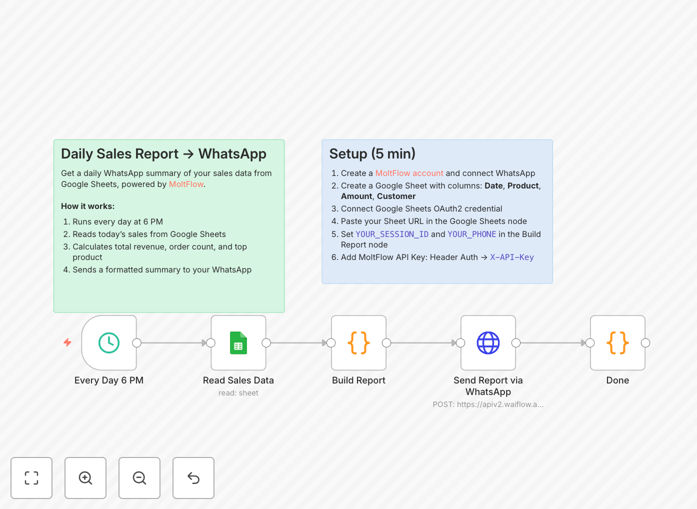
Sales reporting automation workflow connecting Google Sheets and WhatsApp

What This Workflow Does

This automation solves the time-consuming process of manually compiling and distributing daily sales reports. Sales managers often waste hours each week pulling data from multiple sources, formatting spreadsheets, and sending updates to their teams.

The workflow automatically extracts sales data from Google Sheets, calculates key metrics like total revenue and top-performing products, then delivers a formatted summary directly to WhatsApp. It runs at 6 PM daily, ensuring your team gets consistent, accurate reports without manual effort.

How It Works

1. Scheduled Data Extraction

The workflow triggers daily at 6 PM to read your Google Sheets sales data. It filters for today's transactions using the date column.

2. Performance Calculations

The system calculates total revenue, counts completed orders, and identifies the day's top-selling product - giving you the most important metrics at a glance.

3. Report Formatting

Data gets transformed into a clean, readable message template with clear sections for each metric and visual indicators for performance trends.

4. WhatsApp Delivery

The formatted report sends via MoltFlow's WhatsApp integration, appearing directly in your sales team's messaging app where they're most likely to see it.

Who This Is For

This automation is ideal for:

  • Retail managers needing daily sales visibility
  • Ecommerce teams tracking online order performance
  • Field sales leaders managing remote teams
  • Restaurant owners monitoring daily revenue
  • Any business using Google Sheets for sales tracking

What You'll Need

  1. Google Sheets with sales data (Date, Product, Amount columns)
  2. MoltFlow account with active WhatsApp connection
  3. Google OAuth2 credentials configured in your automation platform
  4. Basic understanding of workflow automation concepts

Quick Setup Guide

  1. Import the template into your automation platform
  2. Connect your Google Sheets account
  3. Enter your MoltFlow API credentials
  4. Specify recipient phone numbers
  5. Test with a small data sample
  6. Schedule for daily execution

Pro tip: Add conditional logic to highlight when daily performance exceeds targets or falls below expectations - this helps teams focus on what matters most.

Key Benefits

Saves 3-5 hours weekly by eliminating manual report compilation and distribution. Sales leaders regain time for strategic work.

Improves decision speed with real-time visibility into daily performance trends rather than waiting for weekly reports.

Increases team accountability when everyone receives the same performance data simultaneously.

Reduces errors by automating calculations that humans might miscalculate when tired or rushed.

Works anywhere since WhatsApp delivers reports directly to phones, perfect for mobile sales teams.

Frequently Asked Questions

Common questions about sales reporting automation and integration

Automating sales reports saves 3-5 hours weekly by eliminating manual data compilation. It ensures timely, accurate reporting and enables faster decision-making with real-time sales insights.

For example, a retail chain reduced their regional reporting time from 6 hours daily to fully automated updates, allowing managers to focus on improving underperforming stores instead of compiling numbers.

WhatsApp delivers reports directly to sales teams' phones with 98% open rates. Its familiar interface increases engagement versus email reports that often go unread.

A field sales team saw report engagement jump from 40% with email to 92% after switching to WhatsApp delivery, with managers responding to alerts 3x faster.

Google Sheets provides a centralized, collaborative platform for sales data that updates automatically without IT involvement, unlike traditional CRM systems.

Small businesses particularly benefit since they can start with simple spreadsheets then automate reporting as they grow, without expensive software migrations.

Effective reports show total revenue, order count, average order value, top products, and conversion rates - giving a complete performance snapshot.

  • Revenue totals show overall performance
  • Order count indicates sales volume
  • Top products highlight what's driving results

Automated reporting saves 15-20 hours monthly that reps can reinvest in selling. Instant visibility into performance also helps focus efforts.

One SaaS company redirected 300+ saved hours annually into customer outreach instead of reporting, increasing their demo conversion rate by 22%.

Use OAuth2 authentication, limit API permissions, and implement message encryption to maintain data security in automated workflows.

For sensitive data, consider adding recipient verification or requiring PIN codes to access detailed reports through WhatsApp.

Yes! Our team builds tailored sales automation solutions with your specific KPIs, data sources, and reporting formats for maximum business impact.

Customizations can include:

  • Integration with your existing CRM or ERP
  • Specialized performance metrics
  • Role-based report variations
  • Alert thresholds for unusual activity

Need a Custom Sales Reporting Automation?

This free template is a starting point. Our team builds fully tailored automation systems for your specific business needs.