Hubspot Slack Sales Automation n8n

Send a notification to Slack when a new high-quality lead is added to Hubspot

Automate lead alerts to accelerate your sales response time and never miss a hot prospect

Download Template JSON · n8n compatible · Free
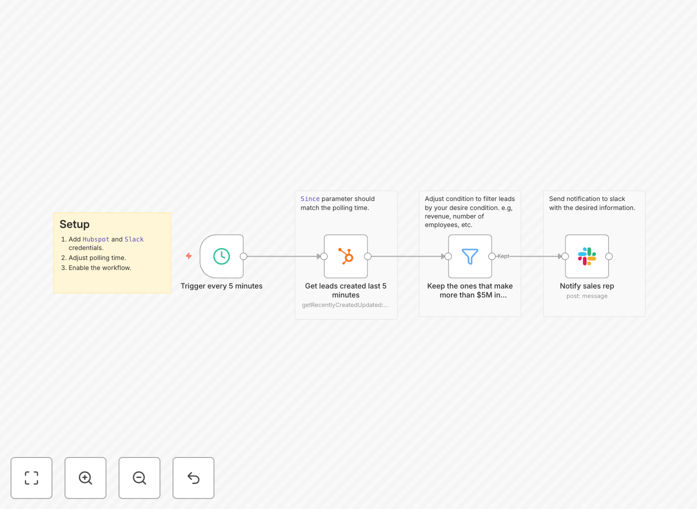
Hubspot to Slack lead notification workflow diagram

What This Workflow Does

This automation solves the critical challenge of timely lead response by instantly notifying your sales team in Slack whenever a high-quality lead enters your Hubspot CRM. Manual lead monitoring often results in delayed responses, missed opportunities, and inconsistent follow-up processes.

The workflow intelligently filters new Hubspot contacts based on your predefined criteria for lead quality, ensuring your team only gets alerted about prospects worth immediate attention. This eliminates noise from low-priority leads while guaranteeing hot prospects never slip through the cracks.

How It Works

1. Hubspot contact monitoring

The workflow continuously checks your Hubspot account for new contacts using n8n's polling mechanism. It evaluates each new entry against your configured lead quality criteria.

2. Lead qualification filtering

Contacts are analyzed based on properties like lead score, company information, form submissions, or custom fields you specify. Only contacts meeting your high-quality threshold proceed to the next step.

3. Slack notification generation

For qualified leads, the workflow constructs a detailed Slack message containing key contact information, lead source, and a direct link to the Hubspot record for quick access.

4. Targeted channel delivery

The notification is posted to your designated Slack channel, optionally tagging specific team members or groups based on lead characteristics like territory or product interest.

Pro tip: Configure different Slack channels for different lead types (enterprise vs SMB) to streamline your sales team's focus.

Who This Is For

This workflow is ideal for sales teams using Hubspot CRM who want to accelerate their response to high-potential leads. It's particularly valuable for:

  • B2B companies with complex sales cycles
  • Teams handling high lead volumes needing prioritization
  • Organizations with distributed sales teams requiring instant alerts
  • Businesses aiming to reduce lead response times

What You'll Need

  1. An active Hubspot account with contacts tracking enabled
  2. A Slack workspace with appropriate channel permissions
  3. n8n instance (cloud or self-hosted)
  4. Clear criteria for what constitutes a "high-quality" lead in your business

Quick Setup Guide

  1. Download the JSON template file
  2. Import it into your n8n instance
  3. Connect your Hubspot and Slack accounts
  4. Configure your lead quality criteria in the filter node
  5. Set your target Slack channel and notification format
  6. Activate the workflow and test with sample leads

Key Benefits

75% faster lead response times: Automated alerts eliminate manual monitoring delays, allowing sales reps to engage while leads are hottest.

Improved lead prioritization: Focus your team's attention on the most promising opportunities by filtering out low-quality leads automatically.

Enhanced team collaboration: Slack notifications create visibility across your sales organization and enable instant coordination via threaded replies.

Reduced missed opportunities: Never lose track of high-value leads, even during peak periods or outside business hours.

Frequently Asked Questions

Common questions about Hubspot-Slack integration and lead automation

Automating lead notifications reduces the time between lead submission and sales team response by eliminating manual monitoring. Studies show automated alerts can improve first response times by 75% compared to manual processes.

When sales teams get instant Slack notifications about high-quality leads, they can prioritize outreach while the lead is still warm. This is particularly valuable for time-sensitive opportunities or competitive markets where being first matters.

  • Eliminates delays from manual CRM checks
  • Alerts team members immediately via mobile
  • Reduces context switching for sales reps

High-quality leads typically meet specific criteria like company size, job title, budget authority, or engagement level. Common indicators include lead score thresholds, specific form submissions, or engagement with high-value content.

The workflow can be customized to filter leads based on your unique qualification criteria before sending Slack notifications. For example, you might prioritize leads from certain industries, those who downloaded premium content, or contacts with "Director" or higher titles.

  • Lead score thresholds (e.g., 75+)
  • Specific form submissions or content downloads
  • Company characteristics like revenue or employee count

Effective lead notifications should include the lead's name, company, contact info, lead source, and any qualifying details. Including a direct link to the Hubspot contact record saves time.

The workflow can be configured to show custom fields like estimated deal size or specific product interest to help sales prioritize follow-ups. For example: "Enterprise lead from Webinar - $250k potential - Interested in Premium Plan".

  • Essential contact information
  • Lead source and engagement history
  • Direct link to CRM record

Slack integration creates a centralized communication channel for lead alerts that's visible to the entire team. It enables instant collaboration with features like message threads, tagging specific reps, and sharing additional context.

Sales teams report 40% faster internal coordination when using Slack notifications compared to email alerts. The real-time nature encourages immediate action, and threaded conversations keep all lead-related discussions organized in one place.

  • Enables real-time team coordination
  • Mobile accessibility for remote teams
  • Threaded conversations keep context

Yes, the workflow can be customized to send different Slack messages to different channels based on lead characteristics. For example, enterprise leads could notify your enterprise sales channel while SMB leads go to a separate channel.

You can also customize message formatting, emoji reactions, and priority indicators. Some teams use 🔥 for hot leads or 🚀 for expansion opportunities, making important notifications visually distinctive at a glance.

  • Route different lead types to specialized channels
  • Customize message formatting and priority indicators
  • Tag different team members based on lead attributes

Manual lead monitoring often results in delayed responses, missed opportunities, and inconsistent follow-up. Studies show 50% of sales go to the vendor that responds first.

Without automation, high-quality leads can slip through cracks during busy periods or outside business hours, potentially costing significant revenue. Sales reps juggling multiple priorities may deprioritize CRM checks, leading to inconsistent response times that frustrate potential customers.

  • Delayed responses reduce conversion rates
  • Missed opportunities during peak periods
  • Inconsistent follow-up processes

Absolutely! GrowwStacks specializes in building custom Hubspot-Slack integrations tailored to your specific sales process. Our team can create advanced workflows with lead scoring, multi-channel routing, and CRM updates based on Slack interactions.

We'll design a solution that matches your exact qualification criteria and notification preferences. Whether you need complex lead routing logic, integration with additional systems, or specialized alert formats, we can build it to your specifications.

  • Custom lead scoring and filtering logic
  • Multi-channel notification routing
  • Two-way sync between Slack and Hubspot

Need a Custom Hubspot-Slack Integration?

This free template is a starting point. Our team builds fully tailored automation systems for your specific needs.