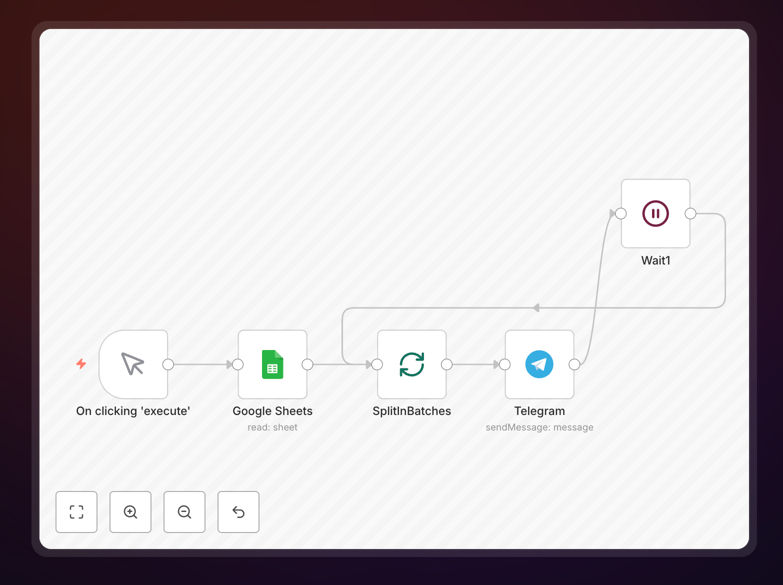
What This Workflow Does
Telegram's API restricts bots to sending only 30 messages per second—a significant bottleneck for businesses communicating with large audiences across multiple groups or channels. This limitation forces manual splitting, delays critical announcements, and creates operational headaches for community managers, marketers, and support teams.
This n8n workflow solves this problem by intelligently queuing and pacing message delivery. It automatically batches your messages, respects Telegram's rate limits, and ensures reliable delivery to hundreds or thousands of recipients without triggering API restrictions. Whether you're announcing product launches, sending promotional offers, updating community members, or distributing time-sensitive information, this automation handles the complexity so you can focus on your message.
The workflow transforms a technical limitation into a strategic advantage. Instead of worrying about rate limits, you gain a scalable communication system that works reliably at any volume, giving you back hours of manual work while improving message consistency and timing.
How It Works
The automation uses a smart queuing system that respects Telegram's API constraints while maximizing delivery speed.
Step 1: Message Preparation & List Import
Your message content and recipient lists are loaded from sources like Google Sheets, databases, or CSV files. The workflow structures this data, allowing for personalization tokens (like {name} or {order_number}) that will be replaced individually for each recipient.
Step 2: Intelligent Batching & Rate Control
The system automatically splits your recipient list into batches of 30 or fewer contacts. It then introduces precise delays between batches to stay within Telegram's 30 messages/second limit, ensuring compliance while optimizing delivery speed.
Step 3: Parallel Processing & Error Handling
Messages are sent through parallel channels where possible, with built-in retry logic for failed deliveries. The workflow logs delivery status, success rates, and any errors for monitoring and follow-up.
Step 4: Delivery Confirmation & Reporting
Once complete, the system generates a delivery report showing successful sends, failures, and timing metrics. This data can be exported to your analytics platform or notification system.
Who This Is For
This automation delivers value across multiple business functions and industries. Marketing teams can blast promotional campaigns to subscriber lists without manual segmentation. Community managers can announce events or updates across dozens of Telegram groups simultaneously. E-commerce businesses can send order confirmations, shipping updates, or flash sale alerts directly to customer chats.
Content creators and educators can distribute new content to their subscriber channels on a scheduled basis. Support teams can broadcast service announcements or outage notifications to user groups. Local businesses can send special offers to their neighborhood Telegram community. Essentially, any organization using Telegram for customer, member, or community communication at scale will benefit from this automation.
What You'll Need
- A Telegram Bot Token: Create a bot via @BotFather on Telegram and obtain your API token.
- n8n Instance: A self-hosted n8n setup or n8n.cloud account.
- Recipient List: Your Telegram chat IDs, group IDs, or channel usernames in a structured format (CSV, Google Sheets, or database).
- Message Content: Prepared text, images, or documents you want to send. Optional personalization variables if needed.
- Basic n8n Knowledge: Familiarity with importing workflows and configuring credentials.
Pro tip: Test with a small batch of 5-10 contacts first to verify your setup before scaling to larger lists. This helps catch configuration issues early.
Quick Setup Guide
- Download the template using the button above and save the JSON file locally.
- Import into n8n: In your n8n instance, go to Workflows → Import from file and select the downloaded JSON.
- Configure Telegram credentials: Click the Telegram node, add your Bot Token from @BotFather, and test the connection.
- Set up your data source: Connect the Google Sheets/CSV node to your recipient list or manually enter chat IDs in the workflow.
- Customize your message: Edit the message content in the Telegram node. Add personalization fields if needed.
- Test and activate: Run the workflow once with a test batch, review the results, then schedule or trigger it as needed.
Key Benefits
Eliminate manual sending work: What used to take hours of copying, pasting, and monitoring now happens automatically. Reclaim 10-15 hours per month typically spent on repetitive messaging tasks.
Scale without hitting limits: Communicate with thousands of Telegram users without worrying about API restrictions. The automation manages rate limits intelligently behind the scenes.
Improve message consistency & timing: Ensure every recipient gets the same message at the optimal time. No more variations from manual sending or timing inconsistencies.
Reduce human error: Automated systems don't forget to include attachments, skip recipients, or send to wrong groups. Delivery accuracy approaches 100% with proper setup.
Gain delivery insights: Track exactly which messages were delivered, when, and to whom. This data helps optimize future communications and measure engagement.