What This Workflow Does
This automation solves a critical problem in recruitment and training programs: the administrative burden of manually communicating outcomes to candidates and their referrers. When candidates complete events or courses, HR teams typically spend hours sending individual emails, SMS messages, and updating referral partners—a process prone to delays, errors, and inconsistency.
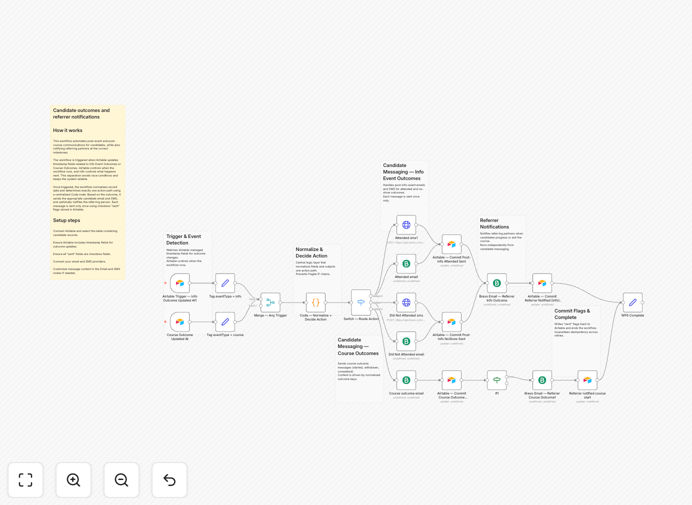
The workflow automatically triggers when Airtable records are updated with outcome information (like "Info Event Outcome" or "Course Outcome"). It then determines the correct communication path, sends personalized emails and SMS to candidates, and notifies referring partners—all while preventing duplicate messages through smart tracking flags. This transforms a chaotic, manual process into a reliable, scalable system that operates 24/7.
Beyond just sending messages, this automation maintains professional relationships by ensuring timely, accurate communication. Candidates receive immediate feedback rather than waiting days, referrers stay informed about their referrals, and your team reclaims valuable hours previously spent on repetitive administrative tasks.
How It Works
1. Airtable Trigger & Data Normalization
The workflow activates when timestamp fields in your Airtable base are updated. This trigger approach ensures Airtable controls when the automation runs, preventing race conditions. The system first normalizes the incoming record data, extracting key information like candidate contact details, outcome type, and referrer information.
2. Centralized Decision Logic
A centralized Code node processes the normalized data to determine exactly one action path. This logic evaluates the outcome type (event vs. course), candidate status, and whether communications have already been sent. The decision-making is consolidated in one place, making the workflow easier to maintain and modify as your processes evolve.
3. Multi-Channel Communication Execution
Based on the determined path, the workflow executes parallel communications: personalized emails via your email provider (like Brevo), SMS messages via your SMS gateway, and referrer notifications. Each channel uses templates that can include dynamic candidate data for personalization while maintaining consistent branding and messaging.
4. Sent Flag Updates & Completion
After successful communication delivery, the workflow updates checkbox "sent" flags in Airtable. This prevents duplicate messages if the workflow accidentally triggers multiple times and provides a clear audit trail of all communications. The system then completes with success notifications or error handling for any failed deliveries.
Who This Is For
This automation is ideal for recruitment agencies, corporate HR departments, training organizations, educational institutions, and bootcamps that manage candidate pipelines. If you regularly communicate outcomes to applicants, students, or participants and need to notify referral partners, this workflow will save you significant time.
Specifically beneficial for teams that use Airtable as their candidate tracking system but manually handle communications through separate email and SMS tools. The workflow bridges these disconnected systems, creating a seamless automation that respects your existing processes while eliminating the manual work.
Also valuable for organizations scaling their hiring or training programs where manual communication becomes unsustainable. As candidate volumes increase, this automation ensures consistent, timely communication without requiring additional administrative staff.
What You'll Need
- Airtable base with candidate records containing timestamp fields for outcome updates and checkbox fields to track sent communications
- Email service provider account (like Brevo, SendGrid, or SMTP access) with API credentials
- SMS gateway account (like Twilio, MessageBird, or similar) with API access
- n8n instance (cloud or self-hosted) with available workflow execution capacity
- Communication templates for candidate emails, SMS messages, and referrer notifications
Quick Setup Guide
Follow these steps to implement this automation in your environment:
- Download and import the template JSON file into your n8n instance using the import functionality.
- Configure Airtable trigger by connecting to your base and selecting the table containing candidate records. Map the timestamp fields that should trigger the workflow.
- Set up email and SMS nodes by adding your provider credentials and testing the connections. Customize message templates with your branding and preferred messaging.
- Adjust decision logic in the Code node if your outcome types or branching logic differs from the default configuration.
- Test thoroughly with sample data before going live. Verify that sent flags update correctly and all communication channels work as expected.
- Activate and monitor the workflow, checking initial executions to ensure everything operates smoothly with your live data.
Pro tip: Start with a small subset of candidates or a test Airtable base to validate the workflow before applying it to your entire candidate database. This allows you to refine templates and logic without affecting real candidates.
Key Benefits
Save 5-10 hours weekly on manual follow-ups that can be redirected to strategic HR initiatives like candidate experience improvement or process optimization.
Eliminate communication delays that frustrate candidates and damage your employer brand, ensuring professional, timely responses regardless of workload.
Maintain perfect consistency across all candidate communications, with standardized messaging that reflects your brand values and compliance requirements.
Automatically update referrers to strengthen partner relationships and encourage future referrals through transparent, timely communication.
Prevent duplicate or missed messages with smart tracking flags that create a reliable audit trail of all communications sent to each candidate.