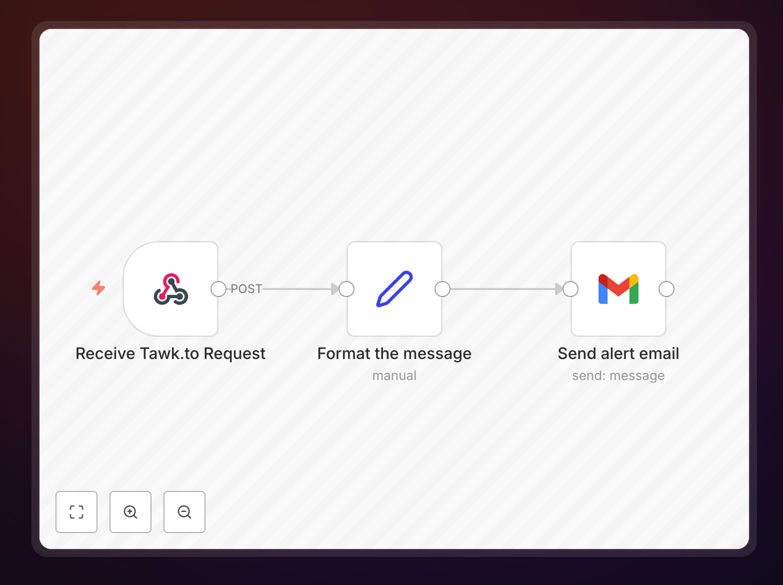
What This Workflow Does
This automation solves a critical customer service challenge - ensuring your team never misses an incoming chat message from your website visitors. When customers initiate conversations via your Tawk.to live chat widget, this workflow instantly sends email notifications to your designated support team via Gmail.
The system captures all relevant message details including visitor name, email (if provided), message content, timestamp, and chat URL. This ensures your team can prioritize responses and maintain fast response times even when they're not actively monitoring the chat dashboard.
How It Works
1. Trigger on new Tawk.to messages
The workflow activates whenever a new message arrives in your Tawk.to chat widget. It captures the complete message context including visitor details and conversation history.
2. Format notification email
The system structures a professional email alert containing all critical information your team needs to respond effectively. This includes clickable links back to the specific chat conversation.
3. Send via Gmail
The formatted notification gets delivered to your predefined support email distribution list through your connected Gmail account, ensuring immediate visibility.
Pro tip: Configure email subject lines to include urgency indicators like "[Chat Alert]" to help your team prioritize these notifications.
Who This Is For
This automation is ideal for:
- Customer support teams managing live chat channels
- E-commerce businesses wanting faster response times
- Service providers who need to capture leads from website chats
- Remote teams who aren't always logged into Tawk.to dashboard
What You'll Need
- An active Tawk.to account with admin access
- A Gmail account with API access enabled
- n8n instance (cloud or self-hosted)
- List of email recipients for notifications
Quick Setup Guide
- Download the workflow template file
- Import into your n8n instance
- Connect your Tawk.to and Gmail accounts
- Configure recipient email addresses
- Test with a live chat message
- Activate the workflow
Key Benefits
Never miss a customer message: Get instant alerts even when your team isn't actively monitoring the chat dashboard, reducing response times by up to 80%.
Improved team coordination: Email notifications ensure multiple team members are aware of incoming chats, preventing duplicate responses or missed messages.
Better customer experience: Faster response times lead to higher customer satisfaction and increased conversion rates from website visitors.