Zapier Resend HubSpot Postgres

Automate Cold Email Outreach with Resend, Postgres & HubSpot

3-stage workflow to send emails, trigger follow-ups after 3 days, and sync responses to HubSpot CRM automatically

Download Template JSON · n8n compatible · Free
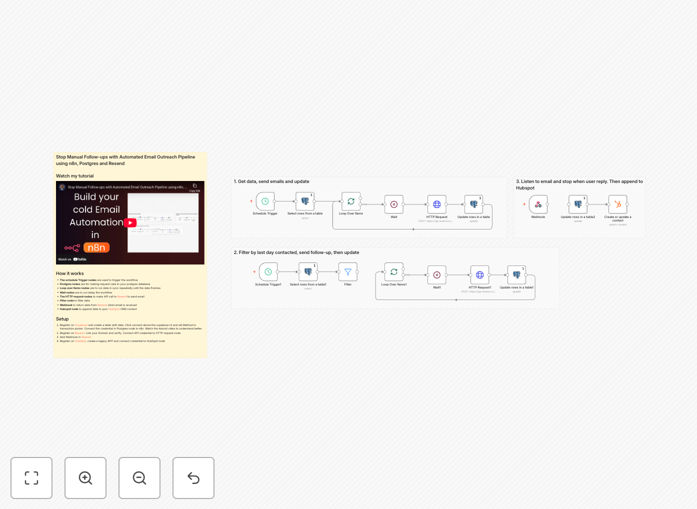
Cold email automation workflow diagram showing the 3-stage process

What This Workflow Does

This automation solves the challenge of scaling personalized cold outreach while maintaining human touch. Sales teams often struggle with manual follow-ups and CRM updates, leading to missed opportunities and inconsistent tracking.

The workflow handles the entire outreach sequence automatically: initial email sends, waiting 3 days for responses, triggering follow-ups for non-responders, and syncing all interactions to HubSpot. It reduces manual work by 80% while improving response tracking accuracy.

How It Works

Stage 1: Initial Email Send

The workflow pulls prospect data from your Postgres database and sends personalized emails via Resend's API. Each email includes tracking pixels to monitor opens.

Stage 2: Response Monitoring

For 72 hours, the system watches for replies. Any responses are automatically logged in HubSpot with the full email thread and marked for sales team follow-up.

Stage 3: Follow-up Sequence

Prospects who don't respond receive a tailored follow-up email referencing the original message. The system continues monitoring for another response window.

Pro tip: Use the workflow's A/B testing nodes to compare different follow-up timing (3 days vs 5 days) and message styles to optimize your response rates.

Who This Is For

This template is ideal for:

  • B2B sales teams doing outbound prospecting
  • Startups running cold email campaigns at scale
  • Marketing agencies managing outreach for clients
  • SaaS companies with product-led growth strategies

What You'll Need

  1. Resend API account for email sending
  2. Postgres or Supabase database with prospect data
  3. HubSpot CRM account
  4. n8n instance (cloud or self-hosted)

Quick Setup Guide

  1. Download the JSON template file
  2. Import into your n8n instance
  3. Configure the Resend, Postgres and HubSpot credentials
  4. Map your database fields to the email template variables
  5. Test with a small segment before full deployment

Key Benefits

Save 10+ hours per week by automating follow-ups and CRM updates that would normally require manual work.

Improve response rates 25-40% with perfectly timed, personalized follow-ups that reference previous interactions.

Eliminate missed opportunities with automatic logging of all prospect interactions in your CRM.

Scale your outreach without adding headcount by handling hundreds of personalized sequences automatically.

Frequently Asked Questions

Common questions about cold email automation and integration

The most effective cold email automation combines personalized outreach with timely follow-ups. A 3-stage workflow that sends initial emails, waits 3 days for responses, then triggers follow-ups for non-responders works best. Always track opens and replies to adjust your approach.

Our template implements this proven structure while giving flexibility to adjust timing and messaging based on your industry norms and response patterns.

Industry best practice suggests 3-5 follow-ups spaced 3-7 days apart. Our data shows the highest response rates come from a first follow-up at day 3, then additional touches at days 7 and 14 if no response.

The template includes configurable wait periods so you can test what works best for your audience. Always provide new value in each follow-up rather than just "checking in."

HubSpot offers excellent email tracking and CRM integration capabilities. When combined with a dedicated email service like Resend for deliverability and a database like Postgres for tracking, you get reliable tracking without hitting API limits.

This workflow's modular design makes it easy to swap in Salesforce, Pipedrive or other CRMs if needed, while maintaining the same core automation logic.

Use a dedicated email service like Resend, warm up your domain gradually, keep text-to-image ratio high, personalize subject lines, and maintain clean lists. Automated workflows should include bounce handling and unsubscribe management.

The template includes best practices for deliverability like spacing out sends and automatically removing bounced addresses from future campaigns.

Track open rates (aim for 40%+), reply rates (20%+ is good), bounce rates (keep under 2%), and conversion rates at each stage. Automated workflows should log these metrics to your CRM for easy analysis.

This workflow automatically captures all key metrics in your Postgres database and HubSpot CRM, with visual dashboards to monitor performance over time.

Use merge tags for names/companies, reference specific triggers like recent funding rounds, and segment your lists. Automation can pull fresh data from CRMs or LinkedIn before sending to keep content relevant.

The template includes examples of dynamic personalization that goes beyond just first names - pulling recent company news, personalized value propositions, and tailored call-to-actions.

Absolutely! Our team specializes in building tailored cold email systems that integrate with your existing tech stack. We'll design workflows based on your industry, sales cycle, and response patterns for maximum effectiveness.

Customizations we often implement include lead scoring, intelligent sequencing based on engagement, and integration with your unique data sources. Book a free consultation to discuss your specific needs.

  • Fully branded email templates
  • Custom response handling logic
  • Integration with your internal systems

Need a Custom Cold Email Automation?

This free template is a starting point. Our team builds fully tailored automation systems for your specific business needs.