What This Workflow Does
Manual CRM reporting is a silent productivity killer. Sales managers waste hours each week pulling data from HubSpot, formatting spreadsheets, and sending updates via email—only for them to get buried in inboxes. This disconnect means teams start their day without a clear view of pipeline health, new leads, or conversion trends.
This n8n workflow solves that by automatically compiling your most critical HubSpot metrics—new deals, contact growth, deal stage movements, win rates—and posting a clean, formatted summary directly to your team's Mattermost channel every morning. It transforms raw CRM data into actionable intelligence delivered where your team already communicates.
Beyond basic reporting, the template is designed for extension. You can enrich reports with data from internal databases, support ticket systems, or financial tools, creating a unified daily brief that gives everyone a 360-degree view of business performance without ever leaving Mattermost.
How It Works
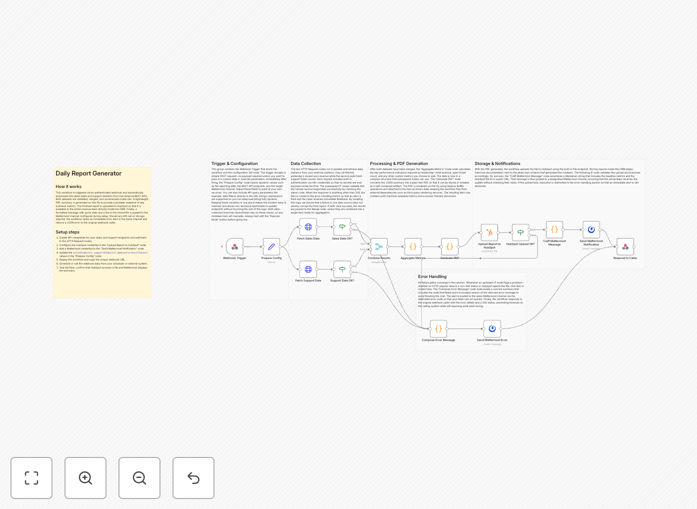
The workflow follows a logical sequence to gather, process, and deliver your daily CRM snapshot.
1. Trigger & Data Collection
A Webhook node waits for a daily trigger from an external scheduler (like a cron job or Zapier). Once activated, it simultaneously fires requests to the HubSpot API to fetch deal and contact data, and optionally to an internal HTTP endpoint for supplementary metrics like support tickets or project updates.
2. Data Processing & Merging
The raw data from HubSpot and other sources flows into a Merge node, which consolidates everything into a single data structure. A subsequent Set node cleans and renames fields for clarity (e.g., renaming properties.amount to deal_value).
3. Calculation & Formatting
A Code node takes the processed data and performs calculations—like determining daily win rates or pipeline growth. It then constructs a well-formatted markdown message, using bullet points, emojis, and clear sections to make the report instantly scannable in Mattermost.
4. Validation & Delivery
An If node acts as a safety check, ensuring the data isn't empty or malformed before proceeding. If validation passes, the Mattermost node posts the formatted report to your designated channel. Finally, a Respond to Webhook node sends a confirmation back to the scheduler, completing the automation loop.
Who This Is For
This template is ideal for sales teams, marketing operations managers, and business leaders who use HubSpot and Mattermost. It's perfect for:
- Sales Managers who need their team to start each day with updated pipeline numbers.
- Marketing Teams tracking lead generation and campaign performance in real-time.
- Startups & SMBs that want professional, automated reporting without hiring a data analyst.
- Remote Teams that rely on Mattermost for daily coordination and need data integrated into their workflow.
- Operations Managers tasked with creating visibility across sales, support, and success metrics.
Pro tip: Use this workflow as a foundation for "alert" automations. Add a filter after the HubSpot node to trigger a separate Mattermost message if, for example, no new deals were created that day or if the win rate drops below a certain threshold.
What You'll Need
- A running n8n instance (cloud or self-hosted).
- HubSpot account with a Private App token created (requires
crm.objects.deals.readandcrm.objects.contacts.readscopes). - Mattermost workspace with an Incoming Webhook configured or a Personal Access Token generated for posting.
- A scheduler to trigger the workflow daily (can be n8n's Cron node, a server cron job, Zapier, or GitHub Actions).
- (Optional) Internal API endpoint if you want to include data from other systems like your helpdesk or project management tool.
Quick Setup Guide
Get this automation running in your environment in under 20 minutes.
- Import the Template: In your n8n dashboard, go to "Workflows" → "Import from File" and upload the downloaded JSON.
- Configure Credentials: Create and add your HubSpot Private App token and Mattermost webhook URL/PAT in the n8n credentials manager.
- Set the Trigger: Copy the Webhook node's production URL. Add this URL to your external scheduler (e.g., a cron job set to run at 9 AM weekdays).
- Customize Queries: In the HubSpot node, adjust the filters to match your deal stages, date ranges, and property names.
- Edit the Message: Open the Code node and modify the markdown template to include the metrics and formatting your team needs.
- Test & Activate: Click "Execute Workflow" to test. Verify the report appears in your Mattermost channel, then toggle the workflow to "Active."
Key Benefits
Eliminate Daily Manual Work: Save 2–3 hours per week previously spent on manual data compilation and distribution. This time can be redirected to analyzing the data and taking action.
Improve Team Alignment: Ensure every team member starts their day with the same, accurate snapshot of performance. This creates a shared context for stand-ups and strategic discussions.
Faster Decision-Making: Spot trends and issues immediately—like a sudden drop in new leads or a spike in deal value—allowing for proactive adjustments instead of reactive firefighting.
Scalable & Extendable Foundation: This isn't just a one-off report. Use it as a blueprint to automate other reports: weekly performance summaries, monthly board updates, or real-time alerts for high-value deal movements.
Centralize Insights: Pull data from multiple sources (HubSpot, internal DBs, support software) into a single, coherent update, breaking down data silos without complex dashboard setups.