What This Workflow Does
For busy professionals, the morning scramble to check calendars across multiple devices is a daily time drain. This automation solves that by delivering your complete daily meeting schedule directly to Telegram each morning. Instead of manually opening Google Calendar, scrolling through appointments, and mentally organizing your day, you receive a clean, formatted summary before your first coffee.
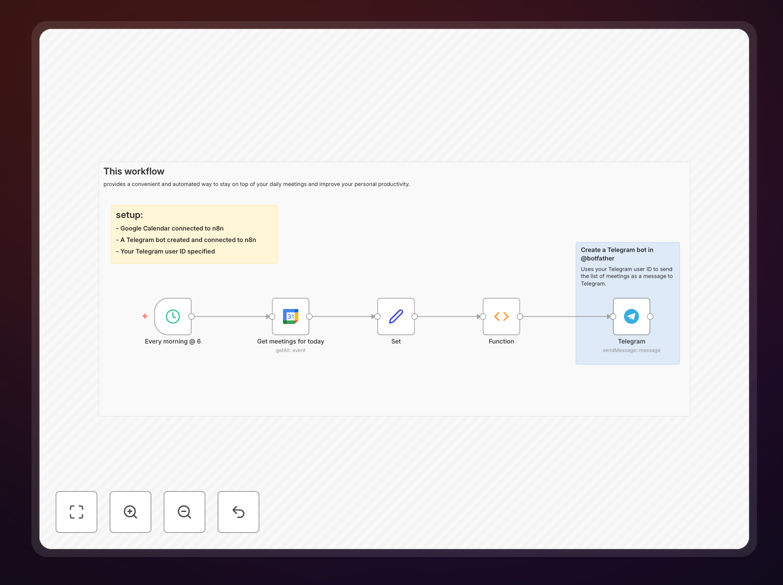
The workflow connects your Google Calendar account to a Telegram bot, automatically queries your events for the current day, formats them into an easy-to-read message, and sends it to your preferred chat. It runs on a schedule (typically early morning) so your agenda is waiting for you when you start your day. This eliminates the risk of missing meetings buried in crowded calendars or overlooked during hectic mornings.
How It Works
The automation follows a logical sequence that mimics what you'd do manually, but with perfect consistency and timing.
Step 1: Scheduled Trigger
A schedule node activates the workflow each morning at your specified time (e.g., 7:00 AM). This ensures the automation runs consistently without manual intervention, providing reliable daily delivery.
Step 2: Fetch Today's Calendar Events
The workflow connects to Google Calendar API and retrieves all events scheduled for the current day. It filters by your primary calendar or specific calendars you designate, gathering titles, times, participants, locations, and video conference links.
Step 3: Format the Meeting Summary
A function node processes the raw calendar data into a human-readable format. It organizes meetings chronologically, adds emojis for different meeting types, includes video call links when available, and creates clear time blocks for easy scanning.
Step 4: Send to Telegram
The formatted message is delivered via your Telegram bot to your specified chat ID. The message appears as a regular Telegram message with clean formatting that's easy to reference throughout your day.
Who This Is For
This automation delivers value across multiple professional scenarios. Remote workers and distributed teams benefit from having their daily schedule pushed to their primary communication tool. Executives and managers with packed calendars appreciate the at-a-glance overview without calendar app switching. Freelancers and consultants managing multiple client calendars can consolidate their view. Sales teams can ensure they never miss client calls. Essentially, anyone who spends more than 5 minutes daily checking and re-checking their calendar will recover that time permanently.
What You'll Need
- Google Calendar account with events you want to track
- Telegram account and a Telegram bot created via @BotFather
- Your Telegram Chat ID (easily obtained by messaging your bot)
- n8n instance (cloud or self-hosted) to run the workflow
- Google Calendar API credentials configured in n8n
Pro tip: Create a dedicated Telegram channel or group for these notifications rather than sending to your personal chat. This keeps work notifications organized and allows team members to join if you want to share your daily schedule.
Quick Setup Guide
- Download the template using the button above and import it into your n8n instance.
- Configure Google Calendar node with your API credentials and select your primary calendar.
- Set up Telegram bot node with your bot token and personal chat ID obtained from @BotFather.
- Adjust the schedule trigger to your preferred morning time (consider timezone differences).
- Test the workflow manually first to ensure formatting and delivery work correctly.
- Activate the workflow and enjoy automated daily meeting summaries.
Key Benefits
Save 5-10 minutes every morning that would otherwise be spent manually checking and organizing your calendar. Over a year, this adds up to 30-60 hours of recovered productive time.
Eliminate meeting misses caused by calendar overload or morning rush. The automated summary ensures you're aware of every appointment, reducing last-minute scrambles and professional embarrassment.
Improve mental preparation by receiving your schedule in a clean, chronological format. You can mentally walk through your day before it begins, leading to better meeting performance and reduced stress.
Centralize notifications by bringing calendar alerts into your primary communication tool (Telegram). This reduces app switching and creates a single source for daily planning.
Customizable formatting allows you to highlight important meetings, include video links automatically, or add personal notes. The template serves as a foundation you can adapt to your specific preferences.