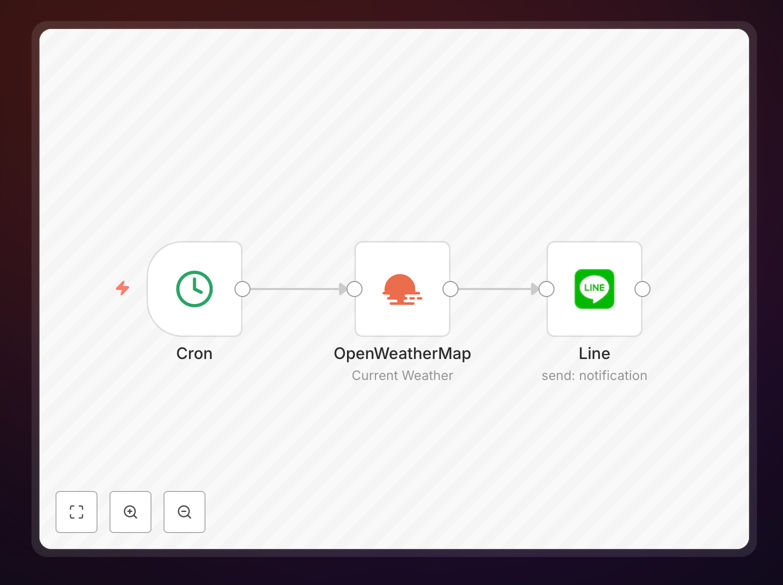
What This Workflow Does
This automation solves the problem of manually checking weather forecasts and communicating them to teams or clients. It automatically fetches daily weather data from a reliable API (like OpenWeatherMap) at a scheduled time, formats a clear and actionable message, and sends it as a notification directly to a specified Line chat, group, or individual.
For businesses, this means field teams know if rain will delay a job site, event planners can proactively communicate with attendees, and remote workers can plan their day without switching apps. It turns a reactive task into a proactive, hands-off system that builds reliability and trust.
How It Works
The workflow follows a logical sequence to gather, process, and deliver information.
Step 1: Scheduled Trigger
A scheduler node (like Cron) activates the workflow daily at your chosen time—for example, 7 AM every weekday.
Step 2: Fetch Weather Data
The workflow calls a weather API, sending location parameters (city, coordinates, or ZIP code) and retrieves current conditions, temperature, precipitation chance, and forecasts.
Step 3: Process & Format Message
The raw data is processed. The workflow extracts key details, applies business logic (e.g., "High rain chance > 60% – consider rescheduling outdoor work"), and formats a user-friendly message, potentially adding emojis or actionable tips.
Step 4: Send to Line
The formatted message is sent via the Line node using a configured access token to the target chat ID, group ID, or user.
Pro tip: Add a conditional step to only send alerts for significant weather changes (e.g., temperature drop >10°C or rain probability >50%). This prevents notification fatigue for your team.
Who This Is For
This template is ideal for businesses and individuals who rely on timely weather information for daily decisions.
Operations & Field Teams: Construction managers, logistics coordinators, and agriculture businesses needing site-specific alerts.
Event & Hospitality Industry: Wedding planners, tour operators, and venue managers who must communicate weather contingencies to clients and staff.
Distributed & Remote Teams: Companies with employees in different regions who want a unified, automated way to share local conditions affecting work-from-home setups or commutes.
Personal Productivity Users: Individuals who want a personalized morning digest sent to their private Line.
What You'll Need
- An n8n instance: Either self-hosted or a cloud account (n8n.cloud).
- A Weather API Key: A free or paid account with OpenWeatherMap or a similar service.
- Line Developer Account & Channel: A Line Business account or a Messaging API channel to generate an access token and channel secret.
- Target Line Chat/Group ID: The ID of the Line group, chat, or user you want to send notifications to.
- Basic understanding of n8n nodes: Knowing how to import a JSON workflow and configure API credentials.
Quick Setup Guide
Follow these steps to get this automation running in your n8n environment.
- Download & Import: Click the download button above to get the JSON file. In your n8n dashboard, go to Workflows > Import from File and select the downloaded JSON.
- Configure Weather API: In the workflow canvas, click the OpenWeatherMap (or similar) node. Add your API key and set your desired location parameters (city name, latitude/longitude).
- Set Up Line Credentials: Click the Line node. Create a new credential using your Line Channel Access Token and Channel Secret. Enter the target user or group ID in the node settings.
- Adjust Schedule: Click the Schedule Trigger node and set your preferred time and timezone for the daily alert.
- Test & Activate: Click "Execute Workflow" once to test. Check your Line chat for the notification. If successful, activate the workflow toggle to let it run automatically on schedule.
Key Benefits
Eliminates Daily Manual Work: No more opening weather apps, copying details, and typing messages. This automation reclaims 5-10 minutes per day for more important tasks.
Improves Team Preparedness & Safety: Proactive weather alerts allow teams to plan equipment use, reschedule outdoor tasks, or issue safety advisories before conditions worsen, reducing risk and downtime.
Enhances Professional Communication: Automated, consistent, and well-formatted alerts build trust with clients and staff, showing foresight and operational maturity.
Highly Customizable Foundation: This template is a starting point. You can easily modify it to pull data for multiple locations, add severity filters, integrate with calendars, or trigger other actions like Slack alerts or database logging.
Cost-Effective & Scalable: Uses affordable or free-tier APIs. The same workflow logic can be duplicated to serve dozens of locations or teams without additional manual effort.