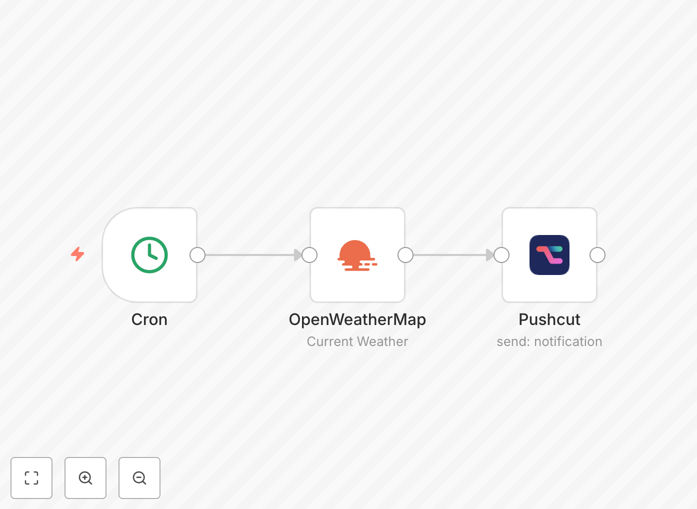
What This Workflow Does
This n8n workflow automates daily weather updates by fetching forecast data and sending it as a push notification via Pushcut. It eliminates the need to manually check weather apps while ensuring you receive timely alerts about conditions that matter to you.
The workflow connects to a weather API to retrieve current conditions and forecasts for your specified location. After processing the data, it formats a clear notification with essential weather details and pushes it directly to your mobile device or desktop.
How It Works
1. Schedule Trigger
The workflow activates daily at your specified time using n8n's scheduler. This ensures consistent delivery without manual intervention.
2. Weather Data Fetch
n8n connects to your chosen weather API (like OpenWeatherMap or WeatherAPI) to retrieve current conditions and forecasts for your configured location.
3. Data Processing
The raw weather data gets transformed into a readable format. You can customize which metrics to include (temperature, precipitation, wind, etc.) and set conditional alerts.
4. Push Notification
Processed weather information gets sent via Pushcut as a rich push notification to all your connected devices with proper formatting and priority settings.
Pro tip: Configure conditional alerts to only notify for significant weather changes (like temperature drops over 10°F or precipitation probability above 50%).
Who This Is For
This automation benefits anyone who needs reliable weather updates without app fatigue. It's particularly valuable for:
- Outdoor workers (construction, landscaping, agriculture)
- Frequent travelers and commuters
- Event planners managing outdoor activities
- Parents monitoring school weather closures
- Elderly individuals needing weather-aware reminders
What You'll Need
- An n8n instance (cloud or self-hosted)
- Pushcut account with configured devices
- Weather API account (free or paid tier)
- Location coordinates for weather data
Quick Setup Guide
- Download and import the JSON workflow into your n8n instance
- Configure your weather API credentials in the HTTP Request node
- Set your location parameters in the weather API node
- Add your Pushcut automation URL to the webhook node
- Test with manual execution before enabling the schedule
Key Benefits
Saves 5-10 minutes daily by eliminating manual weather checks while providing more reliable alerts than most weather apps.
Customizable notifications let you focus only on the weather metrics that impact your decisions (like wind for sailing or UV index for outdoor work).
Cross-platform delivery ensures you get alerts whether you're at your desk or on the go, unlike email or SMS which often get buried.
Conditional logic can trigger special alerts for severe weather or specific conditions you want to monitor closely.