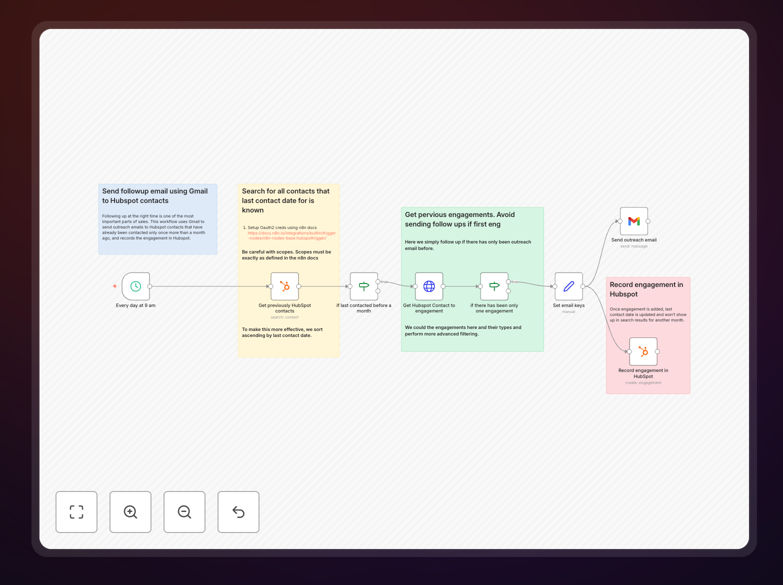
What This Workflow Does
This automation solves the critical sales challenge of timely, consistent follow-up with leads and customers. Manual follow-up processes often fail because sales reps get busy, forget, or struggle to track all their outstanding communications. The workflow automatically sends personalized Gmail follow-ups to HubSpot contacts based on triggers you define.
By connecting your Gmail account with HubSpot CRM, you can create email sequences that activate when contacts reach specific stages in your pipeline, complete certain actions, or meet criteria you establish. All sent emails automatically log back to HubSpot contact records, maintaining complete communication history without manual data entry.
How It Works
1. HubSpot contact qualification
The workflow checks HubSpot for contacts meeting your specified criteria - this could be based on deal stage, lead score, last activity date, or custom properties. You configure the exact filters to match your sales process.
2. Email template selection
Based on the contact's properties and the trigger event, the workflow selects the appropriate Gmail template from your library. Templates can include personalized merge fields pulled from HubSpot contact data.
3. Automated sending
The system sends the email through your Gmail account while maintaining your normal sending patterns and limits. This helps emails appear more natural than bulk-sent messages.
4. Activity logging
Every sent email automatically creates an activity record in HubSpot linked to the contact, with details including the email content, send time, and any links clicked by the recipient.
Who This Is For
This workflow is ideal for:
- Sales teams managing high volumes of leads
- Businesses wanting to improve follow-up consistency
- Companies using HubSpot CRM with Gmail for outreach
- Teams wanting to automate repetitive email tasks while maintaining personalization
What You'll Need
- Active HubSpot account with contacts
- Gmail account for sending emails
- n8n account (free or paid)
- Prepared email templates for different follow-up scenarios
- Clear follow-up rules based on your sales process
Quick Setup Guide
- Download the JSON template file
- Import into your n8n instance
- Connect your HubSpot and Gmail accounts
- Configure your contact filters and triggers
- Upload or create your email templates
- Test with a small contact segment first
- Activate the workflow when ready
Key Benefits
Save 5+ hours per week per sales rep by automating repetitive follow-up emails while maintaining personalization through CRM data integration.
Improve response rates 2-3x by ensuring timely, relevant follow-ups based on contact activity and properties rather than generic blasts.
Never miss a follow-up opportunity with automated triggers based on deal stages, lead scores, or time since last contact.
Maintain complete communication records with automatic logging of all sent emails back to HubSpot contact records.
Pro tip: Start with simple follow-ups like meeting confirmations and thank yous before automating more complex sequences. Monitor performance in HubSpot and refine your templates based on what generates the best engagement.