LinkedIn Google Sheets Lead Generation Automation n8n

Automate LinkedIn Outreach with Google Sheets

Send personalized LinkedIn messages at scale using prospect data from spreadsheets. Free n8n workflow template.

Download Template JSON · n8n compatible · Free
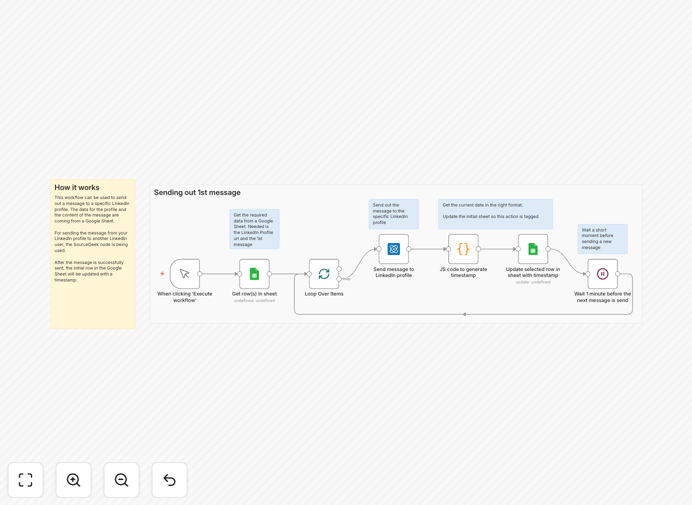
Visual diagram showing LinkedIn outreach automation workflow connecting Google Sheets to LinkedIn messaging

What This Workflow Does

Manual LinkedIn outreach is time-consuming and difficult to scale. This automation solves that by connecting your Google Sheets prospect list directly to LinkedIn messaging. The workflow reads LinkedIn profile URLs and personalized message templates from your spreadsheet, sends connection requests or messages through LinkedIn, and then updates your sheet with timestamps to track what's been sent.

Instead of spending hours each week copying and pasting messages, you can automate personalized outreach to hundreds of targeted prospects while maintaining human-like timing and personalization. The system ensures no prospect receives duplicate messages and provides complete visibility into your outreach campaign performance.

How It Works

1. Data Extraction from Google Sheets

The workflow starts by reading your prospect spreadsheet. It pulls LinkedIn profile URLs, personalized message templates, prospect names, companies, and any other relevant data you've collected. You can segment your list using different sheets or columns for targeted messaging strategies.

2. LinkedIn Message Delivery

Using the LinkedIn integration, the workflow sends personalized messages to each prospect. It handles connection requests, follow-up messages, and can be configured to include specific details from your spreadsheet to increase response rates. The system respects LinkedIn's rate limits to avoid triggering spam filters.

3. Status Tracking and Updates

After each message is sent, the workflow updates your Google Sheet with the send timestamp, message status, and any response indicators. This creates a complete audit trail and prevents duplicate outreach. You can also integrate with CRM systems for more advanced tracking.

Who This Is For

This automation is ideal for B2B sales teams, recruiters, agency owners, consultants, and entrepreneurs who need to scale their LinkedIn networking efforts. If you're spending more than 5 hours per week on manual LinkedIn outreach, this workflow can save you significant time while increasing your reach and consistency.

Marketing agencies managing client outreach campaigns, SaaS companies targeting ideal customer profiles, and professional service providers building their referral network will find particular value in this automation. It's especially useful for businesses with clearly defined target personas and messaging strategies.

What You'll Need

  1. A Google Sheet containing LinkedIn profile URLs and message templates
  2. n8n instance (cloud or self-hosted)
  3. LinkedIn account with messaging capabilities
  4. Google Sheets API credentials (for reading/writing to sheets)
  5. Basic understanding of your target audience and messaging strategy

Pro tip: Start with a small test list of 10-20 prospects to verify your message templates and timing before scaling to larger lists. Monitor response rates and adjust your approach based on what works best for your audience.

Quick Setup Guide

  1. Download the template file using the button above
  2. Import it into your n8n instance (Settings → Import Workflow)
  3. Connect your Google Sheets account in the first node
  4. Configure the LinkedIn integration with your account credentials
  5. Update the spreadsheet ID and range to point to your prospect data
  6. Test with a single row first, then activate the workflow for full automation

Key Benefits

Save 5-10 hours weekly on manual outreach: Automate the repetitive task of sending personalized LinkedIn messages, freeing up time for higher-value activities like conversations and relationship building.

Scale personalized communication 10x: Reach hundreds of targeted prospects with tailored messages that reference their specific background, company, or interests from your spreadsheet data.

Eliminate human error in tracking: Automatic timestamping and status updates ensure you never accidentally message the same prospect twice or lose track of your outreach efforts.

Improve response rates with consistency: Automated follow-up sequences and optimized sending times increase engagement compared to sporadic manual outreach.

Gain valuable campaign analytics: Track open rates, response rates, and conversion metrics directly in your spreadsheet for data-driven optimization of your outreach strategy.

Frequently Asked Questions

Common questions about LinkedIn outreach automation and integration

Automating LinkedIn outreach saves 5-10 hours per week on manual messaging, ensures consistent follow-up, and allows you to scale personalized communication to hundreds of prospects. It eliminates human error in data entry and timing, while providing tracking for message success rates.

Beyond time savings, automation enables A/B testing of different message templates, optimal send timing based on response data, and seamless integration with your existing CRM systems for complete prospect journey tracking.

Google Sheets acts as your central database for prospect information. The automation workflow reads LinkedIn profile URLs and personalized message templates from your spreadsheet, then sends messages through LinkedIn's platform. After sending, it updates the sheet with timestamps to prevent duplicate outreach.

This integration creates a closed-loop system where all prospect data, messaging history, and campaign performance metrics are centralized in one accessible location that multiple team members can view and update collaboratively.

B2B companies, recruitment agencies, SaaS businesses, consultants, and professional service providers benefit most. Any business that relies on building professional relationships, generating leads, or recruiting talent can scale their efforts 5-10x with automated outreach while maintaining personalization.

Specifically, companies with defined ideal customer profiles, those targeting decision-makers in specific industries, and businesses with longer sales cycles see the greatest ROI from consistent, personalized LinkedIn outreach automation.

Use merge tags to insert prospect names, companies, and specific details from your Google Sheet. Segment your list by industry or role and craft different message templates for each group. Add personal observations about their profile or recent activity, and always provide clear value in your opening message.

Effective personalization goes beyond just using their name. Reference their recent posts, congratulate them on work anniversaries, mention mutual connections, or comment on specific achievements listed in their profile to demonstrate genuine interest.

  • Reference specific profile sections or recent activity
  • Mention mutual connections or shared interests
  • Tailor value proposition to their role or industry

Avoid sending too many messages too quickly, which can trigger LinkedIn's spam filters. Don't use generic templates without personalization. Never purchase connection lists—build your own targeted lists. Always include an opt-out option, and regularly monitor response rates to refine your approach.

Other critical mistakes include not warming up new accounts gradually, ignoring response data that could improve your messaging, and failing to maintain a human touch in conversations once prospects engage with your automated outreach.

Yes, you can track open rates, response rates, and connection acceptance rates by integrating with CRM systems or using additional automation nodes. The workflow can log all activities back to your Google Sheet, allowing you to analyze which messages and prospect segments perform best over time.

Advanced tracking might include monitoring conversation progression to sales qualified leads, calculating cost per lead from outreach efforts, and identifying optimal sending times and message templates based on historical performance data across different prospect segments.

Yes, GrowwStacks specializes in building custom LinkedIn automation systems tailored to your specific business needs, target audience, and sales process. We can integrate with your existing CRM, create advanced segmentation logic, and design multi-touch campaign sequences that align with your brand voice.

Our team will work with you to understand your ideal customer profile, develop messaging strategies that convert, and implement tracking systems that provide actionable insights for continuous improvement of your outreach performance.

  • Custom integration with your existing tech stack
  • Multi-touch campaign sequences with conditional logic
  • Performance dashboards and regular optimization reviews

Need a Custom LinkedIn Outreach Automation?

This free template is a starting point. Our team builds fully tailored automation systems for your specific business needs.