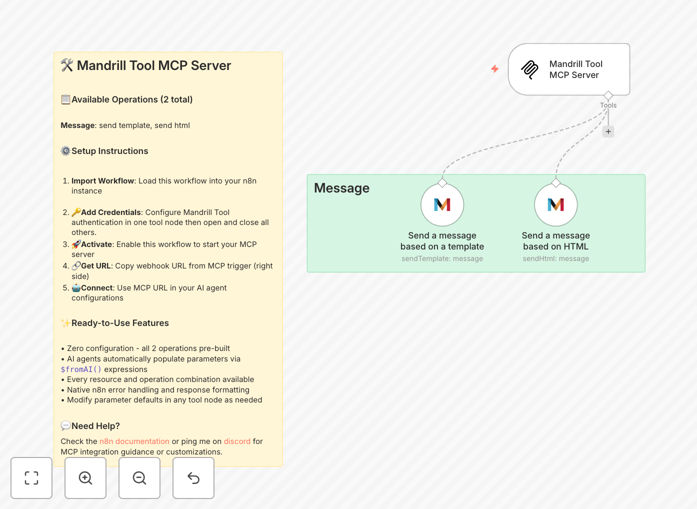
What This Workflow Does
This n8n workflow creates a Model Context Protocol (MCP) server that bridges AI agents with Mandrill's email capabilities. Instead of requiring developers to build custom API endpoints for each AI-agent email task, this template provides a ready-to-use server that exposes Mandrill's core operations—specifically sending messages via templates or HTML—as standardized tools that AI assistants can call directly.
The workflow solves the problem of manual email automation. Businesses often need AI agents to send transactional emails, follow-ups, or notifications based on triggers from other systems. Previously, this required coding custom integrations or manually configuring each email scenario. This MCP server eliminates that complexity, allowing AI agents to autonomously handle email communications through a secure, managed interface.
By deploying this template, you enable AI assistants like Claude Desktop, custom AI applications, or other n8n workflows to send emails through Mandrill without any intermediate human intervention. The server handles authentication, parameter validation, error management, and response formatting—all pre-built and ready for production use.
How It Works
Step 1: MCP Trigger Receives AI Agent Requests
The workflow starts with an MCP Server Trigger node that acts as the endpoint for AI agent calls. When an AI agent needs to send an email, it sends a structured request to this trigger URL. The trigger parses the request and extracts parameters like recipient addresses, template names, or HTML content that the AI provides.
Step 2: Parameter Mapping with $fromAI() Expressions
All Mandrill Tool nodes in the workflow use $fromAI() expressions to automatically populate their parameters from the AI agent's request. This means no manual configuration is needed—the AI agent supplies values like "to_email," "subject," and "content" directly through its tool call interface.
Step 3: Mandrill Tool Execution
The workflow includes two pre-configured Mandrill Tool operations: "Send a message based on a template" and "Send a message based on HTML." Based on the AI agent's request type, the appropriate tool executes, using Mandrill's API to send the email with proper authentication and error handling baked in.
Step 4: Response Formatting and Error Handling
After the email operation completes, the workflow formats the Mandrill API response into a standardized structure that the AI agent expects. If any errors occur (like invalid addresses or template issues), n8n's native error handling manages retries or provides clear error messages back to the AI agent.
Who This Is For
This template is ideal for businesses leveraging AI agents for customer communication, marketing teams automating email campaigns through AI assistants, developers building AI-powered applications that need email capabilities, and IT departments seeking to integrate AI tools with existing email infrastructure.
Specifically, it serves companies using AI agents for lead follow-up automation, customer support ticket responses, transactional notification systems, or marketing automation where AI determines which emails to send based on data analysis. The zero-configuration setup makes it accessible for teams without deep technical expertise in API development.
What You'll Need
- A running n8n instance (cloud or self-hosted)
- Mandrill API credentials (from your Mailchimp account)
- An AI agent platform that supports MCP servers (Claude Desktop, custom AI apps, etc.)
- Basic understanding of n8n workflow activation
- Email templates or HTML content ready in Mandrill
Quick Setup Guide
1. Import the downloaded JSON template into your n8n instance.
2. Activate the workflow to start the MCP server.
3. Copy the webhook URL from the MCP trigger node.
4. Configure your AI agent (Claude Desktop or custom app) with this MCP server URL.
5. Test by having your AI agent send a sample email through Mandrill.
6. Monitor the workflow executions in n8n for debugging and optimization.
Pro tip: Before connecting production AI agents, test with a sandbox Mandrill account to ensure parameter mapping works correctly. Use n8n's execution history to verify that emails are sent successfully and troubleshoot any authentication issues.
Key Benefits
Complete Coverage: Every Mandrill Tool operation is available through the MCP server—no need to build additional endpoints for different email types.
Zero Setup: No parameter mapping or configuration needed. The $fromAI() expressions automatically bridge AI requests to Mandrill parameters.
AI-Ready: Built specifically for AI agent integration with standardized tool definitions that AI platforms expect.
Production Ready: Includes n8n's native error handling, logging, and retry logic—more robust than custom coded endpoints.
Extensible: Easily add additional tool nodes for other services (CRM, databases, notifications) to create a comprehensive AI automation hub.