Toggl Resend Time Tracking Reporting n8n

Send Monthly Toggl Time Tracking Summary via Resend Email

Automate your monthly time tracking reports. Fetch Toggl data, aggregate hours per client/project, and send professional HTML emails automatically.

Download Template JSON · n8n compatible · Free
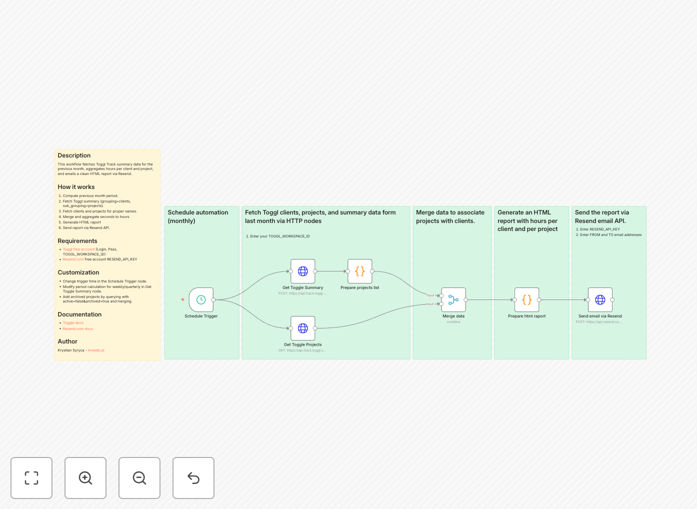
Toggl to Resend email automation workflow diagram showing time tracking data flow

What This Workflow Does

Manual time tracking reporting is a tedious, error-prone process that consumes valuable hours each month. This automation solves that problem by automatically collecting your Toggl Track data, organizing it by client and project, and delivering a polished HTML report directly to stakeholders' inboxes via Resend.

The workflow runs on a monthly schedule, eliminating the need for manual data exports, spreadsheet manipulation, and email composition. It ensures consistent, professional reporting that builds trust with clients and provides clear visibility into how time is being spent across your business.

How It Works

The automation follows a logical sequence to transform raw time tracking data into actionable insights delivered via email.

1. Schedule Trigger & Period Calculation

The workflow activates on the first day of each month (configurable). It automatically calculates the date range for the previous month, ensuring you're always reporting on complete periods without manual date adjustments.

2. Toggl Data Fetching

It connects to your Toggl Track account using API credentials and retrieves summary data grouped by clients and sub-grouped by projects. This structured approach organizes hours logically for reporting.

3. Data Enrichment & Aggregation

The workflow fetches additional client and project details from Toggl to ensure proper naming in reports. It then converts seconds to hours, calculates totals, and prepares the data for presentation.

4. HTML Report Generation

Using the aggregated data, the system generates a clean, professional HTML email template. This includes tables showing hours per client and project, comparisons to previous periods, and clear visual indicators of time allocation.

5. Email Delivery via Resend

The completed HTML report is sent through Resend's reliable email delivery service to your specified recipients. Resend ensures high deliverability rates and provides tracking on email opens.

Who This Is For

This automation is ideal for agencies, consultants, freelancers, and professional service firms that bill by time and need to provide transparent reporting to clients. It's particularly valuable for businesses with multiple clients or projects where manual reporting becomes overwhelming.

Teams using Toggl for internal time tracking will also benefit from automated insights into productivity, project health, and resource allocation without manual data analysis each month.

What You'll Need

  1. Toggl Track Account: Free or paid account with API access enabled
  2. Resend Account: Free account with API key for email delivery
  3. n8n Instance: Self-hosted n8n or n8n.cloud account
  4. Email Recipients: List of stakeholders who should receive reports
  5. Basic Configuration: Workspace ID from Toggl and sender email in Resend

Pro tip: Before full automation, run the workflow manually for a test period to verify data accuracy and report formatting. This helps catch any tagging inconsistencies in your Toggl data.

Quick Setup Guide

Follow these steps to implement this automation in your n8n environment:

  1. Download and Import: Download the template file and import it into your n8n instance via the workflow import function.
  2. Configure Toggl Credentials: Set up the Toggl node with your API token and workspace ID from your Toggl account settings.
  3. Set Up Resend: Add your Resend API key to the Resend node and configure the sender email address.
  4. Customize Recipients: Update the email recipient list in the Resend node to include your stakeholders.
  5. Adjust Schedule: Modify the Schedule Trigger node if you prefer weekly, quarterly, or custom reporting periods.
  6. Test and Activate: Run the workflow manually to test, then activate it to begin automated monthly reporting.

Key Benefits

Save 3-5 hours monthly previously spent on manual report compilation, data export, spreadsheet manipulation, and email composition.

Eliminate calculation errors that can lead to billing discrepancies and client trust issues with automated aggregation and formatting.

Ensure consistent delivery of professional reports that enhance your brand image and demonstrate operational excellence to clients.

Improve client relationships through transparent, regular communication about how their investment is being utilized across projects.

Gain better insights into project profitability and team productivity with standardized reporting that's easy to analyze over time.

Frequently Asked Questions

Common questions about time tracking automation and integration

Automating time tracking reports saves 3-5 hours per month of manual data collection, reduces human error in calculations, and ensures stakeholders receive consistent, professional reports on time. This improves client billing accuracy and internal project visibility.

Beyond time savings, automation creates a reliable system that operates regardless of staff availability. Reports go out even during vacations or busy periods, maintaining communication continuity with clients and internal teams.

Toggl provides detailed time tracking data, while Resend offers reliable email delivery with excellent deliverability rates. Combining them creates automated, branded reports that reach inboxes consistently, enhancing professionalism and client communication.

Resend's analytics also let you track report opens, giving insight into which clients are engaging with your time reports. This combination turns raw time data into actionable business intelligence delivered through a channel clients already use daily.

Regular, transparent time reports build trust with clients by showing exactly where hours are spent. Automated reports ensure consistency, reduce billing disputes, and demonstrate professionalism, leading to stronger long-term client relationships and potential for more work.

When clients see consistent, detailed reporting, they perceive greater value in your services. This transparency often leads to expanded scope requests and referrals, as clients appreciate the clear communication about how their investment is being utilized.

A professional report should include total hours per client, breakdown by project, comparison to previous periods, key insights or trends, and clear visualizations. It should be branded, easy to understand, and delivered consistently on a schedule that works for your stakeholders.

Consider adding executive summaries that highlight key achievements or concerns, percentage breakdowns showing how time was allocated, and forward-looking recommendations based on the data. This transforms a simple timesheet into a strategic business document.

Yes, you can create different report formats for internal teams, clients, and management. Internal reports might focus on productivity and project health, while client reports emphasize value delivered and transparency. Automation makes it easy to maintain multiple report versions.

With n8n's conditional logic, you can route data through different template branches based on recipient type. This means one automation can generate detailed technical reports for project managers while sending high-level summaries to executives, all from the same time data.

Implement consistent time entry practices, use project and client tagging consistently, review entries weekly for accuracy, and set up validation rules in your automation. Start with a manual review period before full automation to catch any data quality issues.

Consider running parallel processes for 1-2 months where you generate automated reports but also create manual versions for comparison. This helps identify any discrepancies in how time is categorized and ensures your team understands the importance of accurate daily time entry.

Beyond reporting, Toggl data can automate client invoicing, project profitability analysis, team capacity planning, payroll processing for hourly employees, and project milestone tracking. Integration with accounting, project management, and CRM systems creates powerful workflows.

For example, you can automatically generate invoices when projects reach certain hour thresholds, alert managers when projects are exceeding budgeted hours, or trigger capacity planning workflows when team utilization rates hit specific levels. The time data becomes a trigger for numerous business processes.

Yes, GrowwStacks specializes in building custom time tracking and reporting automations tailored to your specific business needs, tools, and workflows. We can integrate Toggl with your existing systems and create bespoke reporting solutions that save time and improve insights.

Our team will work with you to understand your unique reporting requirements, client communication preferences, and internal processes. We'll design an automation system that fits seamlessly into your operations, whether you need multi-level reporting, integration with specific accounting software, or custom analytics dashboards.

  • Integration with your existing tech stack
  • Custom report formats and branding
  • Advanced analytics and insights generation
  • Ongoing support and optimization

Need a Custom Time Tracking Automation?

This free template is a starting point. Our team builds fully tailored automation systems for your specific business needs.