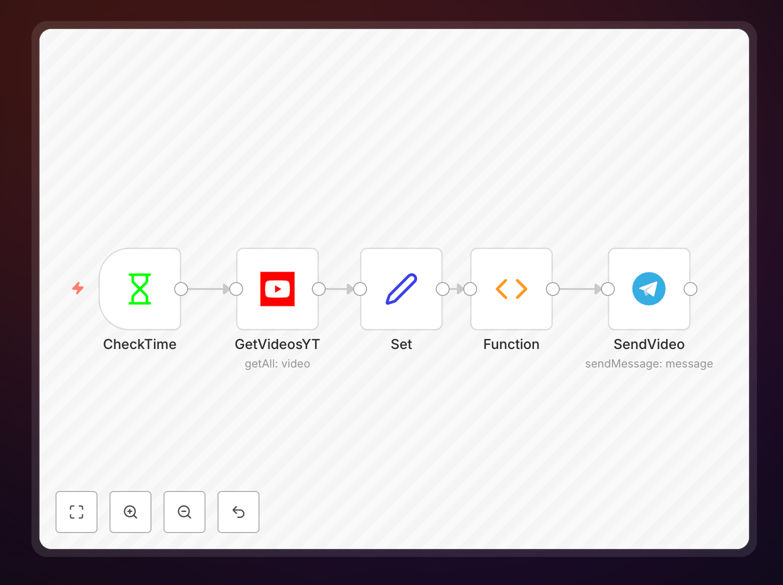
What This Workflow Does
This automation solves the tedious task of manually sharing new YouTube videos to Telegram channels, groups, or private chats. Content creators, marketers, and community managers often spend significant time copying video links, crafting messages, and posting updates—a process that’s both time-consuming and prone to delays or missed content.
The workflow automatically monitors any YouTube channel for new uploads, captures video details (title, description, link), and sends formatted notifications directly to Telegram. It runs on a scheduled interval (default 30 minutes), ensuring your audience receives updates promptly without any manual intervention. This creates a seamless bridge between your video content platform and your messaging community.
Beyond simple notification, the system includes duplicate checking to prevent sending the same video twice, customizable message formatting, and reliable error handling. It transforms a multi-step manual process into a single, automated flow that operates continuously once activated.
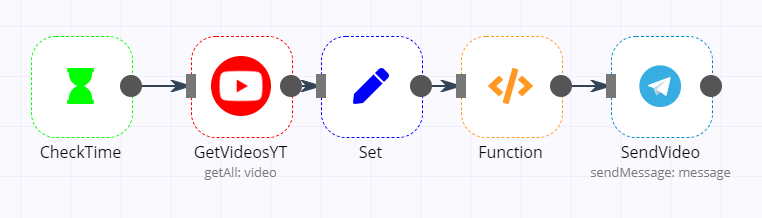
How It Works
Step 1: Scheduled Trigger
The workflow begins with a scheduled trigger node that runs at regular intervals (configurable from minutes to hours). This acts as the automation’s heartbeat, initiating the process to check for new content without requiring manual activation.
Step 2: YouTube Video Fetching
A YouTube node queries the specified channel using its channel ID (found in the URL). It retrieves the latest videos based on a configurable limit, gathering essential data like video title, description, publication date, and direct link.
Step 3: Data Processing & Duplicate Check
Set nodes organize the retrieved data into clean variables for easy handling. A function node then compares new video IDs against a stored list of previously sent videos, ensuring only genuinely new content proceeds to notification.
Step 4: Telegram Message Delivery
The final Telegram node sends a formatted message containing video details to the specified chat, group, or channel. You can customize the message text, include relevant links, and format it to match your brand communication style.
Who This Is For
This automation is ideal for content creators who maintain YouTube channels and want to instantly notify their Telegram communities about new uploads. It’s equally valuable for marketers distributing video content to customer groups, educators sharing tutorials with student channels, or businesses circulating company updates to internal teams.
Community managers overseeing multiple platforms benefit significantly by eliminating cross-platform posting labor. Social media coordinators can ensure consistent content distribution without manual copying. Even individual creators with modest audiences gain efficiency by automating what would otherwise be a repetitive administrative task.
The workflow suits both technical and non-technical users thanks to its clear node structure and guided configuration. Whether you’re a solo creator or part of a larger organization, this automation reduces workload while improving audience engagement through timely notifications.
What You'll Need
- YouTube Channel ID: The unique identifier from your YouTube channel URL (the ending part after /channel/).
- Google OAuth2 Credentials: API credentials from Google Cloud Platform to authorize YouTube data access.
- Telegram Bot Token: Authentication token from BotFather to create your Telegram bot.
- Telegram Chat ID: The numeric identifier of the Telegram chat, group, or channel where messages will be sent.
- n8n Instance: A running n8n environment (cloud or self-hosted) to import and execute the workflow.
Pro tip: When setting up Google OAuth2 credentials, ensure your callback URL matches your n8n instance’s domain—especially if using n8n’s tunneling feature. This small configuration detail prevents authentication failures.
Quick Setup Guide
- Download and Import: Download the template JSON file and import it into your n8n instance via the workflow import function.
- Configure YouTube Node: Enter your YouTube channel ID and set the video limit. Add your Google OAuth2 credentials in the node’s authentication settings.
- Adjust Schedule: Modify the interval trigger node to set your preferred checking frequency (30 minutes is recommended for most channels).
- Set Telegram Credentials: Add your Telegram bot token and specify the target chat ID in the Telegram node configuration.
- Customize Message: Edit the Telegram message text to include video details and any additional branding or calls to action.
- Activate and Test: Activate the workflow and test with a manual execution to verify YouTube data retrieval and Telegram message delivery.
Key Benefits
Save 2–5 hours weekly on manual posting. Eliminate the repetitive task of copying video links, crafting messages, and cross-platform sharing. The automation handles everything, freeing you for content creation or community engagement.
Ensure 100% notification consistency. Manual posting sometimes misses videos due to busy schedules or forgetfulness. Automated checking guarantees every new upload gets shared, maintaining audience trust and engagement.
Deliver instant updates within minutes of publication. Instead of waiting hours or days to share new content, your Telegram community receives notifications almost immediately after YouTube publication, maximizing viewership timing.
Scale to multiple channels without added effort. Once configured, the same automation can be duplicated for additional YouTube channels or Telegram groups, creating a scalable content distribution system with minimal incremental work.
Reduce administrative errors and duplicate posts. The built-in duplicate checking prevents sending the same video twice, while automated formatting ensures consistent message structure without manual typos or omissions.