n8n Slack DevOps CI/CD

Send notification when deployment fails

Get instant Slack alerts when your site deployments fail. This n8n workflow automatically notifies your team with critical details about failed deployments, helping you respond faster to issues.

Download Template JSON · n8n compatible · Free
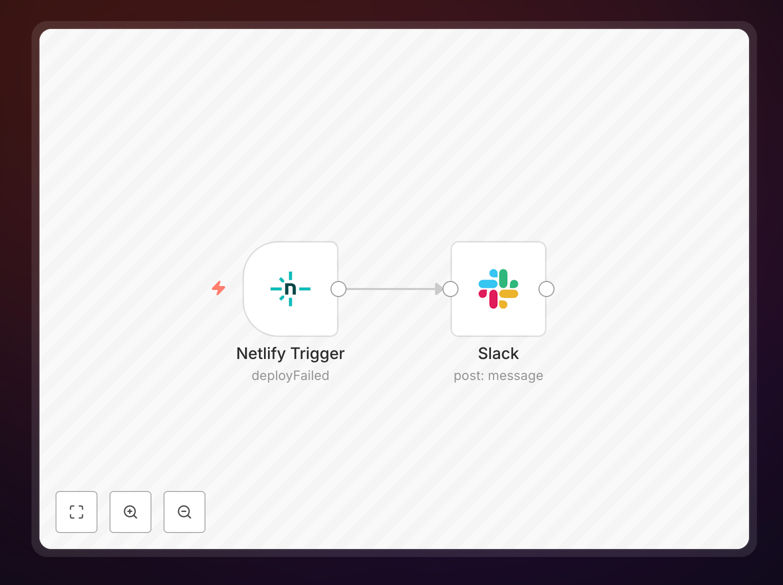
n8n workflow for deployment failure notifications

What This Workflow Does

This automation solves the critical problem of delayed awareness when website or application deployments fail. In modern development environments where deployments happen multiple times per day, teams can't afford to manually monitor every deployment status. This workflow automatically detects failed deployments and sends detailed alerts to your Slack channel.

The solution integrates with popular deployment platforms like Netlify, Vercel, or AWS CodeDeploy to monitor deployment status. When a failure occurs, it immediately notifies the right team members with all necessary context—including error messages, deployment environment, and links to logs—accelerating incident response.

How It Works

1. Deployment Monitoring

The workflow starts by receiving webhook notifications from your deployment platform whenever a deployment completes (successfully or not). This real-time trigger ensures immediate awareness of deployment status changes without polling or manual checks.

2. Failure Detection

The workflow analyzes the deployment status payload to determine if the deployment failed. It checks for specific error codes or failure states that different platforms might use, ensuring reliable detection across various CI/CD tools.

3. Alert Generation

When a failure is detected, the workflow compiles all relevant information—including deployment ID, timestamp, environment, error messages, and any available logs. It formats this into a clear, actionable Slack message with proper formatting and emphasis on critical details.

4. Notification Delivery

The final step sends the formatted alert to your designated Slack channel, tagging relevant team members or channels based on the severity or environment of the failed deployment. The message includes quick action buttons where supported by Slack.

Pro tip: Configure your deployment platform to include commit messages and author information in webhook payloads—this helps your team quickly identify who might best address the failure.

Who This Is For

This workflow is essential for development teams practicing continuous deployment, DevOps engineers managing production environments, and technical leads responsible for system reliability. It's particularly valuable for:

  • Teams deploying to production multiple times per day
  • Organizations with microservices architectures where deployments happen frequently
  • Companies with strict SLA requirements for uptime and incident response
  • Distributed teams needing centralized visibility into deployment status

What You'll Need

  1. An n8n instance (cloud or self-hosted)
  2. A Slack workspace with permissions to create webhooks
  3. A deployment platform that supports webhook notifications (Netlify, Vercel, AWS CodeDeploy, etc.)
  4. The URL of your team's Slack channel for alerts

Quick Setup Guide

  1. Download the workflow template file
  2. Import it into your n8n instance
  3. Configure the webhook trigger with your deployment platform
  4. Set up your Slack webhook connection
  5. Test with a failed deployment to verify notifications
  6. Adjust message formatting and routing as needed

Key Benefits

Reduce downtime by catching failures immediately - The average time to detect deployment failures drops from potentially hours to seconds, minimizing user impact.

Standardize alert formatting across your team - Everyone receives consistent, well-structured notifications with all necessary context, eliminating confusion.

Integrate with existing workflows - Since alerts come through Slack where your team already works, there's no new tool to monitor or learn.

Scale with your deployment frequency - The automated workflow handles any number of deployments without additional monitoring overhead.

Frequently Asked Questions

Common questions about deployment notification automation

Immediate deployment failure notifications are crucial because they allow teams to quickly address issues before they impact users. When a deployment fails, every minute counts—delayed awareness can lead to extended downtime, frustrated customers, and lost revenue.

Modern CI/CD pipelines move fast, so having real-time alerts in Slack where your team already works ensures rapid response. Studies show teams with automated deployment monitoring resolve incidents 60% faster than those relying on manual checks.

An effective deployment failure alert should include the deployment environment (production/staging), time of failure, error codes or messages, and links to logs or dashboards. Context matters—include which team member triggered the deployment and which code changes were involved.

The best alerts also suggest next steps like rollback procedures or who to contact for help. Some teams include quick action buttons to create incident tickets or start troubleshooting calls directly from the Slack notification.

Automating deployment notifications eliminates manual monitoring and reduces mean time to detection (MTTD) from hours to seconds. Teams no longer need to constantly check deployment dashboards or rely on email alerts that get buried.

Automation ensures consistent alert formatting with all necessary details, preventing context-switching between tools. This allows developers to focus on fixing rather than discovering problems, potentially saving 5-10 hours per developer each month.

Yes, advanced workflows can route notifications based on severity or environment. Critical production failures might go to an #urgent-alerts channel while staging issues go to #dev-notifications. Some teams create dedicated channels per service or microservice.

The key is matching notification routing to your team's incident response protocols while avoiding alert fatigue. Consider using Slack's conditional formatting to make critical alerts stand out visually.

Common triggers include CI/CD platform webhooks (GitHub Actions, CircleCI, Jenkins), monitoring tools (New Relic, Datadog), or infrastructure providers (AWS CodeDeploy, Netlify, Vercel). Most modern deployment tools provide webhook events for success/failure states.

Some teams also trigger from log monitoring when specific error patterns emerge or when health checks fail after deployment. The most robust systems combine multiple triggers for comprehensive coverage.

Sophisticated workflows can automatically create incidents in tools like PagerDuty or Opsgenie from deployment failures. They can tag the right on-call engineer based on the failed service or environment. Some teams include buttons in Slack alerts to immediately start a war room call.

Advanced integrations might automatically generate postmortem templates with deployment details pre-filled. This tight integration accelerates the entire incident response lifecycle from detection through resolution and analysis.

Absolutely! GrowwStacks specializes in building tailored deployment automation systems that match your team's workflows. We can integrate with your specific CI/CD pipeline, configure intelligent alert routing, and even build self-healing workflows that attempt automatic rollbacks.

Our engineers will design a solution that fits your technology stack and operational processes perfectly. We've helped companies reduce deployment-related incidents by up to 80% through smart automation design.

  • Custom integration with your unique toolchain
  • Role-based alerting tailored to your team structure
  • Automated remediation workflows where possible

Need a Custom Deployment Automation?

This free template is a starting point. Our team builds fully tailored automation systems for your specific needs.