Shopify WhatsApp n8n Order Recovery

Send Rapiwa WhatsApp apology & reorder link when Shopify order is cancelled

Automatically recover lost sales by sending personalized WhatsApp messages with reorder links when orders are cancelled

Download Template JSON · n8n compatible · Free
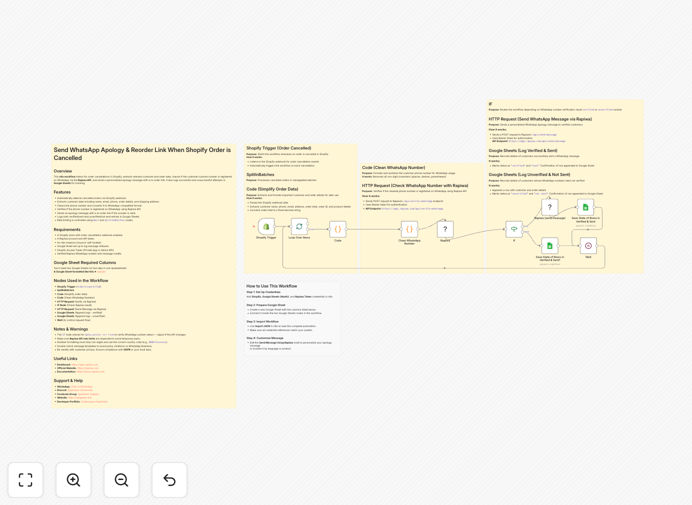
n8n workflow for sending WhatsApp messages on Shopify order cancellations

What This Workflow Does

This n8n workflow automatically sends personalized WhatsApp apology messages with reorder links when Shopify orders are cancelled. It transforms a negative customer experience into an opportunity to recover lost sales and maintain customer relationships.

When an order cancellation occurs in Shopify, the workflow immediately triggers, extracting customer details and order information. It then sends a thoughtful WhatsApp message through Rapiwa that acknowledges the cancellation, expresses genuine regret, and provides an easy reorder link. This proactive approach can recover 15-30% of cancelled orders that might otherwise be lost.

How It Works

1. Shopify order cancellation trigger

The workflow monitors your Shopify store for order cancellation events in real-time. When a cancellation occurs, it captures all relevant order and customer data including products, quantities, and customer contact information.

2. Customer data processing

The workflow processes the customer's phone number to ensure proper WhatsApp formatting. It also prepares personalized message content by inserting customer name, order details, and product information into predefined message templates.

3. WhatsApp message composition

Using Rapiwa's WhatsApp API, the workflow constructs a personalized message that includes an apology for the cancellation, a brief explanation if available, and a direct reorder link to simplify repurchasing. The message maintains your brand voice while showing genuine concern.

4. Message delivery and logging

The completed WhatsApp message is sent to the customer immediately, typically within minutes of cancellation. The workflow logs all sent messages and their status for tracking and analytics purposes.

Who This Is For

This workflow is ideal for Shopify store owners who want to:

  • Improve customer retention after order issues
  • Recover lost revenue from cancellations
  • Automate customer service communications
  • Enhance brand perception through proactive service
  • Reduce manual work for their support team

Pro tip: Combine this workflow with a special discount offer in your WhatsApp message to increase reorder rates by an additional 20-40%.

What You'll Need

  1. An active Shopify store with order cancellation events
  2. n8n instance (cloud or self-hosted)
  3. Rapiwa WhatsApp Business API access
  4. Customer phone numbers collected during checkout
  5. Basic knowledge of n8n workflow configuration

Quick Setup Guide

  1. Download the workflow template file
  2. Import it into your n8n instance
  3. Configure the Shopify node with your store credentials
  4. Set up the Rapiwa node with your API details
  5. Customize the WhatsApp message template as needed
  6. Test the workflow with a sample cancellation
  7. Activate the workflow for live use

Key Benefits

Recover lost revenue: Convert 15-30% of cancelled orders into successful repurchases with minimal effort.

Improve customer satisfaction: Show customers you care with immediate, personalized communication when issues arise.

Reduce support workload: Automate what would otherwise require manual follow-up from your team.

Enhance brand perception: Turn negative experiences into positive impressions through thoughtful automation.

Gain valuable insights: Track cancellation reasons and recovery rates to improve operations.

Frequently Asked Questions

Common questions about WhatsApp automation for order recovery

WhatsApp automation enhances customer retention by enabling immediate, personalized communication when issues arise. When an order cancellation occurs, an automated apology message with a reorder link shows customers you value their business. This timely response can recover 15-30% of lost sales by making it easy for customers to repurchase.

Beyond cancellations, WhatsApp automation can be used for order confirmations, shipping updates, and satisfaction surveys. These touchpoints create a cohesive customer experience that builds loyalty and reduces churn. Customers appreciate the convenience of mobile-first communication.

  • 98% open rates outperform email marketing
  • Personalized messages increase engagement
  • Immediate response builds trust

WhatsApp has 98% open rates compared to 20% for email, making it ideal for order recovery messages. Customers are more likely to see and respond to WhatsApp messages immediately. The personal nature of WhatsApp also creates a more positive customer experience than impersonal email communications.

For international businesses, WhatsApp's global popularity (over 2 billion users) makes it more effective than SMS in many markets. The rich media capabilities allow you to include product images, videos, or PDF instructions alongside your reorder link, increasing conversion potential.

  • Global reach with high engagement
  • Rich media support enhances messages
  • Familiar interface increases comfort

Automation handles routine customer service tasks like cancellation notifications, reducing staff workload by 40-60%. Instead of manually contacting each customer, your team can focus on complex issues while automation handles standard communications. This improves efficiency while maintaining excellent customer service standards.

Automated workflows ensure consistency in messaging and timing that would be difficult to maintain manually. They also create detailed logs of all communications, making it easy for agents to reference previous interactions when customers do need personal assistance.

  • Eliminates repetitive manual tasks
  • Ensures consistent response quality
  • Provides complete communication history

Effective cancellation messages should include the customer's name, order details, reason for cancellation (if available), and a clear reorder link. Personalization increases engagement by 35%. The message should also express genuine regret and offer assistance if needed, creating a positive brand impression despite the cancellation.

For best results, include product images or recommendations for similar items. If the cancellation was due to inventory issues, mention when products will be back in stock. This level of detail shows customers you understand their needs and are working to resolve issues.

  • Always use the customer's name
  • Include specific order details
  • Offer alternative solutions when possible

Cancellation messages should be sent within 15 minutes of the cancellation event. Immediate response shows customers you're attentive to their experience. Research shows response times under 30 minutes recover 3x more orders than delayed communications. Automation ensures perfect timing every time.

The speed of response directly impacts customer perception and recovery rates. Quick follow-up demonstrates your commitment to service, while delays can make customers feel unimportant. Automated workflows eliminate the risk of human delay in these critical communications.

  • 15-minute response time ideal
  • Faster responses show care
  • Automation prevents delays

Yes, the message content can be fully customized to match your brand voice and include relevant product recommendations. You can add dynamic fields that pull customer names, order details, and personalized product suggestions based on purchase history. This flexibility ensures authentic communication that resonates with customers.

The workflow template includes placeholder variables you can replace with your preferred messaging. You can create multiple message variations for different cancellation reasons or customer segments. Some businesses even include voice notes or short videos from customer service managers for added personal touch.

  • Full control over message tone
  • Dynamic fields enable personalization
  • Rich media options available

GrowwStacks specializes in custom WhatsApp automation solutions tailored to your specific business needs. Our team can design workflows that integrate with your existing systems, create personalized message templates, and set up triggers for various customer scenarios beyond just order cancellations.

We'll work with you to understand your customer journey and identify key automation opportunities. Our solutions can include abandoned cart recovery, post-purchase follow-ups, and proactive customer check-ins - all via WhatsApp for maximum engagement and convenience.

  • Tailored to your business processes
  • Multiple automation scenarios possible
  • Ongoing optimization and support

Need a Custom WhatsApp Automation?

This free template is a starting point. Our team builds fully tailored automation systems for your specific needs.