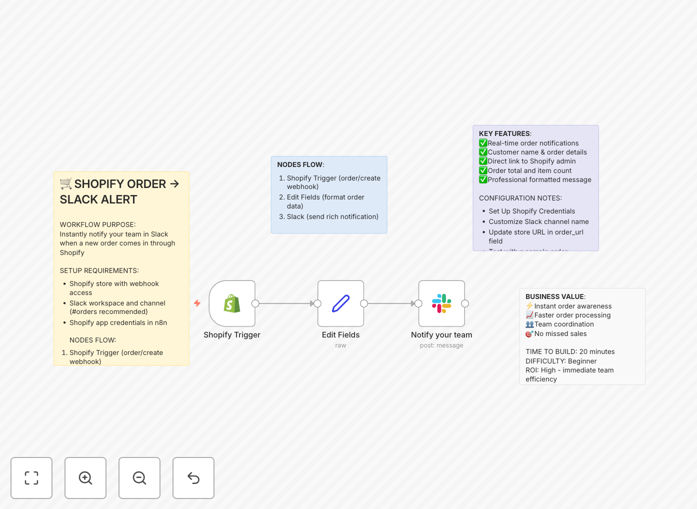
What This Workflow Does
For e-commerce businesses, the gap between a customer placing an order and your team noticing it can mean lost time, slower fulfillment, and missed opportunities for upselling or special handling. This automation bridges that gap instantly.
Whenever a new order is created in your Shopify store, this workflow captures the order details, formats them into a clear, actionable message, and posts it directly to a designated Slack channel. Your entire team—from customer service to fulfillment—gets immediate visibility into sales activity without anyone needing to constantly check the Shopify admin.
Beyond simple alerts, this system creates a single source of truth for new sales within your team's communication hub. It turns passive order monitoring into proactive, collaborative action, ensuring faster response times and a smoother customer experience from the moment a purchase is made.
How It Works
The automation creates a seamless, real-time bridge between your e-commerce platform and your team's communication tool.
Step 1: Shopify Triggers the Workflow
The workflow is initiated by a Shopify webhook, a real-time notification sent by Shopify the moment an order is placed. This ensures zero delay between the customer's purchase and your team's awareness.
Step 2: Order Data is Extracted & Formatted
The raw order data from Shopify is parsed. Key details like customer name, order number, total amount, line items, and shipping address are extracted and structured into a clean, readable format suitable for a Slack message.
Step 3: A Rich Notification is Sent to Slack
The formatted order information is sent to your specified Slack channel. The notification can include a direct link to the order in Shopify Admin for quick access, allowing team members to jump straight into processing or customer service actions.
Pro tip: Customize the Slack message format to highlight crucial info like high-value orders, specific product types, or shipping notes, so your team can instantly prioritize their workflow.
Who This Is For
This template is ideal for any business using Shopify that wants to eliminate manual processes and speed up order fulfillment. It's particularly valuable for:
- Small to Medium E-commerce Teams: Where one person wears multiple hats and can't constantly monitor the Shopify dashboard.
- Dropshipping Businesses: Where speed in forwarding order details to suppliers is critical for customer satisfaction.
- Brands with a Physical Fulfillment Team: Warehouses or packing stations that need immediate order lists to start picking and packing.
- Customer Support Teams: To provide instant visibility into new orders for proactive customer service.
- Agencies Managing Multiple Stores: To get centralized alerts for all client stores in one Slack workspace.
What You'll Need
- A Shopify Store with admin access to set up a webhook.
- A Slack Workspace where you have permission to create an incoming webhook for a channel.
- An n8n instance (cloud or self-hosted) to run the workflow.
- Basic credentials for both services (Shopify API key/password, Slack webhook URL).
Quick Setup Guide
You can have this automation running in under 10 minutes.
- Download the Template: Click the download button above to get the JSON file.
- Import into n8n: In your n8n dashboard, create a new workflow and use the "Import from File" option to upload the JSON.
- Configure Shopify Credentials: In the Shopify trigger node, add your store's subdomain, API key, and API password. Set up the order creation webhook within Shopify.
- Set Up Slack Webhook: In your Slack workspace, create a new incoming webhook for the channel you want notifications sent to, and paste the URL into the Slack node in the workflow.
- Activate & Test: Turn the workflow on and place a test order in your Shopify store. You should see the notification appear in Slack instantly.
Pro tip: Use n8n's built-in test function for the Shopify node to simulate an order and verify your Slack message format before going live with real customer data.
Key Benefits
Eliminate Manual Order Checking: Free your team from the tedious, repetitive task of refreshing the Shopify admin page. Notifications come to them.
Accelerate Order Processing: Reduce the order-to-fulfillment timeline by minutes or even hours, leading to faster shipping and happier customers.
Improve Team Collaboration: With the entire team seeing orders in a shared Slack channel, coordination for fulfillment, customer service, and inventory updates becomes seamless.
Never Miss a Sale: Real-time alerts ensure even after-hours or weekend orders are seen promptly, preventing delays.
Create an Audit Trail: Slack becomes a searchable log of all orders placed, useful for tracking sales patterns or resolving disputes.