n8n RSS MongoDB Webhooks Content Filtering

Send RSS feed data to webhook

Automatically filter articles by keywords, check for duplicates, and route content to different endpoints

Download Template JSON · n8n compatible · Free
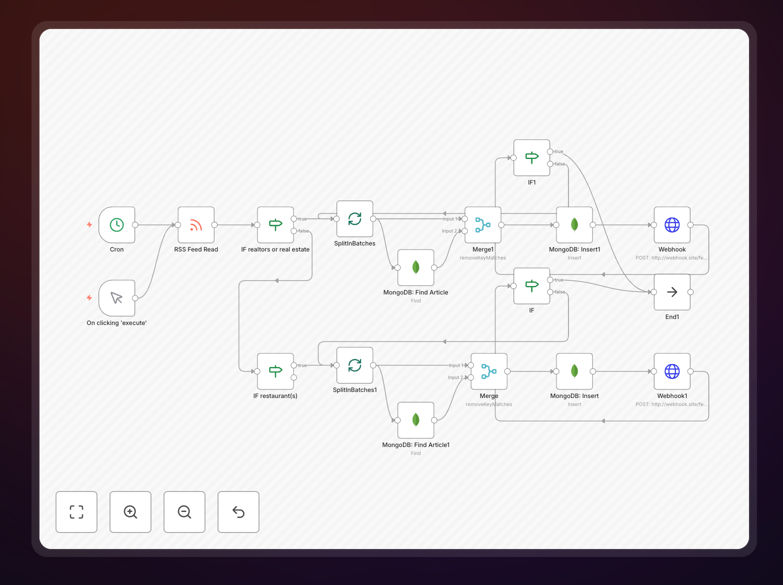
n8n workflow diagram showing RSS feed processing with MongoDB and webhooks

What This Workflow Does

This n8n workflow solves the problem of information overload from RSS feeds by automatically filtering and routing only the most relevant content to your systems. Instead of manually checking multiple feeds for important updates, the automation monitors feeds continuously, applies your custom filters, checks for duplicates against a MongoDB database, and delivers matching articles to designated webhooks.

The solution is particularly valuable for businesses that need to track industry news, competitor updates, or specific topics across multiple publications. By eliminating duplicate entries and irrelevant content before delivery, it reduces notification fatigue and ensures your teams only receive actionable information.

How It Works

1. RSS Feed Polling

The workflow begins by periodically checking configured RSS feeds for new entries. You can set the polling interval based on how frequently you need updates - from every few minutes for breaking news to daily for less time-sensitive content.

2. Keyword Filtering

Each new article is scanned for predefined keywords in its title, description, or categories. The template includes basic text matching that you can expand with regular expressions for more sophisticated pattern recognition.

3. Duplicate Check

Before processing further, the system queries a MongoDB database to verify the article hasn't been previously handled. This prevents sending the same content multiple times if it appears in different feeds or gets republished.

4. Webhook Routing

Filtered and validated articles are sent to different webhook endpoints based on your routing rules. You might send technical articles to your engineering team's Slack channel while routing financial news to your accounting system.

Who This Is For

This workflow benefits marketing teams tracking brand mentions, research departments monitoring academic publications, competitive intelligence analysts following industry trends, and content curators managing multiple information sources. It's equally valuable for solo entrepreneurs who need to stay informed without spending hours reading feeds.

Businesses with distributed teams particularly benefit from the automated routing feature, ensuring relevant updates reach the right departments instantly. The solution scales from monitoring a handful of niche blogs to processing hundreds of high-volume news feeds.

What You'll Need

  1. An n8n instance (cloud or self-hosted)
  2. MongoDB database connection details
  3. Webhook URLs for your destination systems
  4. List of RSS feed URLs to monitor
  5. Keywords or filters for content selection

Pro tip: Start with broad keywords and narrow down based on results. It's easier to filter out some false positives than miss relevant content with overly strict filters.

Quick Setup Guide

  1. Download the JSON template file
  2. Import into your n8n instance
  3. Configure your RSS feed URLs in the HTTP Request nodes
  4. Set up MongoDB connection credentials
  5. Add your keyword filters in the Function nodes
  6. Enter destination webhook URLs
  7. Test with sample data and adjust filters as needed
  8. Activate the workflow

Key Benefits

Save 5-10 hours weekly by eliminating manual RSS feed monitoring and content filtering. The automation handles what would otherwise require constant human attention.

Improve information relevance with precise keyword targeting and duplicate prevention, ensuring your teams only receive novel, pertinent updates.

Enable real-time response to important developments by getting filtered alerts within minutes of publication rather than discovering them days later.

Reduce IT overhead with a lightweight solution that doesn't require maintaining separate feed reader applications or custom scripts.

Scale effortlessly as your monitoring needs grow - simply add more feeds or webhook destinations without increasing operational complexity.

Frequently Asked Questions

Common questions about RSS feed integration and automation

RSS feed automation helps businesses monitor industry news, competitor updates, or relevant content without manual checking. The system filters articles by keywords, eliminates duplicates, and routes content to appropriate teams via webhooks. Marketing teams use this to track brand mentions, while research departments monitor academic publications automatically.

For example, a financial services firm might track regulatory updates across multiple government feeds, ensuring compliance teams receive only relevant new rules. The automation saves countless hours compared to manual monitoring while reducing the risk of missing critical information.

  • Eliminates manual feed checking
  • Ensures timely awareness of key developments
  • Reduces information overload for teams

Any web-enabled system can receive RSS data via webhooks, including Slack channels, CRM platforms like Salesforce, project management tools like Asana, or custom databases. The workflow supports conditional routing to different endpoints based on content type, keywords, or other filters. Common implementations include sending tech news to engineering teams and financial updates to accounting departments.

We've implemented solutions where articles trigger different actions: creating tickets in Jira for product-related mentions, adding leads to HubSpot for sales opportunities, and posting summaries to internal knowledge bases. The flexibility allows each department to receive information in their preferred format and system.

  • Supports JSON, XML, or form-data payloads
  • Handles authentication for secured endpoints
  • Allows custom payload formatting

MongoDB stores historical RSS item URLs and checks new entries against this database. The system skips previously processed links, ensuring each webhook receives only unique content. This prevents notification fatigue and maintains data cleanliness. The database can be configured to auto-expire old entries after set periods, optimizing storage usage.

In practice, we've seen this reduce duplicate alerts by 90%+ for clients monitoring high-volume news feeds. The solution also handles cases where the same story appears across multiple publications with different URLs by implementing content fingerprinting techniques when needed.

  • Configurable record retention periods
  • Supports millions of historical entries
  • Optional content similarity detection

You can filter by keywords in titles/descriptions, publication dates, author names, or categories. Advanced setups use natural language processing to analyze sentiment or relevance scores. The template includes basic keyword matching that you can expand with regular expressions for pattern matching or exclusion terms to block unwanted topics.

A legal firm client filters by case citation patterns, while a tech startup monitors specific product names and competitor announcements. The most effective filters combine inclusion terms (must-have keywords) with exclusion terms (irrelevant topics) to maximize signal-to-noise ratio.

  • Boolean logic (AND/OR/NOT)
  • Regular expression support
  • Case sensitivity options

Most businesses check feeds every 15-60 minutes for timely updates without overwhelming systems. High-frequency news tracking might require 5-minute intervals, while weekly summaries suffice for some research applications. The workflow includes rate limiting to prevent API abuse and can adjust polling frequency based on time of day or content volume.

We recommend starting with hourly checks and adjusting based on content velocity and urgency needs. For time-sensitive financial data, some clients implement push notifications from publishers when available, supplemented by regular polling as a backup.

  • Variable intervals by feed importance
  • Off-peak hour adjustments
  • Dynamic throttling during high-volume periods

Yes, the template supports parallel processing of multiple feeds from different sources. Each feed can have unique filtering rules and destination webhooks. Media monitoring services often run hundreds of feeds through similar systems, applying client-specific keywords and routing logic to deliver customized content streams.

One client manages 87 industry-specific feeds through a single workflow instance, with separate keyword lists and distribution channels for each department. The centralized approach simplifies maintenance while allowing departmental customization through configuration rather than code changes.

  • Centralized feed management
  • Individual feed configurations
  • Bulk operations for common changes

GrowwStacks specializes in tailored RSS automation solutions that match your specific content monitoring needs. Our engineers can build systems with advanced NLP filtering, multi-channel distribution, and integration with your existing tech stack. We've created custom solutions for competitive intelligence teams, academic researchers, and digital marketing agencies.

Recent projects include a sentiment analysis layer for brand monitoring, automated translation for global news tracking, and integration with internal alert systems for critical updates. We'll design a solution that fits your workflow rather than forcing you to adapt to generic tools.

  • Free initial consultation
  • 30-day implementation guarantee
  • Ongoing optimization support

Need a Custom RSS Feed Integration?

This free template is a starting point. Our team builds fully tailored automation systems for your specific needs.