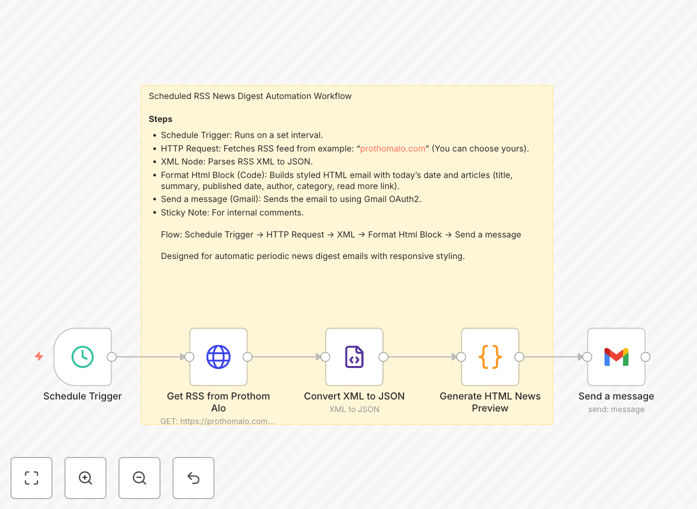
What This Workflow Does
This automation solves the tedious problem of manually collecting, formatting, and sending news updates to your team or audience. Instead of spending hours each week browsing websites and crafting emails, this workflow automatically pulls the latest articles from any RSS feed (like industry blogs, news sites, or competitor updates), formats them into a professional HTML email, and delivers them to your Gmail inbox on a schedule you set.
It transforms raw RSS data into a curated, visually appealing digest that looks like a custom newsletter. Whether you need daily industry briefs for your team, weekly roundups for clients, or regular updates from specific publications, this workflow handles the entire process automatically.
How It Works
Step 1: Schedule Trigger
The workflow starts with a schedule trigger that runs at your chosen interval—daily at 8 AM, weekly on Monday mornings, or any other frequency. This ensures your digests are delivered consistently without manual initiation.
Step 2: Fetch RSS Feed Content
An HTTP Request node connects to your selected RSS feed URL (like Prothom Alo, TechCrunch, or any publication with an RSS feed). It retrieves the latest articles, including titles, summaries, authors, and publication dates.
Step 3: Parse and Transform Data
The XML node converts the RSS feed’s XML structure into JSON format for easy processing. A Code node then transforms this data into a clean HTML template, applying your branding, layout preferences, and formatting rules.
Step 4: Send Formatted Email via Gmail
The Gmail node takes the generated HTML and sends it as a beautifully formatted email to your specified recipients. It uses Gmail’s OAuth2 authentication for secure, reliable delivery, ensuring your digest arrives directly in inboxes with professional presentation.
Pro tip: You can easily add multiple RSS feeds by duplicating the HTTP Request step, creating a digest that aggregates content from several sources into one comprehensive email.
Who This Is For
This workflow is ideal for marketing teams who send regular industry updates to clients, internal communications departments that distribute company news, research teams monitoring competitor blogs, content curators building newsletters, and business leaders who want their team staying informed without manual effort. Anyone who currently spends time manually compiling news updates will benefit from this automation.
What You'll Need
- A running instance of n8n (self-hosted or n8n.cloud).
- A Gmail account with OAuth2 credentials configured in n8n.
- The RSS feed URL of your chosen news source (most blogs and news sites provide this).
- A list of recipient email addresses for your digest.
- Basic familiarity with n8n’s interface to import and adjust the workflow.
Quick Setup Guide
- Download the template JSON file and import it into your n8n instance.
- Configure the Schedule Trigger node with your desired frequency (daily, weekly, etc.).
- Update the HTTP Request node’s URL to point to your chosen RSS feed.
- Set up Gmail OAuth2 credentials in n8n’s credential management.
- Modify the recipient email address in the Gmail node.
- Test the workflow by manually triggering it to ensure the email arrives correctly.
- Activate the workflow to run automatically on your schedule.
Key Benefits
Save 5–10 hours weekly on manual news curation. Instead of browsing websites and formatting emails, your team receives automated, professional digests without any time investment.
Ensure consistent, timely information distribution. Your audience gets regular updates at the same time each day or week, building reliability and trust in your communications.
Create branded, professional newsletters effortlessly. The HTML formatting allows you to maintain your company’s visual identity, making digests look like custom-designed publications.
Aggregate multiple sources into one comprehensive update. Combine feeds from different publications to give your audience a holistic view of industry developments.
Scale your newsletter distribution without added workload. As your recipient list grows, the automation handles increased volume seamlessly, requiring no additional effort from your team.