Meta Ads Server-Side Conversion Tracking

Send server-side conversions to the Meta Ads API (CAPI)

Struggling with inaccurate Meta Ads tracking due to iOS 14+ and ad blockers? This workflow provides a robust, server-side endpoint solution.

Download Template JSON · Zapier compatible · Free
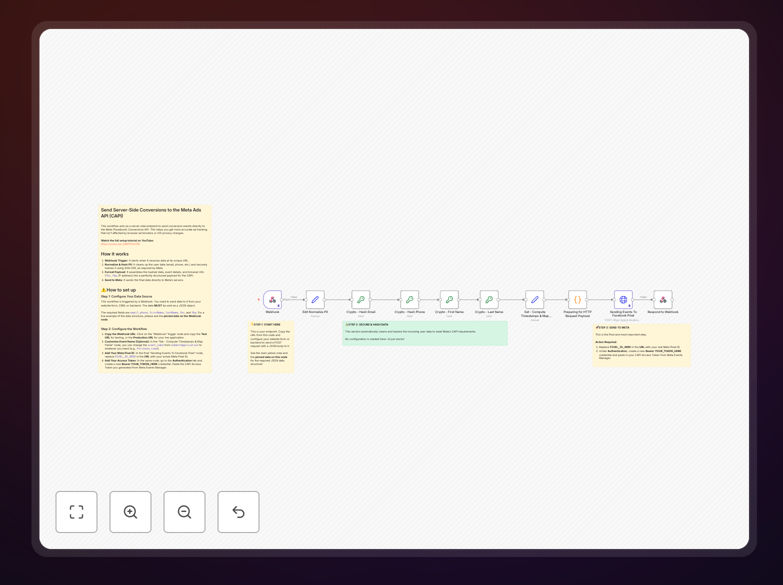
Meta Ads API conversion tracking workflow diagram

What This Workflow Does

This workflow solves the critical problem of lost conversion data in Meta Ads (formerly Facebook Ads) due to iOS privacy changes and ad blockers. It creates a server-side endpoint that reliably sends conversion events directly to Meta's Conversion API (CAPI), bypassing browser restrictions that prevent up to 40% of conversions from being tracked.

The solution captures key events like purchases, leads, and signups from your backend systems and formats them according to Meta's API specifications. It automatically handles data hashing for privacy compliance and includes error handling to ensure no conversions are lost if the API is temporarily unavailable.

How It Works

1. Event Capture

The workflow listens for conversion events from your website, app, or CRM. This could be a purchase confirmation, lead form submission, or any other valuable action you want to track.

2. Data Enrichment

It enriches the event data with additional parameters Meta needs for optimization - value, currency, content IDs, and hashed customer information where available.

3. API Integration

The formatted data is sent to Meta's Conversion API endpoint with proper authentication. The workflow handles rate limiting and retries if the API is busy.

Pro tip: For best results, implement this alongside your existing pixel for hybrid tracking. Meta will automatically deduplicate events received through both methods.

Who This Is For

This solution is ideal for:

  • Ecommerce stores spending $5k+/month on Meta Ads
  • SaaS companies tracking signups and trials
  • Lead generation businesses needing accurate cost-per-lead data
  • Any advertiser seeing >20% discrepancy between Meta and analytics

What You'll Need

  1. Meta Business Manager access with ads_management permission
  2. Existing Meta Pixel configured for your events
  3. Server or cloud function to host the endpoint
  4. Basic understanding of your conversion funnel

Quick Setup Guide

  1. Download the template and import to your automation platform
  2. Configure your Pixel ID and access token
  3. Map your conversion events to the workflow triggers
  4. Test with sample events to verify API connection
  5. Deploy the endpoint to your production environment

Key Benefits

Recover lost conversions: Capture 20-40% more conversion data that browser tracking misses due to iOS restrictions and ad blockers.

Improve ad performance: Meta's algorithm optimizes better with complete data, typically reducing cost per acquisition by 15-30%.

Future-proof tracking: Server-side approaches are more resilient to browser privacy changes than pixel-based tracking.

Enhanced data quality: Reduce discrepancies between your analytics and Meta's reporting for more accurate ROI measurement.

Frequently Asked Questions

Common questions about Meta Ads API integration and conversion tracking

Server-side tracking bypasses browser restrictions that block client-side pixels. It provides more accurate conversion data by sending events directly from your server to Meta's API.

This is crucial since iOS 14+ updates and ad blockers can prevent 20-40% of conversions from being tracked through traditional methods. Server-side tracking maintains data completeness for better ad optimization and reporting accuracy.

  • Works around ITP and other privacy restrictions
  • Captures conversions from Safari and privacy-focused browsers
  • Reduces discrepancy between analytics platforms

You can track any standard or custom conversion event - purchases, leads, signups, etc. The API supports both web and offline events.

For ecommerce, you can pass detailed transaction data including value, currency, and product IDs for better attribution and optimization. The workflow can be configured for standard events like Purchase, Lead, CompleteRegistration, or custom events specific to your business model.

  • Standard Meta Pixel events are fully supported
  • Custom events require matching configuration in Events Manager
  • Offline conversions need customer matching parameters

More complete conversion data helps Meta's algorithm optimize delivery to high-value users. With 30-50% more conversion signals, you'll see better ROAS and lower cost per acquisition.

The system can also deduplicate events that might be double-counted with pixel tracking. By providing the full picture of which ads drive results, you enable Meta's machine learning to make smarter bidding decisions and find more customers like your best converters.

  • 15-30% lower CPA common after implementation
  • Better audience insights from complete data
  • More accurate value-based optimization

You'll need: 1) Meta Pixel ID, 2) Access token with ads_management permission, 3) Event name and parameters matching your pixel events, 4) User data like IP and user agent when available.

The workflow handles hashing sensitive data to comply with privacy requirements. For offline conversions, you'll need customer identifiers like email or phone number (hashed) to match back to ad interactions. The template includes all necessary data transformation steps.

  • Business Manager admin access required
  • Event parameters should mirror pixel implementation
  • Test events help verify setup

Yes, the recommended approach is hybrid tracking. Use the pixel for initial optimization then supplement with server-side data.

This provides redundancy - if the pixel fires, Meta will deduplicate. If it doesn't, you still capture the conversion via API. The combined approach typically provides the most complete data set while maintaining quick response times for real-time optimization.

  • Meta automatically deduplicates same events
  • Pixel provides instant signals for bidding
  • API fills in missing data points

Meta's API is more flexible than Google's - you can send custom events beyond standard ones. However, setup is more technical.

This workflow simplifies the process similar to Google Tag Manager's server-side container, but specifically for Meta's ecosystem with automatic data formatting. While Google's solution is more plug-and-play, Meta's API offers deeper customization for advertisers with complex tracking needs.

  • Meta allows more custom event parameters
  • Google has simpler initial setup
  • Both benefit from server-side implementation

Absolutely. While this template handles basic conversion tracking, we can build custom solutions that integrate with your CRM, add advanced deduplication logic, or create specialized reports.

Our team implements enterprise-grade Meta Ads automations for clients spending $50k+/month on ads. We'll design a solution tailored to your tech stack, business model, and campaign objectives - whether you need multi-touch attribution, offline conversion imports, or custom dashboarding.

  • CRM integration specialists available
  • Custom data transformation logic
  • Enterprise-grade error handling

Need a Custom Meta Ads Integration?

This free template is a starting point. Our team builds fully tailored automation systems for your specific needs.