What This Workflow Does
Manual visitor management is a security risk and an operational headache. Paper logs get lost, email notifications to hosts are forgotten, and security teams often work with incomplete information. This creates bottlenecks at reception, poor visitor experiences, and compliance gaps.
This n8n workflow transforms that chaotic process into a seamless, professional system. It automates the entire visitor journey—from registration to entry—by verifying identities, generating secure digital passes, and ensuring real-time communication between visitors, hosts, and security personnel.
The system validates each visitor's email address to prevent fake registrations, creates unique QR-based entry passes, sends professional PDF badges directly to visitors via Gmail, and immediately alerts your security or reception team on Slack with all necessary details. It turns a manual, error-prone task into a reliable, auditable, and secure automated process.
How It Works
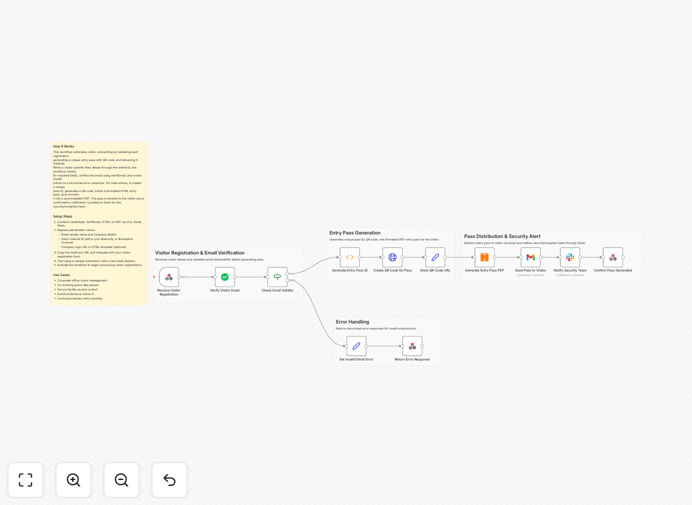
1. Visitor Registration & Data Intake
The workflow starts by receiving visitor details through a webhook. This can be connected to your website form, booking system, or calendar application. Essential information captured includes the visitor's name, email address, host contact, visit date and time, location/building, and purpose of visit.
2. Email Verification & Validation
Before proceeding, the system validates the visitor's email address using VerifiEmail integration. This crucial step checks email deliverability and authenticity, filtering out disposable or fake addresses that could compromise security. Only verified emails move to the next stage.
3. Unique Entry Pass Generation
For each verified visitor, the workflow generates a unique pass ID with timestamp tracking. This ID serves as the digital key for the entire visit lifecycle, enabling precise auditing and reference throughout the security chain.
4. QR Code Creation & PDF Assembly
The system creates a scannable QR code containing the visitor's pass ID and essential details. This QR code is then embedded into a professionally designed, branded PDF entry pass that includes visitor information, host details, visit timing, and any special instructions.
5. Automated Visitor Notification
The completed entry pass PDF is automatically emailed to the visitor via Gmail. The email includes clear instructions, the attached pass, and any preparatory information they need before arrival. This happens immediately after verification, providing instant confirmation.
6. Real-Time Security Team Alert
Simultaneously, a detailed notification is sent to your designated Slack channel for security or reception staff. This alert includes the visitor's details, host information, QR code preview, and visit timing—giving your team complete visibility before the visitor arrives.
Who This Is For
This automation is ideal for any organization that manages physical visitor access. Corporate offices and IT parks can streamline daily guest check-ins. Co-working spaces can automate member guest approvals. Secure facilities, research campuses, and manufacturing plants can enhance their controlled access protocols.
Event organizers for conferences, meetups, and trade shows can manage bulk attendee entry efficiently. Property management companies overseeing multiple buildings can standardize visitor procedures across locations. Essentially, any business tired of paper logs, manual email coordination, and security communication gaps will benefit from this system.
What You'll Need
- n8n instance (cloud or self-hosted) to run the workflow
- VerifiEmail account or API key for email validation
- Gmail/Google Workspace account with API access to send visitor passes
- Slack workspace with a dedicated channel for security notifications
- HTML to PDF service (like PDF.co, DocRaptor, or similar) for pass generation
- Visitor registration form (web-based) that can trigger webhooks
Pro tip: Start with a pilot program for regular visitors or a single building entrance before rolling out organization-wide. This lets you refine templates and processes with minimal disruption.
Quick Setup Guide
1. Download and import the JSON template into your n8n workspace. 2. Configure the webhook node to receive data from your visitor registration form. 3. Set up credentials for VerifiEmail, Gmail, your PDF service, and Slack. 4. Customize the email and PDF templates with your branding and messaging. 5. Test the workflow with a real email address to ensure all steps execute correctly. 6. Activate the workflow and connect your registration form's webhook to the provided URL.
The entire setup typically takes 30-60 minutes. Most of the time is spent configuring API credentials and customizing templates to match your organization's look and feel.
Key Benefits
Enhanced Security Posture: Email verification adds an identity validation layer that paper logs completely lack. Combined with unique QR codes and instant security alerts, you significantly reduce unauthorized access risks.
80% Reduction in Reception Workload: Automating pass generation, email sending, and notifications eliminates hours of manual administrative work each week. Reception staff can focus on welcoming guests rather than processing paperwork.
Professional Visitor Experience: Digital passes sent directly to visitors' phones create a modern, efficient first impression. No more waiting at reception while staff search for paper logs or call hosts for approval.
Complete Audit Trail: Every visitor, verification attempt, pass generation, and notification is timestamped and logged within n8n. This creates an immutable record for compliance, security reviews, or capacity analysis.
Real-Time Coordination: Security teams receive visitor details the moment registration is complete, not when the visitor arrives at the door. This proactive information flow improves response readiness and host coordination.