Weather Automation OpenWeatherMap SIGNL4 Mobile Alerts n8n

Weather Alert Automation: OpenWeatherMap & SIGNL4

Get weather alerts on your mobile phone via push, SMS or voice call. Automate daily weather monitoring and critical alerting for your team.

Download Template JSON · n8n compatible · Free
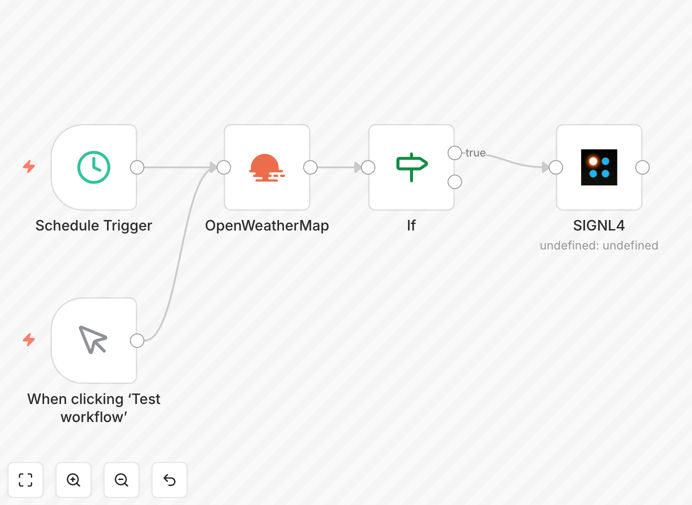
Weather alert automation workflow diagram showing OpenWeatherMap and SIGNL4 integration

What This Workflow Does

This automation solves the problem of manually monitoring weather conditions for business operations. Instead of requiring staff to check forecasts daily or react to sudden weather changes, this workflow automatically fetches weather data from OpenWeatherMap and sends alerts directly to your mobile devices via SIGNL4 when specific thresholds are met.

Whether you need to dispatch snow removal teams before a storm, protect outdoor inventory from hail, adjust sailing schedules due to high winds, or simply keep your team informed about daily conditions, this workflow ensures timely, automated communication. It supports push notifications, SMS texts, and even voice calls for critical alerts, ensuring your team receives information through the channel most likely to get their attention.

The system also includes automatic alert resolution—when conditions return to normal (e.g., temperatures rise above freezing), the alert is automatically closed in the app, reducing manual follow-up and keeping your alert history clean.

How It Works

Step 1: Scheduled Weather Data Fetch

The workflow triggers daily (or at any interval you configure) using n8n's Schedule Trigger. It calls the OpenWeatherMap API to retrieve current weather data for your specified location, including temperature, precipitation, wind speed, and other metrics.

Step 2: Condition Evaluation

Using n8n's IF node, the workflow compares the retrieved weather data against your predefined thresholds. For example, it checks if the temperature drops below freezing, if precipitation exceeds a certain amount, or if wind speed reaches dangerous levels.

Step 3: Alert Generation & Delivery

When a threshold is breached, the workflow formats a clear alert message and sends it to your SIGNL4 team via the SIGNL4 node. The alert includes relevant details (current temperature, expected duration, severity) and can be configured to use push, SMS, or voice call based on urgency.

Step 4: Alert Resolution Monitoring

The workflow continues to monitor conditions after an alert is sent. When the weather parameter returns to a safe range, it automatically sends a resolution notification through SIGNL4, closing the alert loop without manual intervention.
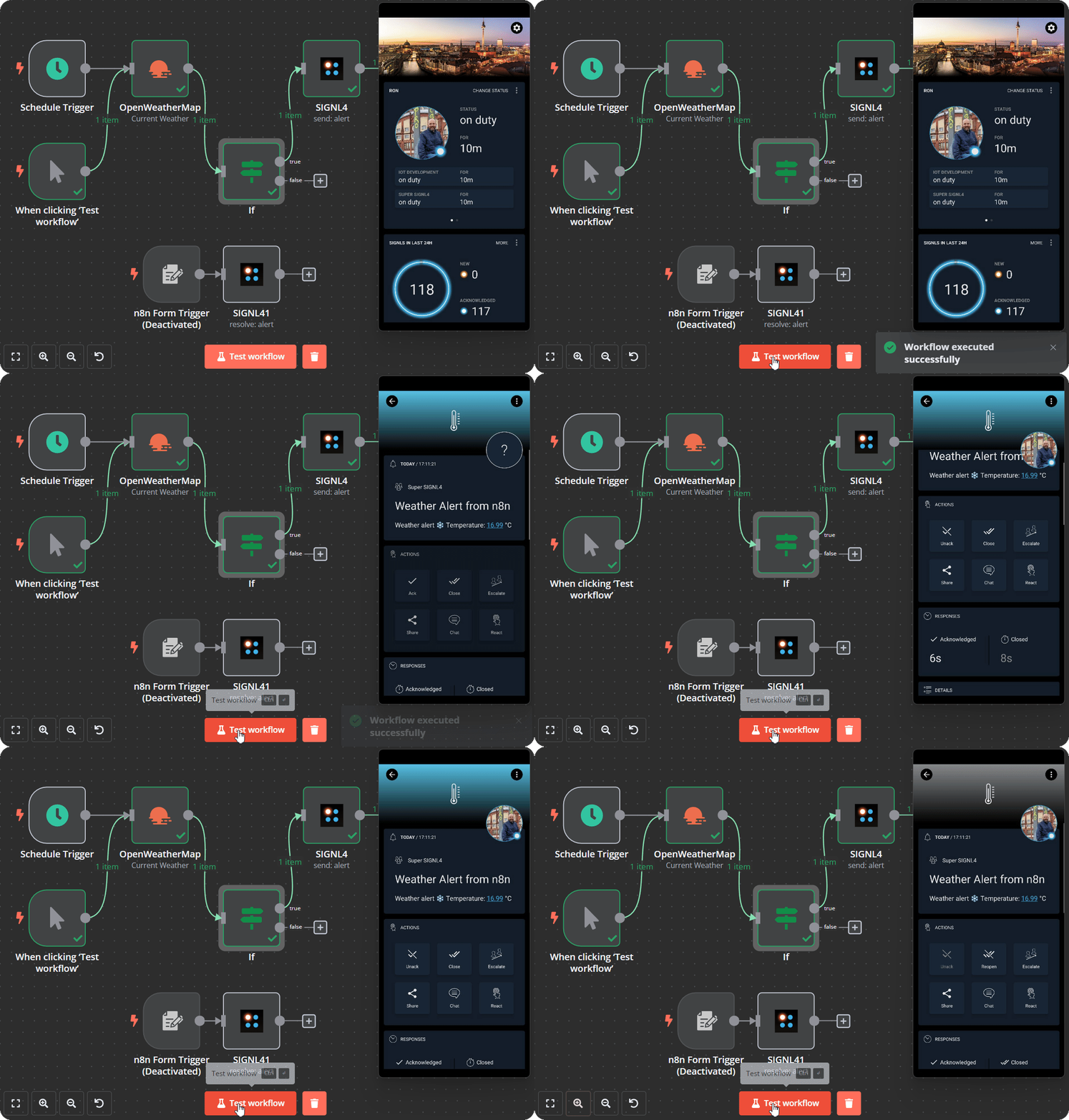
Animation showing SIGNL4 alert generation and mobile notification delivery
SIGNL4 mobile alert interface showing weather alert delivery and acknowledgment

Who This Is For

This automation is ideal for businesses and teams whose operations are impacted by weather conditions. Construction companies can alert crews about unsafe working conditions. Logistics and transportation managers can warn drivers about road conditions. Agricultural operations can monitor frost or heat risks. Event planners can make timely decisions about outdoor events. Retailers with outdoor inventory can protect assets from weather damage.

Any organization that relies on timely weather information for safety, scheduling, or asset protection will benefit from automating this process instead of relying on manual monitoring.

Pro tip: Configure different alert thresholds for different team members. Field staff might need immediate frost alerts, while management might only need daily summary notifications.

What You'll Need

  1. OpenWeatherMap API Key – Free tier available for basic weather data.
  2. SIGNL4 Account – Set up your team and notification preferences.
  3. n8n Instance – Cloud or self-hosted version to run the workflow.
  4. Location Coordinates – Latitude and longitude for the area you want to monitor.
  5. Alert Thresholds – Define your temperature, precipitation, or wind speed limits.

Quick Setup Guide

1. Download the template JSON file using the button above.

2. Import it into your n8n instance via the Import Workflow function.

3. Configure the Schedule Trigger node to set your preferred check frequency (daily, hourly, etc.).

4. Add your OpenWeatherMap API key in the HTTP Request node and set your location parameters.

5. Connect your SIGNL4 account in the SIGNL4 node and define your team members.

6. Adjust the IF node conditions to match your weather thresholds.

7. Activate the workflow and test with current weather data.

Key Benefits

Proactive Risk Management: Receive alerts before weather impacts your operations, allowing you to take preventive action rather than reactive damage control.

Reduced Manual Overhead: Eliminates daily weather checking by staff, saving 30–60 minutes per person each week.

Multi-Channel Reliability: Alerts reach teams via push, SMS, and voice calls, ensuring critical messages are received even when apps aren't open.

Automated Resolution: When conditions normalize, alerts automatically close, keeping your notification system clean and reducing manual follow-up.

Scalable Across Locations: Easily duplicate the workflow for multiple locations or teams with different threshold requirements.

Frequently Asked Questions

Common questions about weather alert automation and integration

Automating weather alerts reduces manual monitoring, prevents operational disruptions, and ensures timely response to weather events. It saves teams hours per week checking forecasts, eliminates human error in alerting, and enables proactive decision-making for safety and logistics.

For example, a construction company can halt outdoor work before lightning strikes, a logistics firm can reroute trucks before snow accumulation, and an event planner can reschedule before rain ruins an outdoor setup.

OpenWeatherMap provides real-time, accurate weather data directly into your automation system. This eliminates manual data lookup, ensures consistency, and allows you to trigger actions based on specific thresholds like temperature, precipitation, or wind speed automatically.

Instead of having someone check multiple weather sources each morning, the system pulls the data once and distributes it to relevant teams based on predefined rules. This consistency prevents conflicting information and ensures everyone acts on the same data.

SIGNL4 delivers alerts via push notification, SMS, and voice call, ensuring critical messages reach teams even when they're offline. It's designed for urgent operational communications where immediate acknowledgment and response are required, unlike general chat platforms.

Email and Slack messages can be missed or delayed. SIGNL4 uses multiple channels simultaneously and includes escalation features if alerts aren't acknowledged, making it suitable for safety-critical notifications where timely response is essential.

Yes. The workflow logic can be extended to monitor rain, hail storms, high winds, humidity, UV index, or air quality. You can set thresholds for any weather parameter OpenWeatherMap provides and trigger different alert levels or actions based on those conditions.

For agricultural operations, you might monitor soil moisture and evaporation rates. For outdoor events, you might track precipitation probability and wind gusts. The template provides the framework; you customize the thresholds and alert messages.

Construction, logistics, agriculture, outdoor events, retail operations, and facility management benefit significantly. Weather impacts scheduling, safety, inventory protection, and customer service. Automated alerts help these businesses mitigate risks and optimize daily operations.

Construction sites can pause work during high winds. Logistics companies can reroute shipments before road closures. Farmers can protect crops from frost. Event planners can communicate changes to attendees proactively. Each industry saves time and reduces weather-related losses.

The workflow can automatically close alerts when conditions return to normal. For example, if a freezing temperature alert was sent, the system can monitor subsequent data and send a resolution notification once temperatures rise above the threshold, keeping your team informed without manual follow-up.

This feature prevents alert fatigue and keeps your notification history accurate. Teams know when the risk has passed without needing to check manually, and the system maintains a clean record of when alerts were active and resolved.

You need an OpenWeatherMap API key (free tier available), a SIGNL4 account for team alerting, and an n8n instance (cloud or self-hosted). The workflow template includes all logic; you just configure your location, alert thresholds, and team notification preferences.

The setup typically takes under 30 minutes. Most of the configuration involves entering API credentials and setting your geographic coordinates and weather thresholds. No coding is required—just follow the import and configuration steps outlined in the template.

Yes. GrowwStacks specializes in building tailored automation systems. We can create workflows that integrate multiple weather sources, combine with your internal data (like schedules or asset locations), and deliver alerts through your preferred channels with custom escalation rules.

Custom builds can include location-specific thresholds for multiple sites, integration with your internal dashboards, automated reporting after weather events, and connections to other systems like inventory management or scheduling tools. We design workflows that fit your exact operational needs.

  • Multi-location monitoring with different thresholds per site
  • Integration with your existing operational software
  • Custom alert escalation paths based on severity
  • Historical weather impact reporting and analysis

Need a Custom Weather Alert Automation?

This free template is a starting point. Our team builds fully tailored automation systems for your specific business needs.