Webflow Google Sheets Form Automation

Send Webflow form data to Google Sheets

Automatically capture and organize form submissions in a spreadsheet. This n8n workflow eliminates manual data entry while ensuring no leads or customer inquiries get lost in your inbox.

Download Template JSON · Zapier compatible · Free
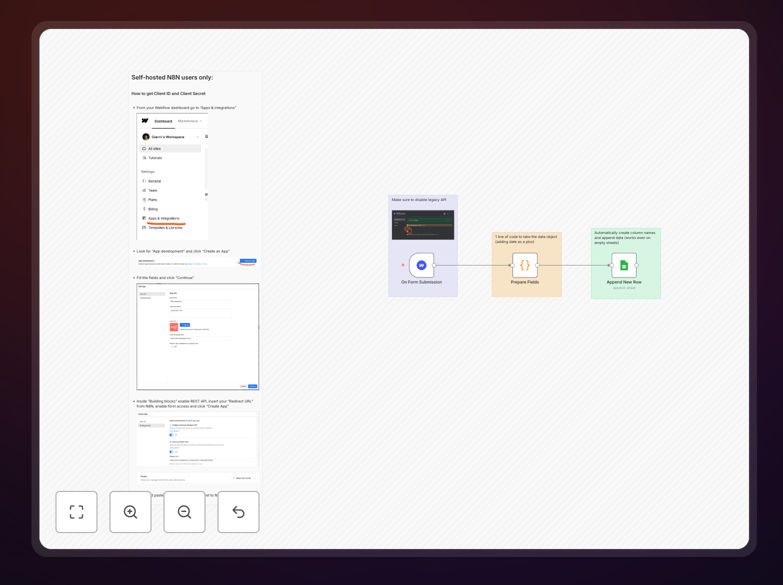
Webflow to Google Sheets workflow diagram showing form submission data flowing into spreadsheet

What This Workflow Does

This automation solves the common problem of manually copying form submissions from Webflow to spreadsheets. Every time a visitor submits a form on your Webflow site, this workflow automatically captures all submitted data and adds it as a new row in your specified Google Sheet.

Businesses using this automation typically save 5-10 hours per week on data entry while eliminating human errors in transcription. The system creates a centralized, searchable database of all form submissions that can be easily analyzed, shared with team members, or connected to other business tools.

How It Works

1. Form Submission Trigger

The workflow monitors your Webflow forms for new submissions. When someone completes a form, Webflow sends the data to the workflow via webhook.

2. Data Processing

The workflow extracts and formats the form data, handling special cases like multiple-choice answers, file uploads, and conditional fields.

3. Google Sheets Update

The processed data gets appended as a new row in your designated Google Sheet, with each form field mapped to its corresponding column.

Pro tip: Add a timestamp column to track when submissions were received. This helps with response time monitoring and data analysis.

Who This Is For

This workflow benefits any business using Webflow forms for:

  • Lead generation and contact forms
  • Event registrations and RSVPs
  • Customer support inquiries
  • Product feedback and surveys
  • Job applications and hiring forms

What You'll Need

  1. A Webflow site with forms enabled
  2. A Google account with Sheets access
  3. n8n or Zapier account (free tier works)
  4. 5 minutes to set up the connections

Quick Setup Guide

  1. Download the template file
  2. Import it to your n8n or Zapier account
  3. Connect your Webflow and Google Sheets accounts
  4. Map your form fields to spreadsheet columns
  5. Activate the workflow and test with a form submission

Key Benefits

Eliminate manual data entry by automatically recording every form submission in your spreadsheet. No more copying and pasting from emails or Webflow's submissions panel.

Reduce human errors with 100% accurate data transfer. The workflow captures exactly what was submitted, without typos or missed fields.

Gain real-time visibility as submissions appear in your spreadsheet immediately. Multiple team members can access the data simultaneously.

Enable advanced analysis by having all submissions in spreadsheet format. Create pivot tables, charts, or connect to BI tools.

Scale effortlessly as your form volume grows. The automation handles 10 or 10,000 submissions with equal reliability.

Frequently Asked Questions

Common questions about Webflow to Google Sheets integration

The automation captures form submissions from Webflow and transfers them to a Google Sheet. When someone submits a form on your Webflow site, the workflow triggers automatically to record all submission data in your specified spreadsheet. This eliminates manual data entry while ensuring no leads or customer inquiries get lost.

Behind the scenes, the workflow uses Webflow's webhooks to detect new submissions and Google Sheets' API to append data. The connection happens in seconds, with no manual intervention required after setup. You can view all historical submissions in one organized location.

  • Works with all Webflow form field types
  • Processes submissions in real-time
  • Maintains data formatting consistency

Automating form data collection saves hours of manual work while improving data accuracy. Businesses using this automation typically reduce form processing time by 90% and eliminate human errors in data transcription. The automated system also creates a searchable database of all submissions for future reference and analysis.

For example, a marketing agency might use this to track campaign response rates, while a product team could analyze feature requests. The spreadsheet format enables sorting, filtering, and visualization that's impossible with Webflow's native submissions panel alone.

  • No more missed or duplicate submissions
  • Instant access to submission history
  • Easy sharing with team members

Yes, the workflow can be configured to capture specific form fields and organize them in your preferred spreadsheet columns. You can choose to include or exclude any field from your Webflow form, and even transform the data before it reaches Google Sheets (like formatting dates or combining fields).

A common customization is adding columns for internal use that don't correspond to form fields, such as status tracking or assignment notes. You can also rearrange columns to match your existing spreadsheet structure or reporting needs.

  • Selectively include/exclude sensitive fields
  • Reformat data during transfer
  • Add metadata columns for internal use

The data transfer uses secure API connections with encryption in transit. Webflow and Google Sheets both employ enterprise-grade security measures. The workflow only requests necessary permissions and doesn't store your data on intermediary servers, maintaining privacy throughout the transfer process.

For additional security, you can restrict Google Sheet access to specific team members. The workflow also supports excluding sensitive fields from the transfer if needed, keeping confidential information only in Webflow's secured submissions panel.

  • End-to-end encrypted connections
  • Minimal required permissions
  • Option to exclude sensitive fields

The automation scales automatically to handle increased form submissions without additional setup. Whether you receive 10 or 10,000 submissions, the workflow will continue processing them reliably. For very high volumes, we recommend adding timestamp columns and occasional spreadsheet archiving for optimal performance.

High-traffic sites might also benefit from splitting submissions across multiple sheets by date or campaign. The workflow can be modified to route submissions based on content, ensuring your primary sheet remains manageable as your business grows.

  • No performance degradation at scale
  • Option to archive older submissions
  • Can split data across multiple sheets

Absolutely. This template serves as a foundation that can be extended with notifications, CRM updates, or follow-up emails. Common additions include sending Slack alerts for high-priority submissions or triggering email confirmations to form submitters through services like Mailchimp or SendGrid.

Advanced users often connect the spreadsheet to data visualization tools or set up automated responses based on submission content. The workflow can branch based on form answers, routing different submission types to appropriate team members or systems.

  • Add instant notifications
  • Trigger follow-up sequences
  • Integrate with other business tools

Yes! GrowwStacks specializes in custom automation solutions. Our team can build a tailored Webflow to Google Sheets integration with additional features like data validation, conditional routing, or integration with your other business tools. Book a free consultation to discuss your specific requirements.

We regularly create enhanced versions with features like duplicate detection, spam filtering, automatic response categorization, and connections to CRMs like HubSpot or Salesforce. Custom solutions ensure the automation fits perfectly into your existing workflows and systems.

  • Tailored to your specific forms and needs
  • Integration with your other tools
  • Ongoing support and maintenance

Need a Custom Webflow to Google Sheets Integration?

This free template is a starting point. Our team builds fully tailored automation systems for your specific needs.