Zapier Google Calendar WhatsApp MoltFlow Appointment Reminders

Send WhatsApp appointment reminders from Google Calendar with MoltFlow

Automatically send WhatsApp reminders for upcoming appointments from your Google Calendar

Download Template JSON · Zapier compatible · Free
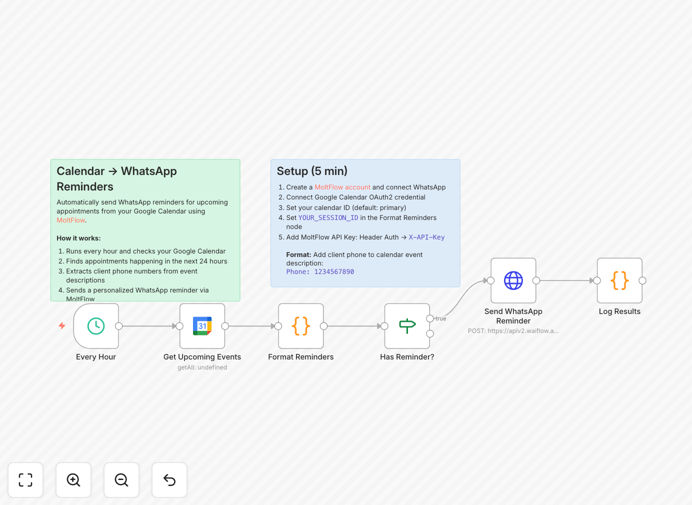
WhatsApp appointment reminder automation workflow diagram

What This Workflow Does

This automation solves the costly problem of missed appointments by automatically sending WhatsApp reminders to clients based on their Google Calendar events. It eliminates manual reminder processes that consume staff time and often lead to human errors or forgotten notifications.

The system checks Google Calendar for upcoming appointments, filters events based on your criteria (like event titles or calendars), then sends personalized WhatsApp messages through MoltFlow's business messaging platform. You maintain complete control over message timing, content, and recipient lists while saving hours of administrative work.

How It Works

1. Calendar Event Trigger

The workflow monitors your Google Calendar for new or updated events matching your appointment criteria. You can specify which calendars to monitor and set filters for event titles, descriptions, or custom fields.

2. Reminder Timing Calculation

Based on your configured lead time (e.g., 24 hours before appointment), the system calculates exactly when to send each reminder. This ensures clients receive notifications at the most effective time to reduce no-shows.

3. Message Personalization

The template pulls relevant details from the calendar event - client name, appointment time, service details, and location - to create personalized WhatsApp messages. You can customize the message format and include variables for dynamic content.

4. WhatsApp Delivery via MoltFlow

MoltFlow's API delivers the messages through WhatsApp Business, ensuring high deliverability and compliance with messaging regulations. The system handles retries for failed deliveries and can include interactive buttons for confirmations.

Pro tip: Add a rescheduling link in your WhatsApp messages to let clients easily change appointments without calling your office.

Who This Is For

This automation delivers the most value for service businesses that:

  • Schedule appointments through Google Calendar
  • Experience no-show rates above 10%
  • Want to modernize client communications
  • Need to reduce administrative workload
  • Operate in regions where WhatsApp dominates messaging

What You'll Need

  1. Google Calendar with appointment events
  2. MoltFlow WhatsApp Business API account
  3. Zapier account (free plan works)
  4. Approved WhatsApp message templates (for certain regions)

Quick Setup Guide

  1. Download the template file
  2. Connect your Google Calendar in Zapier
  3. Authenticate your MoltFlow account
  4. Customize the WhatsApp message template
  5. Set your preferred reminder timing
  6. Activate the workflow

Key Benefits

Reduce no-shows by up to 70% with timely, personalized reminders sent through clients' preferred messaging channel.

Save 5-10 hours weekly by automating what would otherwise require manual calls, texts, or emails for each appointment.

Improve client satisfaction with professional, consistent communication that demonstrates respect for their time.

Gain delivery analytics through MoltFlow's dashboard to track open rates and optimize your messaging strategy.

Frequently Asked Questions

Common questions about WhatsApp appointment reminders and automation

WhatsApp reminders improve customer experience by delivering timely notifications directly to clients' preferred messaging platform. Studies show WhatsApp messages have 98% open rates compared to 20% for email. This reduces no-shows by up to 70% while maintaining personal touch without intrusive calls.

The convenience of receiving reminders in an app people already use daily increases engagement. Clients appreciate the ability to quickly confirm or reschedule with a tap, rather than needing to call during business hours. The system also eliminates the frustration of forgotten appointments.

  • Include clear rescheduling options in messages
  • Send first reminder 48 hours before, second 24 hours before
  • Add location map links for first-time clients

Service businesses with scheduled appointments see the most benefit - healthcare clinics, salons, consultants, and tutors. Any business that loses revenue from missed appointments can recover 15-30% of lost income through automated reminders. The system works particularly well for last-minute cancellations when sent 24-48 hours in advance.

Businesses in Latin America, Europe, and Asia see especially high returns since WhatsApp dominates messaging in these regions. Even in North America, adoption grows rapidly among younger demographics who prefer messaging over phone calls for business communications.

  • Medical/dental practices reduce no-shows from 20% to 5%
  • Beauty salons increase rebooking rates by 40%
  • Consultants report higher client satisfaction scores

Google Calendar integration ensures reminders sync with real-time schedule changes automatically. When appointments get rescheduled or canceled, the system updates reminders instantly. This eliminates manual data entry errors and ensures clients always receive accurate information about their upcoming appointments.

The integration also allows for smart filtering - you can configure the system to only send reminders for specific calendar colors, event types, or clients. This prevents unnecessary messages for internal meetings or blocked time slots while ensuring all client-facing appointments receive proper notification.

  • Set different reminder times for different service types
  • Exclude events marked "private" from reminders
  • Add custom fields to calendar events for personalized messages

Effective reminders include: 1) Appointment date/time in local timezone 2) Service provider name 3) Location/directions 4) Cancellation policy 5) Easy rescheduling link. Personalized messages with the client's name perform 35% better than generic templates. Always include clear action buttons for confirmation or rescheduling.

For best results, structure messages with the most critical information first. Example: "Hi [Name], your [Service] with [Provider] is tomorrow at [Time]. Location: [Address]. Reply CONFIRM or tap to reschedule: [Link]. 24-hour cancellation policy applies." This format ensures clients quickly grasp key details while providing options to manage their appointment.

  • Use WhatsApp's quick reply buttons for one-tap responses
  • Include estimated service duration for time management
  • Add preparation instructions when relevant (e.g., fasting for tests)

MoltFlow provides enterprise-grade WhatsApp API access without coding. Features include message templates approval, automated responses, and analytics dashboards. It handles message queuing during peak times and ensures delivery compliance with WhatsApp's business policies. The platform supports multimedia attachments for directions or prep instructions.

Unlike basic WhatsApp Business apps, MoltFlow enables bulk messaging with personalization at scale. Their API connection maintains message history and handles opt-in/opt-out management automatically. This professional solution meets compliance requirements for industries like healthcare while providing the tools to optimize communication workflows.

  • Pre-approved message templates reduce delivery delays
  • Delivery receipts confirm client received reminders
  • Two-way messaging enables questions without sharing personal numbers

Automation reduces staff time spent on reminders by 90%, saving 5-10 hours weekly for medium businesses. At $15/hour labor costs, this saves $3,000-$6,000 annually. Additional revenue comes from reduced no-shows - the average business recoups 4x the automation cost in prevented lost appointments during the first year.

The system pays for itself quickly when considering both labor savings and recovered revenue. A medical practice charging $150 per visit that reduces no-shows from 20% to 5% would save $11,250 annually on just 100 weekly appointments. The ROI makes automation an obvious choice for any appointment-based business.

  • Calculate potential savings: (Avg appointment value) x (No-show reduction %) x (Weekly appointments)
  • Factor in staff time currently spent calling/texting reminders
  • Consider upsell opportunities from confirmed attendees

Yes! GrowwStacks specializes in custom calendar-to-messaging automation. We'll tailor the system to your booking software, add two-way communication, payment reminders, or satisfaction surveys. Our solutions integrate with 100+ calendar and CRM platforms beyond Google Calendar. Book a free consultation to discuss your specific workflow needs.

Our engineers can build advanced features like: 1) Multilingual reminders 2) Payment collection links 3) Waitlist management 4) Post-appointment feedback requests 5) CRM data enrichment. We handle WhatsApp Business verification, template approvals, and ensure your automation scales as your business grows.

  • Custom integrations with your existing booking system
  • White-label messaging that matches your brand
  • Advanced analytics on reminder effectiveness

Need a Custom WhatsApp Reminder System?

This free template is a starting point. Our team builds fully tailored automation systems for your specific needs.