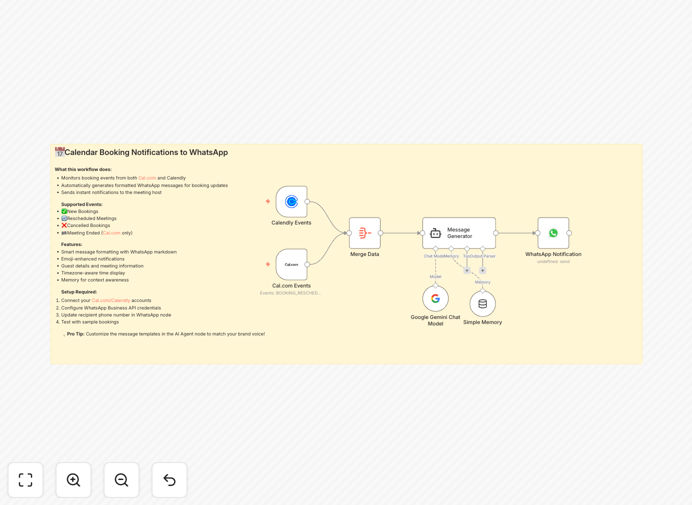
What This Workflow Does
This automation solves the problem of constantly checking multiple platforms for booking updates. Professionals using Cal.com or Calendly often miss important appointment changes buried in email notifications or have to manually check their calendars throughout the day.
The workflow monitors both scheduling platforms in real-time, then sends beautifully formatted WhatsApp messages for every booking activity. It transforms raw booking data into mobile-friendly notifications with all relevant details clearly presented.
How It Works
1. Booking Detection
The workflow continuously monitors both Cal.com and Calendly for new, changed, or canceled appointments through their API connections.
2. Data Aggregation
Booking details from both platforms are standardized into a common format, ensuring consistent notifications regardless of which service was used.
3. AI Message Formatting
Google Gemini transforms the raw booking data into human-readable WhatsApp messages with proper spacing, emojis, and emphasis on key details.
4. Instant Notification
The formatted message is immediately sent via WhatsApp Business API to your specified number, typically arriving within seconds of the booking activity.
Pro tip: For teams, you can modify the workflow to notify multiple WhatsApp numbers when bookings involve specific team members or meeting types.
Who This Is For
This automation is ideal for:
- Consultants and coaches with packed appointment schedules
- Sales teams managing high volumes of prospect meetings
- Medical/legal professionals who can't afford to miss appointments
- Small business owners handling their own scheduling
- Virtual assistants managing calendars for multiple clients
What You'll Need
- Active Cal.com and/or Calendly account with API access
- WhatsApp Business API credentials
- Google API key for Gemini
- Webhook endpoints configured for both calendar services
- Basic understanding of n8n workflow configuration
Quick Setup Guide
- Download and import the JSON template into your n8n instance
- Connect your Cal.com and/or Calendly accounts in the trigger nodes
- Configure the WhatsApp node with your Business API credentials
- Add your Google Gemini API key to the AI processing node
- Test with sample bookings to verify notification formatting
- Activate the workflow for live monitoring
Key Benefits
Never miss a booking change again. Get instant mobile notifications instead of relying on email or manual calendar checks.
Save 30+ minutes daily by eliminating constant platform switching to verify appointments.
Professional communication with clients who appreciate timely, well-formatted updates about their appointments.
Reduce no-shows by sending clear reminders through WhatsApp's high-open-rate platform.
Customizable notifications that match your brand voice and include only the details you need.