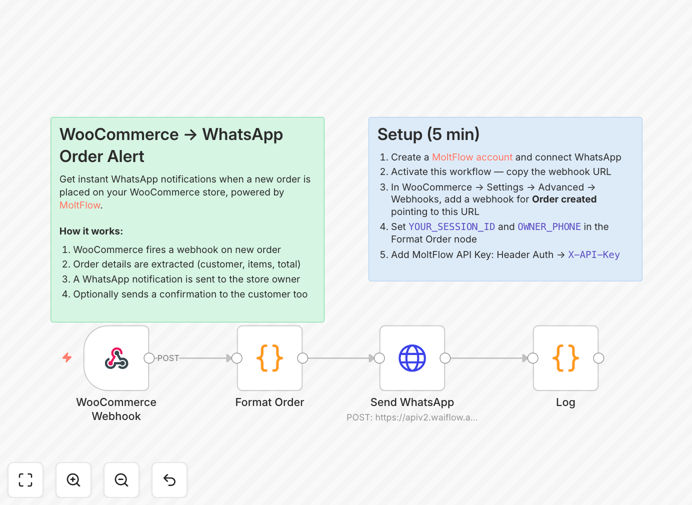
What This Workflow Does
Running an online store means constantly checking for new orders, manually notifying your team, and sending confirmation emails that often go unread. This automation solves that by connecting WooCommerce directly to WhatsApp, creating an instant communication channel for both store owners and customers.
When a customer completes a purchase, this workflow automatically sends a WhatsApp message to the store owner with all order details—customer name, items purchased, total amount, and shipping information. Simultaneously, if the customer provided their phone number, they receive an immediate order confirmation via WhatsApp, which has a 98% open rate compared to traditional email.
The system eliminates manual order processing steps, reduces the risk of missed orders, and provides customers with the instant reassurance they expect in today's fast-paced e-commerce environment.
How It Works
This automation creates a seamless bridge between your WooCommerce store and WhatsApp messaging through a series of connected steps.
Step 1: Order Detection
WooCommerce is configured to send a webhook notification whenever a new order is placed. This webhook contains all the order data in a structured format that the automation can process immediately.
Step 2: Data Extraction
The workflow extracts key information from the order: customer name, contact details, items purchased with quantities and prices, order total, payment status, and shipping address. This data is formatted for clear communication.
Step 3: Store Owner Alert
A formatted WhatsApp message is sent to the store owner or management team via MoltFlow. This alert includes all critical order details, allowing for immediate awareness and action if needed.
Step 4: Customer Confirmation
If the customer provided a valid phone number during checkout, a personalized order confirmation is sent via WhatsApp. This message thanks the customer, confirms their purchase details, and provides next-step expectations.
Pro tip: Add conditional logic to only send customer WhatsApp messages for orders above a certain value or for specific product categories, maximizing impact while managing communication costs.
Who This Is For
This automation is ideal for e-commerce businesses using WooCommerce that want to improve their order management and customer communication. It's particularly valuable for:
- Small to medium online stores where the owner handles multiple roles and needs instant order alerts
- Businesses selling time-sensitive products like food, flowers, or event tickets that require immediate order processing
- Stores with international customers where WhatsApp is more reliable than email for order confirmations
- E-commerce teams wanting to reduce manual order checking and eliminate missed order opportunities
- Businesses focusing on customer experience that want to provide modern, instant communication channels
What You'll Need
- A WooCommerce store with administrative access to configure webhooks
- A MoltFlow account (or similar WhatsApp Business API service) with an active WhatsApp session
- n8n instance (cloud or self-hosted) to run the automation workflow
- Store owner's WhatsApp number for receiving order alerts
- Optional: Customer phone number collection enabled in your checkout process
Quick Setup Guide
- Download and import the template JSON file into your n8n instance
- Create a MoltFlow account at molt.waiflow.app and connect your WhatsApp number
- Copy your n8n webhook URL from the Webhook node in the workflow
- In WooCommerce admin, go to Settings → Advanced → Webhooks and create a new webhook for "Order created" events pointing to your n8n URL
- Configure the workflow by adding your MoltFlow API key (as Header Auth credential) and setting your session ID and owner phone number in the code node
- Test the automation by placing a test order in your WooCommerce store
Pro tip: Start by only enabling store owner notifications. Once you're comfortable with the workflow, enable customer confirmations and consider adding shipping update automation as a next phase.
Key Benefits
Instant order awareness: Receive WhatsApp notifications within seconds of a new order, eliminating the need to constantly check your store dashboard. This is especially valuable during sales events or for time-sensitive products.
Improved customer experience: Customers receive immediate order confirmation via their preferred messaging app, reducing anxiety about whether their order went through and building trust in your brand.
Reduced administrative workload: Automating this process saves approximately 5-10 hours per week for store owners who previously manually processed and confirmed each order.
Higher message open rates: WhatsApp messages have a 98% open rate compared to 20% for email, ensuring your important order communications are actually seen by recipients.
Scalable communication: As your order volume grows, this automation scales effortlessly without requiring additional staff time for order notifications and confirmations.