Google Sheets OpenAI AI Automation Customer Feedback n8n

Automate Product Review Sentiment Analysis with Google Sheets & OpenAI

Free n8n template that automatically analyzes customer feedback, classifies sentiment, and updates your spreadsheet—saving hours of manual work.

Download Template JSON · n8n compatible · Free
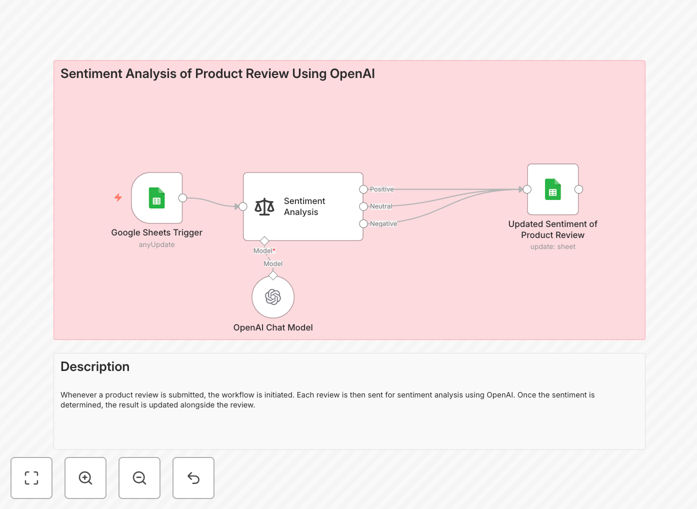
Visual diagram showing sentiment analysis workflow connecting Google Sheets to OpenAI AI model

What This Workflow Does

Manually reading and categorizing hundreds of product reviews is time-consuming, inconsistent, and doesn't scale. This automation solves that by connecting Google Sheets directly to OpenAI's AI models to instantly analyze customer sentiment.

Whenever a new review is added to your spreadsheet, the workflow automatically sends the text to OpenAI, classifies it as Positive, Negative, or Neutral, and writes the result back to the sheet. This gives you real-time insight into customer satisfaction without any manual intervention.

The system works continuously in the background, processing new reviews every minute. Whether you're monitoring 10 reviews or 10,000, it provides consistent, objective sentiment analysis that helps product teams, marketing departments, and customer support identify trends and issues faster.

How It Works

Step 1: Trigger from Google Sheets

The workflow uses a Google Sheets trigger node that polls your spreadsheet every minute for new rows. When a review is added to the designated "Review" column, the workflow automatically captures that text for analysis.

Step 2: AI Sentiment Analysis

The review text is sent to OpenAI's language model (GPT-4o-mini or GPT-3.5) with a specialized prompt for sentiment classification. The AI evaluates the emotional tone, context, and language to determine whether the sentiment is positive, negative, or neutral.

Step 3: Write Results Back to Sheet

Once the AI returns the sentiment classification, the workflow updates the corresponding row in your Google Sheet, adding the result to the "Sentiment" column. This creates a continuously updated dashboard of customer sentiment directly in your spreadsheet.

Pro tip: Add a Slack notification node to immediately alert your team when a negative review is detected, enabling rapid response to customer issues.

Who This Is For

This automation is ideal for e-commerce businesses, SaaS companies, product teams, and anyone collecting customer feedback through reviews, surveys, or support tickets. Marketing teams can use it to identify promotable positive reviews, while product teams can spot recurring issues in negative feedback.

Customer support managers can triage issues more effectively, and business owners get an objective, data-driven view of customer satisfaction without reading every single review. The workflow scales from small businesses with occasional reviews to enterprises processing thousands of feedback points daily.

What You'll Need

  1. A Google Sheet with "Review" and "Sentiment" columns (or similar structure)
  2. Google Sheets OAuth2 credentials configured in n8n
  3. An OpenAI API key (available from platform.openai.com)
  4. n8n instance (cloud or self-hosted) with LangChain and OpenAI nodes enabled
  5. Basic understanding of how to import and activate n8n workflows

Quick Setup Guide

  1. Prepare your Google Sheet with two columns: "Review" (for customer feedback) and "Sentiment" (initially empty).
  2. Download the template JSON file and import it into your n8n instance.
  3. Connect your Google Sheets credentials to the trigger node.
  4. Add your OpenAI API key to the OpenAI Chat Model node.
  5. Update the spreadsheet ID and sheet name in the Google Sheets nodes to match your document.
  6. Activate the workflow and test by adding a sample review to your sheet.

Pro tip: Start with a small test dataset of 5-10 reviews to verify everything works before processing your entire review history.

Key Benefits

Save 10+ hours monthly on manual review analysis. What used to require hours of reading and categorizing now happens automatically in seconds, freeing your team for higher-value work.

Gain consistent, objective sentiment scoring. Unlike human reviewers who might have different interpretations, AI provides standardized classification across all reviews, eliminating subjective bias.

Identify issues and opportunities in real-time. Negative trends surface immediately rather than waiting for quarterly review analysis, allowing faster response to customer concerns.

Scale effortlessly with your business. The same automation that handles 100 reviews monthly can process 10,000 without additional setup or cost increases beyond API usage.

Create actionable data for multiple departments. Sentiment data feeds into product development, marketing campaigns, customer support prioritization, and executive reporting from a single automated source.

Frequently Asked Questions

Common questions about sentiment analysis automation and integration

Sentiment analysis is the process of using AI to determine whether text expresses positive, negative, or neutral emotions. For businesses, it's crucial because it automates the understanding of customer feedback at scale, helping identify product issues, measure satisfaction, and uncover opportunities without manually reading thousands of reviews.

This technology transforms unstructured text data into actionable insights. For example, an e-commerce store can automatically detect which products receive consistently negative feedback, while a SaaS company can identify features that delight users based on positive sentiment patterns.

Modern AI sentiment analysis using models like GPT-4 achieves 85-95% accuracy compared to human reviewers for straightforward feedback. It's particularly effective for high-volume analysis where consistency and speed matter more than nuanced interpretation of sarcasm or complex emotional states.

The accuracy improves when the AI is given clear examples and context. For most business applications—product reviews, survey responses, support tickets—AI sentiment analysis provides more than sufficient accuracy while processing data thousands of times faster than human teams could manage.

This workflow can analyze product reviews, support tickets, survey responses, social media comments, app store reviews, and any other text-based customer feedback collected in Google Sheets. It works best with clear, direct feedback rather than heavily sarcastic or metaphorical language.

The system is flexible enough to handle various feedback sources. You can connect it to review platforms, survey tools, or CRM systems that export to Google Sheets, creating a centralized sentiment analysis hub for all customer touchpoints across your business.

Using OpenAI's API for sentiment analysis costs approximately $0.0015 per review (for GPT-3.5). Analyzing 1,000 reviews monthly costs about $1.50, making it extremely cost-effective compared to manual analysis that could take 20+ hours of staff time.

For businesses processing thousands of reviews, the cost remains minimal compared to the value gained. The automation eliminates the need for dedicated staff to read feedback, provides consistent analysis 24/7, and generates insights that can directly impact product development and customer satisfaction.

Yes, AI sentiment analysis can be fine-tuned with custom prompts to understand industry-specific terminology, product features, or brand language. You can adjust the classification categories beyond positive/negative/neutral to include specific emotions or product attributes relevant to your business.

For example, a software company might add categories like "Feature Request" or "Bug Report," while a restaurant could include "Food Quality," "Service," and "Ambiance" as sentiment dimensions. This customization makes the analysis more actionable for your specific use case.

Sentiment analysis can trigger alerts for negative reviews, generate weekly sentiment reports, route critical feedback to support teams, identify trending product issues, extract positive quotes for marketing, and correlate sentiment with customer segments or purchase history for deeper insights.

Advanced implementations might include automatic response generation for negative reviews, sentiment trend forecasting, competitor sentiment comparison, or integrating sentiment scores with customer lifetime value calculations to understand how feedback correlates with business outcomes.

Yes, GrowwStacks specializes in building custom sentiment analysis automations tailored to your specific business needs. We can integrate with your existing systems, add industry-specific classifications, create dashboards, and build complete feedback management workflows beyond this template.

Our team works with you to understand your unique requirements, data sources, and desired outcomes. We then design and implement a solution that fits seamlessly into your operations, providing the insights you need without the manual work.

  • Integration with your CRM, helpdesk, or review platforms
  • Custom sentiment categories and reporting dashboards
  • Automated alerting and response workflows
  • Historical data analysis and trend identification

Need a Custom Sentiment Analysis Automation?

This free template is a starting point. Our team builds fully tailored automation systems for your specific business needs.