What This Workflow Does
Manually reading and categorizing customer feedback is time-consuming and inconsistent. Teams waste hours each week trying to understand whether reviews are positive or negative, missing critical trends that could impact customer retention and product development.
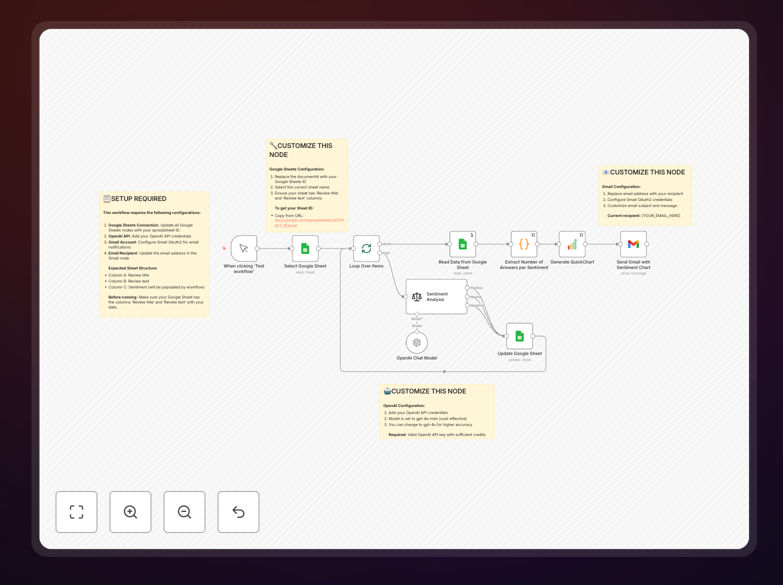
This automation solves that by connecting your existing Google Sheets review database with OpenAI's powerful language models. It automatically processes each new review, classifies the sentiment, updates your spreadsheet, and generates a visual chart that gets emailed to your team. What used to take hours of manual work now happens automatically, giving you consistent, real-time insights into customer satisfaction.
How It Works
1. Fetch Customer Reviews
The workflow starts by reading new customer reviews from your Google Sheet. It can be triggered manually, on a schedule, or when new rows are added to your spreadsheet.
2. AI Sentiment Classification
Each review passes through OpenAI's GPT-4o model, which analyzes the text and returns a simple classification: Positive, Neutral, or Negative. The AI understands context, nuance, and even mixed emotions in customer feedback.
3. Update Your Database
The classified sentiment gets written back to your Google Sheet in a dedicated column, creating a searchable, filterable database of analyzed feedback that grows automatically over time.
4. Generate Visual Chart
Once all reviews are processed, the workflow counts sentiment totals and creates a professional doughnut chart using QuickChart.io. This visualization makes trends immediately obvious at a glance.
5. Email Insights to Your Team
The final chart gets attached to an email sent through Gmail to designated team members, ensuring everyone stays informed about customer sentiment without checking multiple tools.
Who This Is For
This workflow is ideal for product managers who need to track feature feedback, customer support teams monitoring satisfaction trends, marketing professionals managing brand reputation, and small business owners who want to understand customer sentiment without hiring dedicated analysts. It's particularly valuable for SaaS companies, e-commerce stores, agencies, and any business that collects customer reviews through forms, surveys, or support channels.
What You'll Need
- A Google Sheets spreadsheet containing customer reviews (with columns for review text/title)
- An OpenAI API key (for GPT-4o sentiment analysis)
- Gmail account configured in n8n (for sending reports)
- Basic n8n instance (cloud or self-hosted)
- 10 minutes for initial setup and configuration
Pro tip: Start with a small sample of 20-30 reviews to test the workflow. Once you're confident in the AI classifications, scale up to process hundreds or thousands of reviews automatically.
Quick Setup Guide
- Download the template using the button above and import it into your n8n instance.
- Connect Google Sheets by adding your spreadsheet ID and sheet name to the Google Sheets nodes.
- Add OpenAI credentials with your API key in the Sentiment Analysis node.
- Configure Gmail OAuth2 and set the recipient email address in the final node.
- Test the workflow with a few sample reviews to ensure everything connects properly.
- Schedule automation (optional) using n8n's cron trigger to run daily or weekly.
Key Benefits
Save 10+ hours monthly on manual review analysis. What used to require reading every comment now happens automatically while your team focuses on acting on insights rather than gathering them.
Detect negative trends immediately with automated alerts. When sentiment scores drop unexpectedly, your team gets notified right away instead of discovering issues weeks later during quarterly reviews.
Create consistent historical data for year-over-year comparison. AI applies the same classification standards consistently, eliminating human bias and inconsistency in how feedback is categorized.
Distribute insights automatically to relevant stakeholders. Product, support, and marketing teams all receive the same clear visualization, ensuring everyone works from the same understanding of customer sentiment.
Scale effortlessly from dozens to thousands of reviews. The same workflow that processes 50 reviews monthly can handle 5,000 without additional configuration or manual effort.