Jekyll GPT-4 GitHub Social Media SEO

SEO Blog Publishing for Jekyll with GPT-4, GitHub & Social Sharing

Automate your entire blog publishing workflow from AI content generation to GitHub commits and social media distribution. This n8n template saves hours per post while ensuring SEO optimization and consistent publishing.

Download Template JSON · n8n compatible · Free
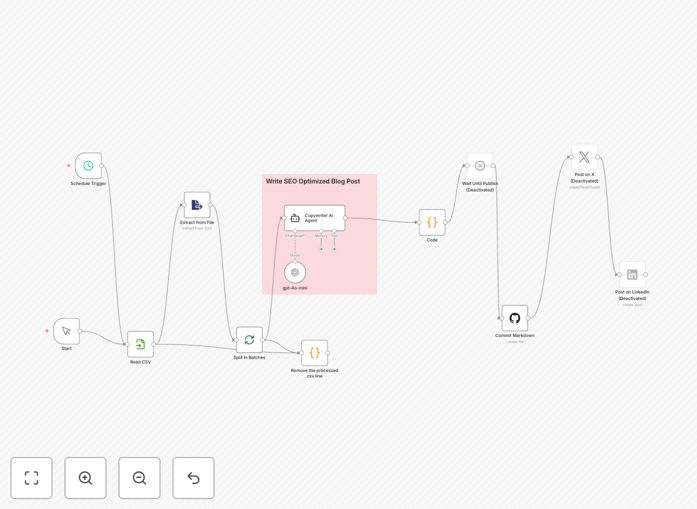
Screenshot of Jekyll blog publishing automation workflow in n8n

What This Workflow Does

This automation solves the time-consuming process of publishing SEO-optimized content to Jekyll blogs. Traditional publishing requires manual content creation, Markdown formatting, GitHub commits, and social sharing - often taking 5+ hours per post. The workflow combines GPT-4 for intelligent content generation with GitHub integration for seamless publishing and automated social media distribution.

By connecting these systems, marketers and developers can maintain consistent blog output without repetitive technical tasks. The AI ensures content meets SEO best practices while the automation handles all technical implementation, allowing teams to focus on strategy rather than execution.

How It Works

1. AI Content Generation

The workflow starts with GPT-4 analyzing your topic brief to generate SEO-optimized content. The AI structures the post with proper headings, meta descriptions, and semantic keyword placement while maintaining natural readability.

2. Markdown Formatting

The generated content is automatically converted to Jekyll-compatible Markdown with proper front matter. The system includes YAML metadata, image references, and proper code block formatting for technical posts.

3. GitHub Commit

The formatted Markdown file is committed to your Jekyll repository's _posts directory with proper naming conventions. The workflow can handle branch management and pull requests if needed.

4. Social Media Sharing

Once published, the workflow automatically shares the post across configured social platforms with optimized messaging. It handles platform-specific formatting requirements and can include tracking parameters.

Who This Is For

This workflow benefits technical marketers managing Jekyll blogs, developer advocates publishing tutorials, and content teams needing to scale output. It's ideal for:

  • SaaS companies with developer documentation blogs
  • Technical content creators publishing tutorials
  • Marketing teams maintaining corporate blogs
  • Indie hackers managing personal brand sites

What You'll Need

  1. An n8n instance (cloud or self-hosted)
  2. OpenAI API access for GPT-4
  3. GitHub repository for your Jekyll site
  4. Social media API credentials (Twitter, LinkedIn, etc.)
  5. Basic understanding of Jekyll's content structure

Quick Setup Guide

  1. Download and import the JSON workflow into your n8n instance
  2. Configure your OpenAI API credentials in the GPT-4 node
  3. Set up GitHub OAuth or personal access token
  4. Connect your social media accounts
  5. Test with a sample post before full automation

Key Benefits

Save 5-10 hours per blog post by eliminating manual content formatting, technical implementation, and distribution tasks.

Ensure SEO consistency with automatically generated meta tags, semantic HTML, and proper heading structures in every post.

Maintain publishing cadence even during busy periods with scheduled, automated content deployment.

Reduce human error in technical implementation like file naming, front matter formatting, and deployment processes.

Frequently Asked Questions

Common questions about Jekyll blog automation and AI content

AI tools like GPT-4 analyze search intent and generate content optimized for both readers and search engines. They can create comprehensive articles with proper keyword density, semantic relevance, and structured formatting. The AI suggests headings, meta descriptions, and internal linking opportunities while maintaining natural language flow.

For technical blogs, the AI can generate code examples with explanations that rank well for developer queries. The system learns from your existing high-performing content to match your brand voice and content style.

  • Automatically includes LSI keywords
  • Maintains optimal content length
  • Generates FAQ schema markup

Automated publishing saves 5-10 hours per post by eliminating manual content formatting, GitHub commits, and social sharing tasks. It ensures consistent publishing schedules, reduces human error in technical implementation, and allows content teams to focus on strategy rather than repetitive tasks.

The workflow also maintains version control through automated GitHub commits. Marketing teams can scale content production without needing deep technical knowledge of Jekyll or Git workflows.

  • Never miss publishing deadlines
  • Eliminate manual deployment errors
  • Free up creative resources

GitHub serves as the version control system for Jekyll sites. Automated workflows can commit new posts directly to your repository, triggering automatic builds via GitHub Pages. This eliminates manual file uploads while maintaining full change history.

The integration handles proper file naming, front matter formatting, and directory structure requirements. For teams, it can create pull requests for editorial review before merging to main. The automation respects all Jekyll conventions while simplifying the publishing process.

  • Automatic _posts directory placement
  • Proper YAML front matter generation
  • Commit message standardization

Jekyll's static site architecture and Markdown-based content system make it ideal for automation. Posts are simple text files with predictable structures that workflows can generate programmatically. The lack of database dependencies means content updates don't require complex migrations.

GitHub integration provides built-in deployment pipelines through GitHub Pages. Jekyll's templating system allows for consistent layouts without CMS overhead. The clean separation of content and presentation simplifies automated content injection.

  • No database synchronization needed
  • Predictable file structures
  • Native GitHub Pages support

Automated workflows ensure every post includes optimized meta tags, proper heading structures, and semantic HTML. They can enforce content length requirements, internal linking strategies, and image alt text inclusion. The system maintains consistency in URL URL structures and automatically generates sitemap updates.

AI-powered content suggestions improve topical coverage and semantic relevance. Automation prevents common SEO mistakes like missing alt text or duplicate meta descriptions. Scheduled publishing helps maintain fresh content signals.

  • Consistent meta tag optimization
  • Automatic internal linking
  • Regular sitemap updates

Most workflows support Twitter, LinkedIn, Facebook, and Mastodon out of the box. Some can also post to Reddit communities, Pinterest boards, or Slack channels. The automation handles character limits, hashtag insertion, and link formatting while tracking engagement metrics.

Enterprise systems can integrate with Buffer or Hootsuite for centralized social management. The workflow can customize messages per platform, adding code snippets for developer-focused channels while simplifying explanations for general audiences.

  • Platform-specific message formatting
  • Hashtag optimization
  • Engagement analytics tracking

Yes, GrowwStacks specializes in tailored content automation systems. Our team can design workflows matching your specific CMS, approval processes, and distribution channels. We integrate with your existing tools while adding custom features like multi-language support or paid promotion scheduling.

Custom solutions might include editorial review workflows, multi-channel content repurposing, or dynamic content personalization. We'll analyze your content strategy to build an automation system that scales your output while maintaining quality standards.

  • Custom approval workflows
  • Multi-platform repurposing
  • Performance analytics dashboards

Need a Custom Blog Publishing Automation?

This free template is a starting point. Our team builds fully tailored automation systems for your specific content workflow needs.