Semrush Google Sheets SEO Competitor Analysis n8n

Automated SEO Competitor Analysis with Semrush & Google Sheets

Free n8n workflow to automatically gather competitor SEO data and log it to Google Sheets for ongoing tracking and reporting.

Download Template JSON · n8n compatible · Free
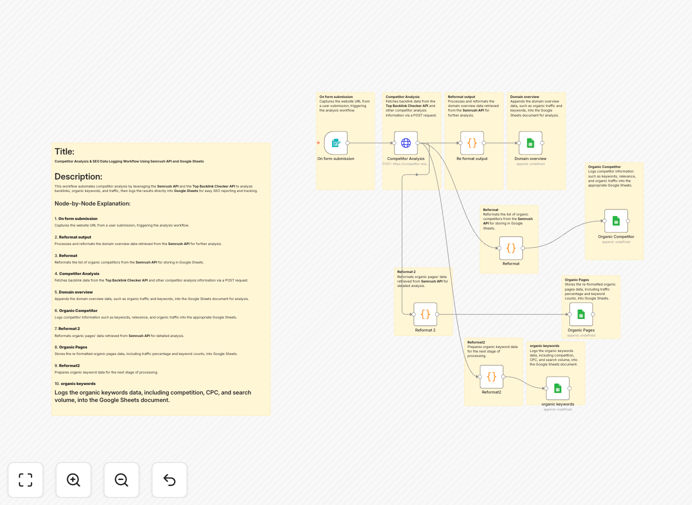
Visual representation of an automated SEO competitor analysis workflow connecting Semrush API to Google Sheets

What This Workflow Does

This n8n workflow automates the entire process of SEO competitor analysis, eliminating manual research and data entry. It connects directly to the Semrush API to pull comprehensive SEO data for any domain you specify, then automatically structures and logs that information into Google Sheets for easy analysis and reporting.

The workflow captures four key types of SEO intelligence: domain overview metrics (organic keywords and traffic estimates), organic competitors (identifying who you're actually competing against), top-performing organic pages, and detailed keyword data including search volume, cost-per-click, and difficulty scores. This creates a centralized, always-updated competitor intelligence system that would otherwise require hours of manual work each week.

By automating this process, marketing teams, SEO agencies, and business owners can maintain constant visibility into their competitive landscape without the time drain of manual research. The data flows directly into Google Sheets where it can be visualized, shared with stakeholders, or connected to other reporting tools.

How It Works

The workflow follows a logical sequence to gather, process, and store competitor SEO data efficiently.

1. Trigger & Domain Input

The workflow begins with a manual trigger where you input the competitor domain you want to analyze. This could be configured to run on a schedule (weekly, monthly) or triggered by other events in your marketing stack.

2. Semrush API Data Collection

The core of the workflow makes authenticated requests to the Semrush API, specifically the Competitor Analysis endpoint. It pulls multiple data points including domain authority metrics, traffic estimates, and competitive positioning data.

3. Data Processing & Transformation

n8n's data transformation nodes clean and structure the raw API responses. This includes extracting specific metrics, formatting dates, calculating percentages, and preparing the data for spreadsheet insertion.

4. Google Sheets Integration

The processed data is automatically appended to designated Google Sheets tabs. The workflow creates organized sections for domain overview, competitor lists, page performance, and keyword details—maintaining a clean, historical record of competitive movements.

5. Error Handling & Notifications

Built-in error handling ensures the workflow continues running smoothly even if one data point is missing. Optional notification nodes can alert your team via Slack or email when significant competitive changes are detected.

Who This Is For

This automation is particularly valuable for SEO specialists, digital marketing agencies, content teams, and business owners who need to track competitive positioning without manual effort. It's ideal for agencies managing multiple client accounts, in-house marketing teams monitoring industry competitors, or startups benchmarking against established players.

If you're currently spending hours each month copying data from Semrush into spreadsheets, or if your competitive intelligence is inconsistent because manual updates get deprioritized, this workflow will transform your SEO monitoring process. It's also perfect for businesses that need to provide regular SEO reports to clients or stakeholders with minimal manual intervention.

What You'll Need

  1. n8n instance – either self-hosted or n8n.cloud account
  2. Semrush API access – requires a Semrush subscription with API credits
  3. Google Sheets – a Google account with Sheets access
  4. Google Service Account – for automated Sheets integration (setup instructions included)
  5. Basic understanding of SEO metrics – to interpret the collected data effectively

Pro tip: Start with just 2-3 key competitors to validate the workflow before scaling to monitor dozens of domains. This helps you refine what metrics matter most to your business before automating at scale.

Quick Setup Guide

Getting this workflow running takes about 15-20 minutes if you have your API credentials ready.

  1. Download the template using the button above and import it into your n8n instance
  2. Configure Semrush credentials in the HTTP Request node with your API key from RapidAPI
  3. Set up Google Sheets connection using a service account (detailed instructions in the workflow notes)
  4. Test with a single domain to ensure data flows correctly from Semrush to your Sheets
  5. Schedule the workflow to run weekly or monthly for ongoing competitive tracking
  6. Customize the Sheets output to match your preferred reporting format and add any additional calculations

Key Benefits

Save 5-10 hours monthly on manual competitor research. What used to be a tedious, error-prone process becomes fully automated with consistent results.

Maintain always-current competitive intelligence. With scheduled runs, you'll never miss a competitor's strategic shift or content opportunity.

Standardize reporting across your team or clients. Everyone works from the same data structure, making comparisons and trend analysis straightforward.

Identify content gaps and keyword opportunities faster. Automated analysis surfaces insights that might take weeks to notice manually.

Scale competitor monitoring effortlessly. Add new domains to track without increasing your workload proportionally.

Frequently Asked Questions

Common questions about SEO competitor analysis automation and integration

Manual SEO competitor analysis is time-consuming and error-prone. Automating it with tools like n8n ensures you get consistent, up-to-date data without manual effort. This allows you to track competitor keyword rankings, backlink profiles, and content strategies on a regular schedule, freeing up hours each week for strategic work.

Beyond time savings, automation provides systematic coverage that humans often miss. While manual analysis might focus on obvious competitors, automated systems can monitor dozens of sites simultaneously, catching emerging threats and opportunities you'd otherwise overlook.

The Semrush API provides comprehensive SEO data including domain authority metrics, organic search traffic estimates, top-performing organic keywords with volume and difficulty scores, competitor domain lists with relevance scores, and detailed page-level data for top-performing content. This gives you a complete picture of any website's search performance.

You can extract specific metrics like organic traffic trends, keyword gap analysis (keywords they rank for that you don't), backlink profiles, and even advertising research data. The API returns structured data that's perfect for automated analysis and reporting.

Automated SEO reporting eliminates manual data collection and spreadsheet updates. Instead of spending hours each week gathering data, the workflow automatically pulls fresh metrics and updates your Google Sheets. This can save 5-10 hours per week for SEO specialists, allowing them to focus on strategy and optimization rather than data entry.

The time savings compound when you consider the consistency benefits. Automated reports run on schedule regardless of vacations, sick days, or busy periods, ensuring your competitive intelligence never has gaps. This reliability is particularly valuable for agencies reporting to clients or teams presenting to leadership.

Yes, this workflow can be easily adapted to monitor multiple client websites. You can modify the trigger to accept a list of domains or set up separate workflow instances for each client. The data will be organized in separate Google Sheets tabs or files, making client reporting straightforward and scalable.

For agencies, this means you can standardize competitor analysis across all clients while maintaining separate, confidential data streams. Each client gets their own automated report without cross-contamination of competitive intelligence between accounts.

Google Sheets provides immediate accessibility for team collaboration, easy visualization with charts, and simple sharing with clients or stakeholders. Unlike specialized databases, most team members already know how to use Sheets, reducing training time. It also integrates seamlessly with other Google Workspace tools and allows for real-time collaboration on SEO insights.

For businesses without dedicated data teams, Sheets offers a perfect balance of capability and accessibility. You can build pivot tables, create dashboards, set up automated charts, and share read-only views with clients—all without needing database administration skills or additional software licenses.

For most businesses, monthly analysis is sufficient to track meaningful changes. However, competitive industries or rapidly changing markets might benefit from bi-weekly analysis. The beauty of automation is you can schedule it to run as frequently as needed without additional manual effort—daily, weekly, or monthly—depending on your competitive landscape and resources.

Consider your business cycle: e-commerce during holiday seasons might need weekly checks, while B2B services might be fine with monthly. The key advantage of automation is you can adjust frequency without increasing workload, letting data needs rather than time constraints dictate your monitoring schedule.

Beyond Semrush and Google Sheets, you can extend this workflow to connect with Slack for alerting when competitors gain significant traction, Google Data Studio for advanced dashboards, email platforms for automated reports, or CRM systems to link SEO performance with sales data. n8n's flexibility allows integration with hundreds of additional apps.

Popular extensions include connecting to Ahrefs for backlink data, Google Analytics for comparing traffic estimates with actuals, or project management tools like Asana to create tasks when competitive threats are detected. The workflow becomes a central intelligence hub that feeds data to wherever your team works.

  • Slack/Teams notifications for significant ranking changes
  • Google Data Studio dashboards for executive reporting
  • CRM integration to link SEO performance to deal tracking
  • Content calendar updates when content gaps are identified

Absolutely. While this free template provides a solid foundation for SEO competitor analysis, every business has unique needs. Our team at GrowwStacks specializes in building custom automation solutions that connect your specific SEO tools, data sources, and reporting requirements. We can create workflows that match your exact competitive landscape, KPIs, and team workflow.

Custom solutions might include integrating multiple SEO tools (Semrush, Ahrefs, Moz), connecting to proprietary databases, creating advanced alerting logic, or building executive dashboards that combine SEO data with other business metrics. We work with marketing teams and agencies to design automation that fits their specific processes.

  • Multi-tool SEO data aggregation
  • Custom alerting thresholds and notifications
  • Integration with internal data systems
  • White-labeled reporting for agencies

Need a Custom SEO Automation?

This free template is a starting point. Our team builds fully tailored automation systems for your specific business needs.