SEO Competitor Analysis Google Sheets

SERP Competitor Research Automation

Track competitor rankings in Google search results automatically. This n8n workflow extracts SERP data via Scrape.do API and organizes it in Google Sheets for ongoing competitive analysis.

Download Template JSON · n8n compatible · Free
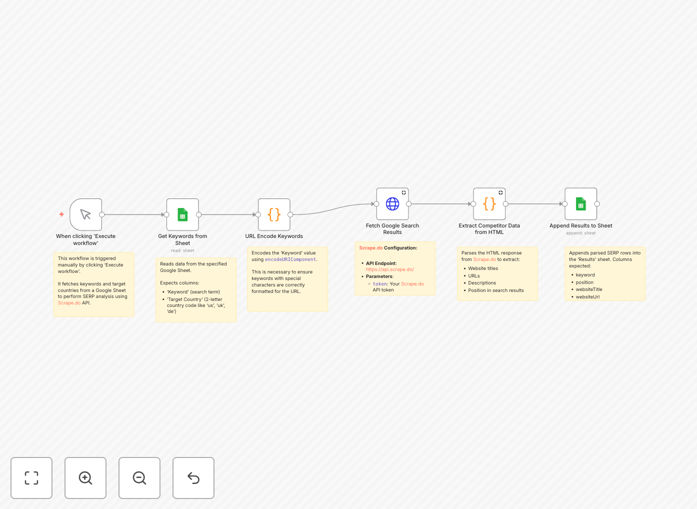
SERP competitor research workflow diagram showing n8n nodes connecting Scrape.do API to Google Sheets

What This Workflow Does

This automation solves the tedious manual process of checking competitor rankings in Google search results. Instead of conducting daily searches and recording positions in spreadsheets, the workflow programmatically extracts SERP data through Scrape.do's API and organizes it in Google Sheets for analysis.

Marketing teams and SEO professionals use this to monitor ranking fluctuations, identify content gaps, and benchmark performance against competitors. The automated approach ensures consistent data collection at scheduled intervals while eliminating human error in tracking.

How It Works

1. Configure Target Keywords

The workflow begins with your list of strategic keywords to monitor. These can be organized by product category, service line, or content theme in your Google Sheet.

2. Execute Scrape.do API Calls

For each keyword, the workflow makes authenticated requests to Scrape.do's SERP API, which returns structured data about the top 100 search results.

3. Process Competitor Data

The API response is parsed to extract competitor URLs, ranking positions, featured snippet status, and other SERP features that impact click-through rates.

4. Update Google Sheets

Results are appended to your designated Google Sheet with timestamps, creating a historical record of ranking movements over time.

Pro tip: Add conditional formatting in Sheets to highlight when your competitors enter/exist the top 3 positions for valuable keywords.

Who This Is For

This workflow benefits digital marketing agencies managing multiple client campaigns, ecommerce businesses monitoring product category rankings, and content teams tracking article performance against competitors.

What You'll Need

  1. Active Scrape.do API account (free tier available)
  2. Google Sheets with your target keywords
  3. Self-hosted n8n instance or n8n.cloud account
  4. Google Service Account credentials for Sheets API

Quick Setup Guide

  1. Download the JSON workflow file
  2. Import into your n8n instance
  3. Configure Scrape.do API credentials
  4. Connect your Google Sheets service account
  5. Add your target keywords to the designated sheet
  6. Set your preferred scheduling frequency

Key Benefits

Time savings: Replaces 5-10 hours of manual SERP checks per month with automated data collection.

Historical tracking: Builds a search ranking timeline to identify seasonal patterns and campaign impacts.

Competitive intelligence: Reveals content gaps where competitors rank but you don't appear.

Alert system: Can be extended to trigger notifications for significant ranking changes.

Frequently Asked Questions

Common questions about SERP tracking and competitor research

SERP competitor research tracks where competitors rank in Google search results for key terms. It helps identify content gaps, backlink opportunities, and keyword strategies. Regular monitoring reveals ranking fluctuations that impact organic traffic.

For example, noticing a competitor's new blog post ranking for your target keyword can prompt content updates or link building. Historical tracking shows whether SEO improvements are working or if competitors are gaining ground.

  • Identifies content opportunities you're missing
  • Reveals competitor SEO strategies
  • Measures impact of your optimization efforts

Automation eliminates manual searches by programmatically extracting ranking data. This workflow runs scheduled checks, compiles historical data in Sheets, and alerts you to significant ranking changes. It saves 5-10 hours monthly compared to manual tracking.

An ecommerce business might track 50 product category keywords across 5 competitors. Manual checks would require 250 searches weekly, while automation handles this in minutes with consistent formatting and timestamps.

  • Runs on schedule without manual intervention
  • Standardizes data collection format
  • Enables large-scale keyword monitoring

The template extracts competitor URLs, ranking positions, featured snippets status, and SERP features like knowledge panels. It captures title tags, meta descriptions, and URL structures for competitive analysis.

When analyzing a "best running shoes" query, you'll see which competitors appear in position 0 featured snippets, comparison tables, or local packs. This reveals opportunities to optimize your content for these SERP features.

  • Ranking position (1-100)
  • URL and domain authority signals
  • SERP feature participation

Most businesses benefit from weekly or biweekly checks. High-competition industries may need daily monitoring during campaigns. This workflow supports custom scheduling to match your analysis frequency needs.

A SaaS company launching a new feature might monitor daily for the first month, then weekly. An established ecommerce site might check category keywords biweekly unless running promotions.

  • Weekly for most ongoing monitoring
  • Daily during campaigns or launches
  • Monthly for stable, low-competition terms

Yes, the Scrape.do API supports location-based SERP scraping. Simply configure the workflow with target city/region parameters to monitor geo-specific rankings alongside national results.

A plumbing service could track rankings for "emergency plumber" in their 10 target service areas. The workflow would show where they appear in local packs versus organic results in each location.

  • Configure city, state, or zip code parameters
  • Track local pack versus organic rankings
  • Compare performance across regions

SerpAPI, Scale SERP, and DataMiner offer similar capabilities. This workflow's modular design allows adapting it to other APIs with minor node adjustments in n8n.

If you need more data points like search volume or CPC estimates, SerpAPI might be preferable. For large-scale enterprise tracking, Scale SERP offers higher request limits and proxy rotation.

  • SerpAPI - good for additional metrics
  • Scale SERP - better for enterprise scale
  • DataMiner - Chrome extension alternative

Absolutely. GrowwStacks specializes in custom search analytics solutions. We can build tailored workflows with additional data points, visualization dashboards, and competitor alerts specific to your industry.

For example, we could create a version that tracks image pack rankings for visual products, monitors competitor Google Ads copy, or integrates with your CRM to alert sales reps about ranking changes for key accounts.

  • Industry-specific tracking parameters
  • Custom alert thresholds and notifications
  • Integration with your existing tools

Need Custom SERP Tracking Automation?

This free template is a starting point. Our team builds fully tailored automation systems for your specific needs.