Shopify WooCommerce Google Sheets Inventory Management n8n

Shopify & WooCommerce inventory sync with Google Sheets alerts

Automatically keep stock levels consistent across sales channels and get notified of changes

Download Template JSON · n8n compatible · Free
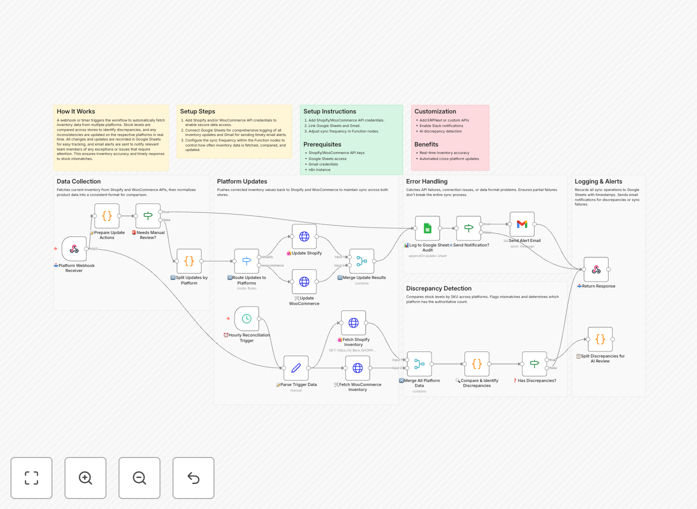
Shopify WooCommerce inventory sync workflow diagram

What This Workflow Does

This automation solves the critical challenge of maintaining accurate inventory counts across multiple eCommerce platforms. When you sell the same products on both Shopify and WooCommerce, manual inventory updates are time-consuming and error-prone. Discrepancies lead to overselling, frustrated customers, and operational headaches.

The workflow automatically synchronizes stock levels between your Shopify and WooCommerce stores at regular intervals. It compares inventory counts, identifies discrepancies, and updates both platforms to reflect accurate availability. When stock levels change significantly or fall below thresholds you define, it generates alerts in Google Sheets for your team.

How It Works

1. Inventory Data Collection

The workflow begins by fetching current inventory levels from both Shopify and WooCommerce using their respective APIs. It retrieves product SKUs, quantities, and variant information to ensure accurate matching between platforms.

2. Comparison & Synchronization

The system compares stock levels for matched products across both platforms. When discrepancies are found, it updates both systems to reflect the correct available quantity based on your predefined rules (like always using the lower count to prevent overselling).

3. Alert Generation

Significant inventory changes trigger alerts in Google Sheets. The workflow appends a new row with details about the product, old/new quantities, and which platform initiated the change. Conditional formatting highlights critical stock situations.

Who This Is For

This solution is ideal for eCommerce businesses that:

  • Sell the same products on both Shopify and WooCommerce
  • Experience inventory sync challenges between platforms
  • Want to prevent overselling and stock discrepancies
  • Need better visibility into inventory changes across channels
  • Want to automate manual stock reconciliation processes

What You'll Need

  1. Active Shopify and WooCommerce stores
  2. API access credentials for both platforms
  3. A Google Sheets spreadsheet for alerts
  4. n8n account or self-hosted instance
  5. Products matched by SKU or barcode across both stores

Quick Setup Guide

  1. Download the JSON template file
  2. Import into your n8n instance
  3. Configure Shopify and WooCommerce API connections
  4. Map your product identifiers between platforms
  5. Set your Google Sheets alert destination
  6. Define your stock alert thresholds
  7. Test with sample products before going live

Key Benefits

Eliminate overselling: Automatic sync prevents selling products that are actually out of stock on another platform, protecting your customer experience.

Save 5+ hours weekly: No more manual spreadsheet updates or platform hopping to reconcile inventory counts across systems.

Improve decision making: Google Sheets alerts create an audit trail of inventory movements, helping identify trends and optimize stock levels.

Reduce fulfillment errors: Accurate inventory counts mean fewer surprises when processing orders from multiple sales channels.

Scale effortlessly: The system handles inventory updates automatically as your product catalog grows across platforms.

Pro tip: Set different alert thresholds for your best-selling products to get early warnings before they sell out completely.

Frequently Asked Questions

Common questions about multi-platform inventory synchronization

Inventory synchronization prevents overselling and stock discrepancies across sales channels. When products sell on one platform but inventory isn't updated elsewhere, you risk selling unavailable items. This damages customer trust and creates fulfillment headaches.

Automated sync ensures all platforms show accurate stock levels in real-time. For example, if a product sells out on Shopify, WooCommerce will immediately reflect that change, preventing duplicate orders for unavailable stock.

  • Reduces customer service issues from overselling
  • Maintains brand credibility across all sales channels
  • Simplifies warehouse and fulfillment operations

Most businesses sync inventory every 15-60 minutes during business hours. High-volume stores may need near real-time updates (1-5 minute intervals). Less frequent updates (hourly/daily) work for stores with slower sales velocity.

The ideal frequency balances accuracy with API rate limits and system resources. Consider your sales volume, product turnover rate, and technical constraints when setting sync intervals.

  • Monitor API usage to avoid hitting platform limits
  • Increase frequency during peak sales periods
  • Test different intervals to find the right balance

Google Sheets provides a centralized, shareable dashboard for inventory tracking. Teams can access it anywhere without special software. Formulas can calculate reorder points, highlight low stock, and generate purchase orders.

Historical data helps identify seasonal trends and optimize stock levels over time. For example, you might notice certain products consistently sell out faster on one platform versus another, allowing you to adjust inventory allocation accordingly.

  • Create custom views for different team members
  • Build forecasting models using historical data
  • Integrate with other business systems via Apps Script

Yes, advanced sync workflows can map variant SKUs between platforms and adjust bundle components. This requires matching product identifiers (SKU, barcode) across systems. Complex products may need custom field mapping to ensure accurate inventory deductions when variants sell.

For bundles, the system can track component parts inventory separately from the bundled product. When a bundle sells, it automatically deducts the appropriate quantities from each component's stock.

  • Ensure consistent SKU naming across platforms
  • Test variant sync thoroughly before full deployment
  • Consider custom logic for kits/configurable products

The workflow can automatically mark products as out of stock, hide listings, or trigger reorder alerts. Some businesses prefer to keep listings visible with 'backorder' status. The system can also notify suppliers when stock falls below predetermined thresholds.

For example, you might configure the workflow to email your purchasing team when stock drops below a 2-week supply, giving them time to reorder before complete sellout occurs.

  • Set different thresholds for different product categories
  • Automate purchase order generation for fast-moving items
  • Consider customer expectations for backorder scenarios

Custom automation provides similar core functionality at lower cost, with flexibility to match your exact workflows. Paid systems offer more turnkey reporting and may handle complex fulfillment scenarios better. For many small-to-mid size businesses, automated sync provides 80% of the value at 20% of the cost.

Enterprise systems shine for businesses with multiple warehouses, complex B2B ordering rules, or advanced manufacturing workflows. But for straightforward multi-channel sync, custom automation often delivers excellent results without expensive software subscriptions.

  • Evaluate your specific needs before choosing
  • Start with automation and upgrade if needed
  • Consider hybrid approaches for complex scenarios

Absolutely! GrowwStacks specializes in tailored eCommerce automations. We can build systems that sync inventory across any combination of platforms, incorporate your unique business rules, and connect to your preferred notification channels.

Our solutions handle complex scenarios like wholesale/retail splits, multi-location fulfillment, and dropshipping workflows. We'll design a system that fits your exact operational needs and scales with your business.

  • Custom mapping for your product catalog
  • Integration with your existing tools
  • Ongoing support and optimization

Need a Custom Inventory Sync Solution?

This free template is a starting point. Our team builds fully tailored automation systems for your specific needs.