Shopify Dynamics 365 n8n Order Processing ERP Integration

Shopify orders to D365 Business Central sales orders / sales invoices

Automatically sync new Shopify orders to Dynamics 365 Business Central as sales orders and invoices

Download Template JSON · n8n compatible · Free
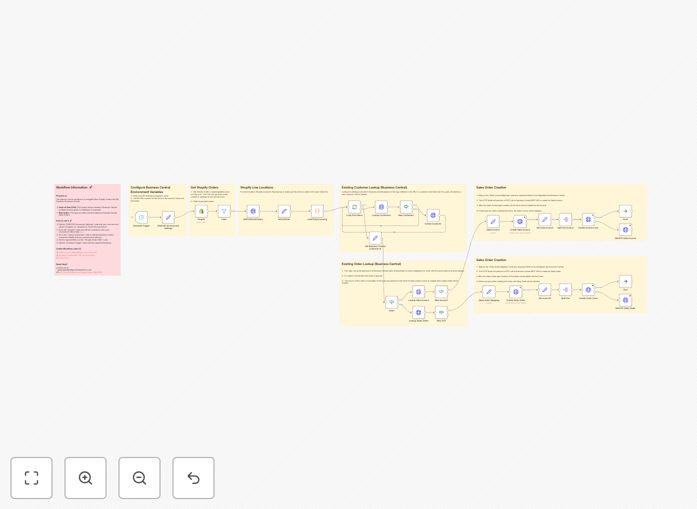
Shopify to Dynamics 365 Business Central workflow diagram

What This Workflow Does

This automation bridges the gap between your Shopify ecommerce store and Microsoft Dynamics 365 Business Central ERP system. It eliminates the manual process of recreating Shopify orders in Business Central, ensuring your accounting and inventory systems stay perfectly synchronized with your online sales.

When a customer places an order on Shopify, this workflow automatically creates corresponding sales orders and invoices in Business Central. It transfers all critical order details including customer information, line items, pricing, taxes, and shipping data while maintaining data integrity between both systems.

How It Works

1. New order detection

The workflow monitors your Shopify store for new orders using webhooks or API polling. When a new order is detected, it retrieves the complete order details including customer data, products, quantities, and payment information.

2. Customer record synchronization

The system checks if the customer already exists in Business Central. If not, it creates a new customer record with all relevant details from Shopify before proceeding with the order processing.

3. Sales order creation

The workflow transforms the Shopify order data into Business Central's sales order format and posts it to the ERP system. This includes mapping product SKUs, applying correct tax rates, and including any order notes or special instructions.

4. Invoice generation

Once the sales order is successfully created, the workflow can optionally generate and post an invoice in Business Central, marking the order as paid if payment was collected through Shopify.

Pro tip: Configure the workflow to sync inventory levels back to Shopify after order processing to maintain accurate stock visibility across both systems.

Who This Is For

This integration is ideal for ecommerce businesses using Shopify for online sales while relying on Dynamics 365 Business Central for accounting, inventory management, and financial reporting. It's particularly valuable for:

  • Retailers with high order volumes who need to eliminate manual data entry
  • Businesses requiring real-time financial visibility from ecommerce sales
  • Companies that need accurate inventory synchronization between online and ERP systems
  • Organizations looking to automate their order-to-cash cycle

What You'll Need

  1. A Shopify store with admin API access
  2. Microsoft Dynamics 365 Business Central with API connectivity
  3. n8n instance or account to host the workflow
  4. Basic understanding of API authentication for both platforms
  5. Product SKU mapping between Shopify and Business Central

Quick Setup Guide

  1. Download the JSON workflow file
  2. Import it into your n8n instance
  3. Configure Shopify API credentials in the first node
  4. Set up Business Central API connection in the output nodes
  5. Map your product SKUs between systems
  6. Test with a sample order and verify data flows correctly
  7. Activate the workflow for live order processing

Key Benefits

Eliminate manual data entry: Save 10-15 minutes per order by automating the transfer from Shopify to Business Central, allowing your team to focus on higher-value tasks.

Improve financial accuracy: Reduce human errors in order processing that can lead to accounting discrepancies and inventory mismatches between systems.

Accelerate order fulfillment: Orders flow instantly into your ERP system, enabling faster picking, packing, and shipping processes.

Real-time financial visibility: See your ecommerce sales reflected immediately in Business Central for accurate cash flow tracking and reporting.

Scalable order processing: Handle order volume spikes effortlessly without adding administrative staff or overtime hours.

Frequently Asked Questions

Common questions about Shopify and Dynamics 365 Business Central integration

Automating Shopify to Business Central integration eliminates manual data entry, reduces errors, and speeds up order fulfillment. This automation ensures your accounting system stays updated in real-time while freeing staff to focus on higher-value tasks rather than repetitive data transfer between systems.

For example, a mid-sized retailer processing 50 orders daily could save over 400 hours annually by automating this workflow. The time savings compound as order volume grows, making the integration essential for scaling operations efficiently.

The integration can sync customer details, order items, quantities, prices, discounts, shipping information, and payment status. Advanced configurations can also include inventory level updates, tax calculations, and fulfillment status tracking between both platforms.

Most implementations focus on transferring the core data needed for accurate financial recording and fulfillment. Custom fields and special order attributes can also be mapped based on your specific business requirements and ERP configuration.

Most businesses configure real-time sync for immediate financial visibility, while others batch process hourly or daily. The ideal frequency depends on your order volume, accounting needs, and whether you require instant inventory updates in Business Central.

High-volume retailers typically prefer real-time processing to prevent order backlogs. Businesses with complex order validation rules might opt for scheduled batches to allow for manual review when needed before ERP posting.

Yes, a well-configured integration can process returns and refunds bi-directionally. When a return is initiated in Shopify, it can automatically create credit memos in Business Central and update inventory levels accordingly.

The workflow can be extended to handle various return scenarios including partial returns, exchanges, and restocking fees. This ensures your financial records accurately reflect all post-sale adjustments without manual intervention.

Common challenges include mapping product SKUs correctly, handling tax calculations consistently, managing inventory across both systems, and ensuring customer records stay synchronized. Proper workflow design can overcome these with validation steps and error handling.

Implementation teams often spend significant time aligning data models between the platforms. Testing with historical order data helps identify and resolve mapping issues before going live with the integration.

Automated order syncing ensures your financial reports reflect sales data accurately without delays. This provides real-time visibility into revenue, COGS, and profitability while eliminating reconciliation work between ecommerce and accounting systems.

Month-end closing becomes faster and more accurate since all Shopify sales are already properly recorded in Business Central. The integration also maintains a clear audit trail linking each ERP transaction back to its original Shopify order.

Yes, GrowwStacks specializes in custom ecommerce-to-ERP integrations. Our team can build a tailored solution that handles your specific product variants, tax rules, fulfillment workflows, and reporting requirements between Shopify and Dynamics 365 Business Central.

We start by analyzing your current processes to identify automation opportunities beyond basic order syncing. The solution can incorporate advanced features like inventory forecasting, customer segmentation, and automated purchase order generation based on Shopify sales trends.

Need a Custom Shopify to Business Central Integration?

This free template is a starting point. Our team builds fully tailored automation systems for your specific needs.